Guide
Get help
You can ask questions and get support whenever you need it. Below are the current support channels we have available to help you.
Instant Live Chat
Instant live chat at the bottom right to talk to a customer support engineer directly 
In-app Feedback
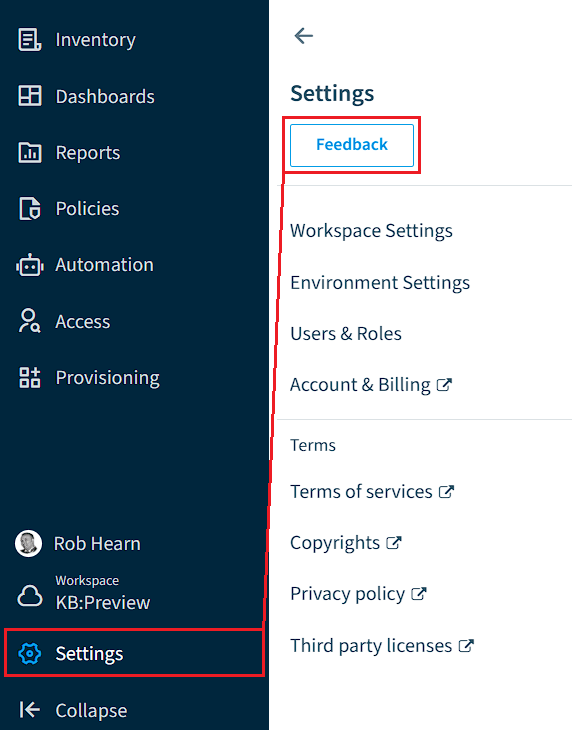
In-app feedback button to report a bug, feature request, or general feedback. The feedback button allows you to capture and annotate the screen, record a video, and provide a message. To use the feedback button. Click on “Settings” on the Nav Panel and click “Feedback”. This will create a support ticket in our Support Portal.
Create a Support Conversation
Currently, there are three ways to create a support Conversation.
- Send an email to [email protected] from your work email.
- Creating a Support Conversation directly in our Support Portal.
When contacting support about an issue related to a specific Rencore Governance workspace, please include your environment information in the request. This helps our support team investigate the issue more efficiently. You can find instructions on how to quickly copy your environment information to the clipboard in the relevant guide.
All communication regarding your request will take place through our support portal. Updates and responses can be viewed directly within the support ticket or through email notifications sent to the address used to create the ticket.
To ensure you receive all updates, please verify that emails from [email protected] are not blocked or filtered by any mail rules or spam filters.
All communication regarding your request will take place through our support portal. Updates and responses can be viewed directly within the support ticket or through email notifications sent to the address used to create the ticket.
To ensure you receive all updates, please verify that emails from [email protected] are not blocked or filtered by any mail rules or spam filters.