Reference
Power Platform Consent
The Power Platform application is the scanning service used for gathering data about Power Automate and Power Apps entities.
It is the only Rencore Governance scanning application that is requiring so-called delegated permission, because Microsoft 365 currently does not allow third parties to connect with application permissions to these services.
This means that the user account used to give the consent will be used also during the scanning process and hence needs to be able to access the resources.
To succeed in connecting to Power Platform, create a dedicated user account to consent which must meet all of the following requirements:
-
The user account has the administrator role: **Power Platform Administrator.
Caution: ** The Power Platform Administrator role needs to be assigned permanently without restrictions!
(e.g. not only temporarily using Privileged Identity Management).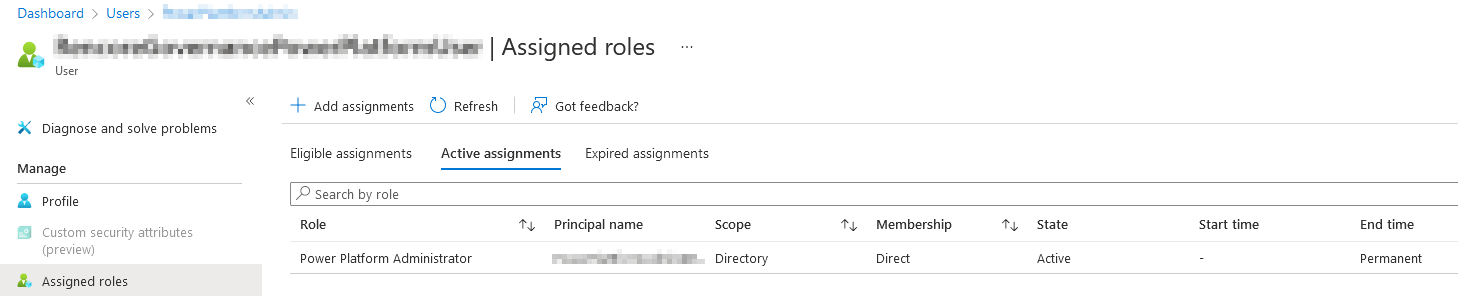
-
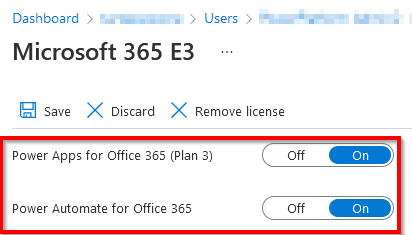
The user account has all of the following licenses assigned to allow access for Power Automate and Power Apps
(e.g. via a Microsoft 365 E3 license)-
Power Apps for Office 365 (Plan 3)
-
Power Automate for Office 365
-
-
The user account **must not be a Global Administrator.
Caution! ** Microsoft 365 currently does not allow user accounts with the Global Administrator role to use Power Platform Administrator APIs. -
The dedicated user is not part of many groups and does not have many additional roles assigned.