Guide
Enabling Demo Mode
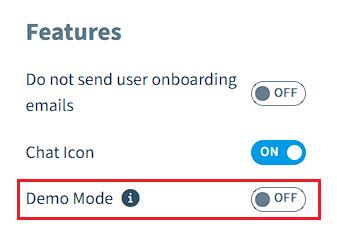
Enabling Demo mode allows the ability to hide all banners to connect your tenant, expiring subscriptions, exceeding the use threshold, and enabling preview features. This feature is meant for presenting the product to other users without showing distracting content.
To enable Demo Mode:
-
Click on “Settings”.
-
Either click on;
- Click on “Workspace Settings” to enable Demo Mode on all environments in a workspace.
- Click on “Environment Settings” to enable Demo Mode on the current environment.
-
Click “Appearance”.
-
Under “Features”, enable the toggle for “Demo Mode”.