Guide
Share Dashboard
In order to share a dashboard, you will need to select the desired dashboard using the Dashboard Selection in the top left of the dashboard page.
- On the desired dashboard, click on the ellipses for the dashboard settings and choose “Share this dashboard”.
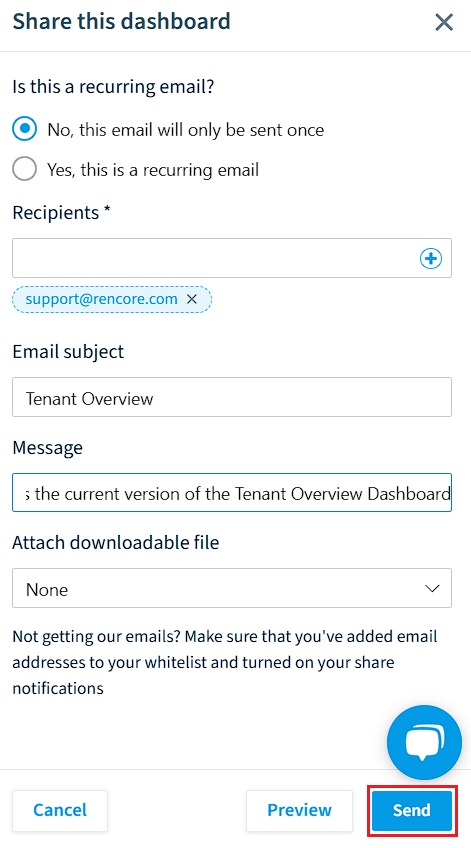
- On the pop-out window, you will need to select whether or not the share is a recurring email. Select either “No, this email will only be sent once” or “Yes, this a recurring email”.
No, this email will only be sent once
-
Selecting this option means that the share will only occur once. You will need to enter:
- Recipients: Enter the email addresses that you want to share the dashboard too.
- Email subject: Enter a subject for the email.
- Message: Enter a message for the email.
- Attach downloadable file: Select whether or not the share will include a PDF file that is attached to the email and can be downloaded by the recipient.
-
Click “Send now” to send the email.
Yes, this is a recurring email
-
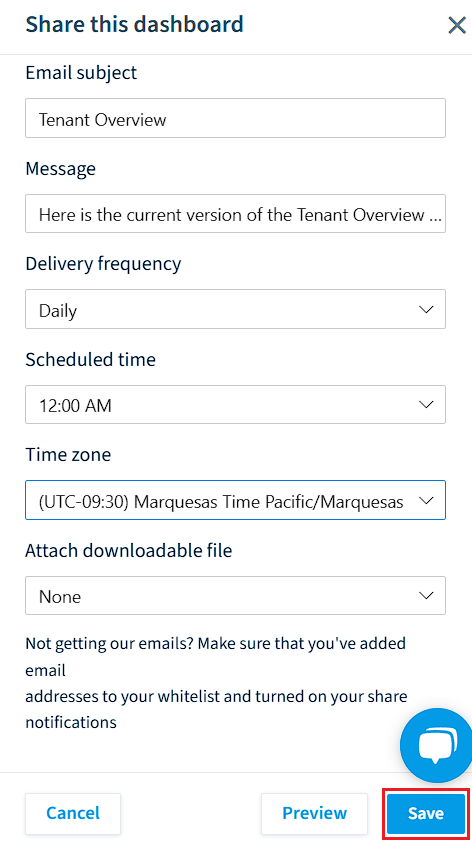
Selecting this option means that the share will recur. You will need to enter:
- Name of the recurring email: Provide a name for the
- Recipients: Enter the email addresses that you want to share the dashboard too.
- Email subject: Enter a subject for the email.
- Message: Enter a message for the email.
- Delivery frequency: This can be set to Daily, Weekly, or Monthly.
- Scheduled time: Select which hour of the day the email is sent.
- Time zone: Select the time zone in which the email is sent.
- Attach downloadable file: Select whether or not the share will include a PDF file that is attached to the email and can be downloaded by the recipient.
-
Click “Save” and the email will be sent when scheduled.