Guide
Export an Automation
Rencore Governance has been developed to permit the sharing of Automation between different environments and workspaces. As such this article will explain how to export an Automation.
In order to export an Automation from Rencore Governance you will need to:
-
Click on “Automation”.
-
Navigate to the automation you want to export.
-
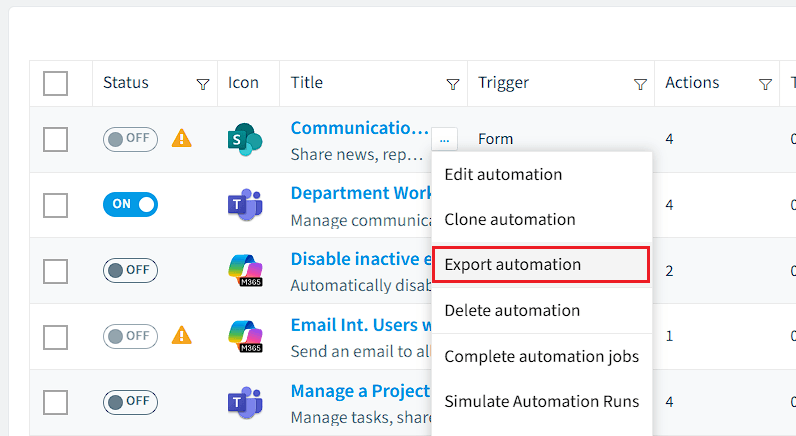
Click on the “Action menu”.
-
Select “Export automation”.This will automatically download the .automation file (which is a .json file).
-
This file can then be shared and imported into Rencore Governance.
-
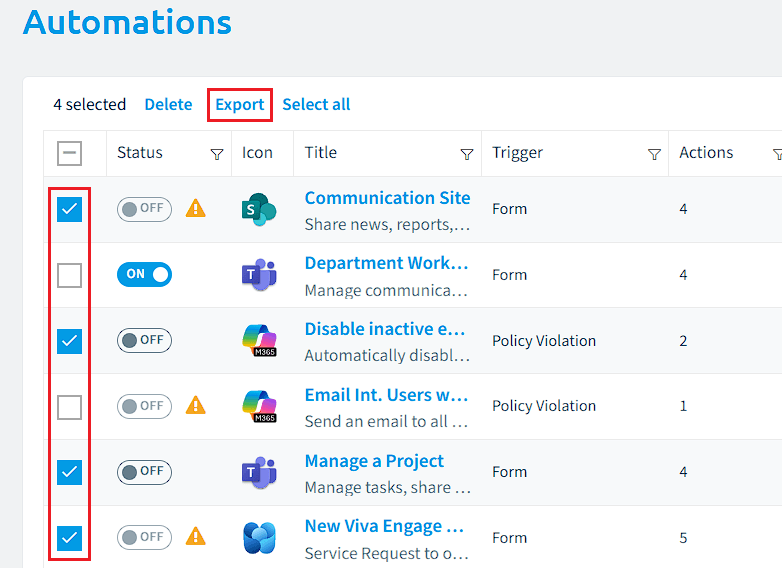
Alternatively, you can export multiple templates at a time.
-
To export multiple automations, simply tick the box on the left of the corresponding automations.
-
Once you have made your selection, click on the “Export” located at the top of the Datagrid.
-