Guide
Review
Access reviews help keep your Microsoft 365 workspaces secure and well-managed. When your organization schedules a review, workspace owners are asked to verify who has access, remove people who no longer need it, and confirm that sharing permissions are appropriate.
If you own a workspace that is included in a review, you will receive a review assignment in the Rencore Teams App.
Your active reviews
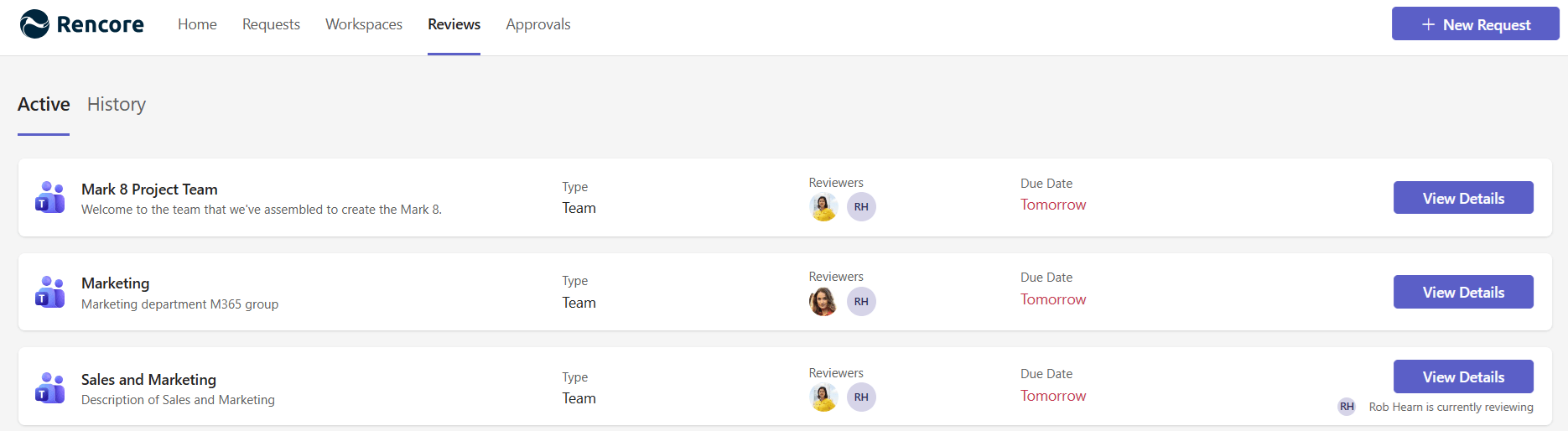
The Active tab shows all reviews currently assigned to you. Each card displays:
- Service type icon (Teams, SharePoint, or other)
- Workspace name and description
- Workspace type (Team, Site, or Community)
- Other reviewers (if multiple people are assigned)
- Due date - shown as relative time (e.g., “Today”, “In 3 days”)
- A Review button to start
Reviews are sorted by urgency - those due soonest appear first.
When you have no pending reviews, the page shows a message confirming you are all caught up.
When multiple reviewers are assigned
If a workspace has more than one reviewer, you will see the other reviewers’ profile pictures on the card. When another reviewer is currently working on the same review, an indicator shows that someone has started. The first reviewer to complete the review submits the final result.