Release notes
24.0.0
Released: 2026-05-11
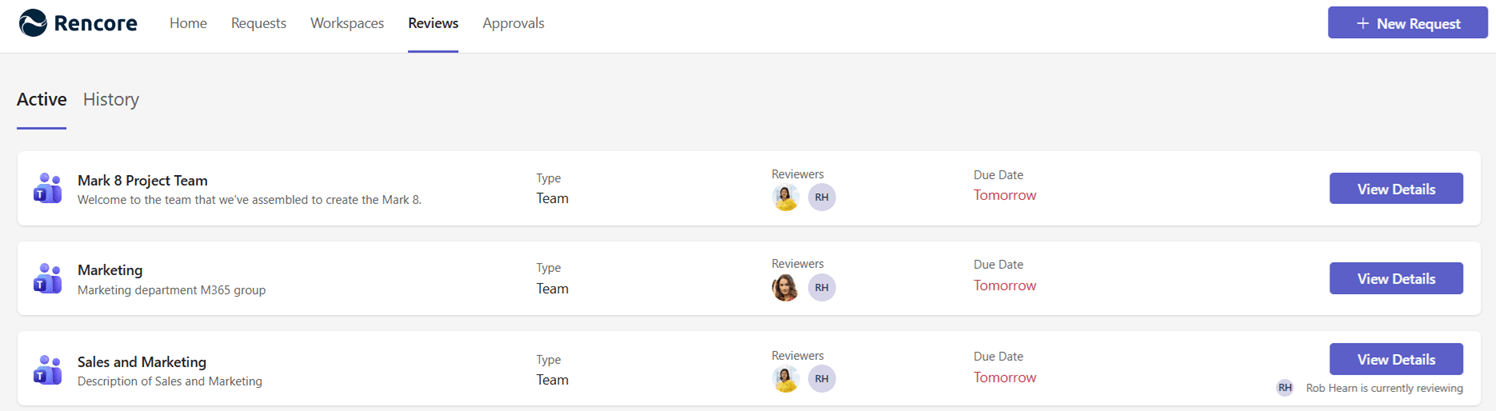
Preview: Reviews - Periodic Governance, Built Into our Rencore Teams App
Governance reviews used to require commitment, expertise, and patience for complex UI. We aimed to remove all three.
Reviews is the new way to run periodic governance on your Microsoft 365 workspaces - configurable at the admin level, guided at the reviewer level, and built directly into the tools your people already use every day.
Why we built this
Access Reviews had the right idea: continuous, periodic reviews of who owns what, who is in what, and what is shared with whom. But the path to getting there was too steep. Admins had to commit to full-scope reviews from day one. Reviewers needed to understand SharePoint permission models. And when a review expired, nothing happened. Reviews finished silently.
With the new Reviews feature, we have rebuilt the experience end-to-end so that running a review is something an organization can start small and grow into - and reviewers can complete in a few clicks, without leaving Microsoft Teams.
What is new for administrators (User Portal)
- Configurable scope per schedule - Choose exactly what gets reviewed. Owners only. Members only. File sharing only. Or all of it. “Review everything or nothing” is gone.
- Schedules, Cycles, and Object Reviews - A new three-level model makes recurring reviews first-class. Configure once, and see per-cycle progress every month, quarter, or year.
- Enforcement through automations - Define what happens when a review is rejected or expires. Archive the workspace. Delete it. Notify the owner’s manager. Reviews finally have teeth.
- Decision-level analytics - Filter by outcome, not just status. “All reviews in Q2 that ended in deletion” is now a real question you can answer.
What is new for reviewers (Rencore Teams App)
- Guided steps inside Microsoft Teams - The review lands where reviewers already work. No new tool, no separate login, no end-user training.
- Inline action - Archive, delete, reject, add or remove members directly inside the flow. Dead workspaces get cleaned up where they are discovered.
- A history that tells you what happened - Past reviews show the decision - “Archived,” “Deleted,” “Reviewed” - not just “Complete.” Useful for the reviewer, useful for audit.
- Teams and SharePoint reviewed together - In Microsoft 365 they are inseparable, so the review treats them that way. One workspace, one review.
Coverage at launch
Reviews supports Microsoft Teams and connected SharePoint sites at preview launch. Additional services will follow shortly.
Already on the Public Preview?
Reviews is available within the Rencore Teams App preview, if you are already part of it you will see the new feature in the left side navigation in Rencore Governance. In case you are not part of the preview yet, please talk to your Customer Success Manager or Partner.
Currently using Access Reviews?
Your existing Access Reviews configuration continues to run in parallel. There is no forced migration today - try Reviews alongside what you already have, and switch over when you are ready. Access Review configuration or historical data will not be migrated.
What about the future of Access Reviews?
The Access Review feature will co-exist with the new Reviews feature until it moves to general availability, we will then provide communication regarding the end of life for the Access Review feature. If you haven’t started using the Access Review feature yet we would like to highly recommend using the Reviews feature instead.
Where can I find additional information?
You can find additional information on our public documentation: