Release notes
28.3.0
Released: 2026-06-25
Governance, where your people already work
A year ago, governing Microsoft 365 meant pulling owners and end users into tools and portals they had never seen using technical jargon and clunky UIs. The work that actually keeps a tenant clean - confirming who owns a workspace, removing people who no longer belong, requesting a properly governed Team instead of spinning one up unmanaged - sat with the people least equipped to do it in tools built for IT.
The Rencore Teams App was our answer: bring governance into Microsoft Teams, where your people already are, and make each task something they can finish in a few clicks without training. After a Private Preview that started a few months ago and steady expansion since, the Rencore Teams App is now Generally Available.
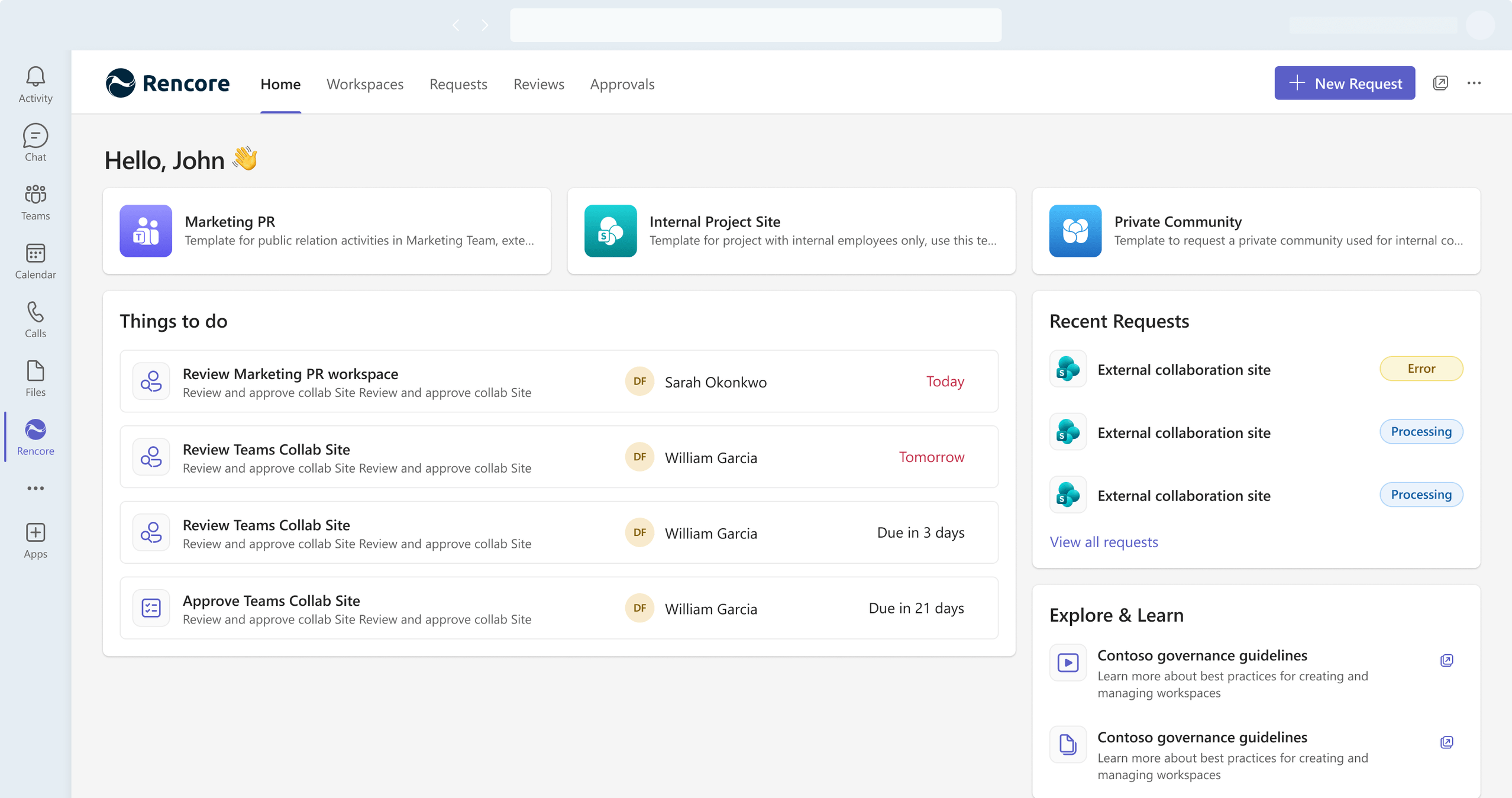
What the Rencore Teams App gives your organization
One app in Microsoft Teams, five jobs done where the work happens:
- Home - A personal dashboard that surfaces what needs attention - pending tasks, ongoing requests, quick-start templates - so users always know their next action without hunting for it.
- Requests - Self-service provisioning of governed workspaces (Teams, SharePoint, Viva Engage, and more) in less than a minute, with your compliance rules applied automatically. No shadow IT, no waiting on a ticket.
- Workspaces - A single place for owners to see and manage every Microsoft 365 workspace they own or belong to - members, owners, access, and now changes - without leaving Teams.
- Approvals - A clear approval workflow that keeps decision-makers in control and provisioning moving, instead of stalling in an inbox.
- Reviews (Public Preview) - Guided periodic access reviews that owners complete in a few clicks, right inside Teams. Reviews remains in Public Preview while we expand service coverage - see below.
For IT, the trade-off that usually comes with putting governance in end users’ hands - losing control - does not apply here. Administrators decide which features are visible, which services can be managed, and how the app is branded, all from Rencore Governance. You set the guardrails and own your framework.
What’s new in this release
General Availability is not just a label change. This release adds the capabilities that make the app something owners can rely on day to day.
Manage workspaces without leaving Teams
The headline of this release. Workspace owners can now make membership and access changes directly in the app - and we built a deliberate safety flow around it so changes are never accidental or destructive:
- Add and remove members, owners, and file or site access entries right on the workspace page.
- Stage and confirm - changes are collected into a review-before-you-commit summary; nothing is applied until the owner confirms.
- Locked while processing - the workspace is locked for everyone with a clear alert and a read-only view of what is pending, so two people cannot make conflicting changes at once.
- Recover from failures - if a change cannot be applied, the owner sees exactly what failed and can retry or discard it to unlock the workspace.
- Admin control - a per-service “Enable Management” setting lets administrators decide whether owners can make these changes at all.
Stay in the loop with Teams notifications
The app now sends notifications straight to the Microsoft Teams activity feed for the moments that matter - review assignments and deadlines, approval requests and outcomes, completed provisioning, automation triggers, and workspace changes that need attention. Notifications are available in English and German.
Make the app your own with custom branding
Administrators can white-label the Rencore Teams App with their organization’s own name, icons, and in-app logo, then download a ready-to-deploy app package - no manual editing of manifest files. For your end users, governance shows up as part of your own toolset, not a third-party add-on.
Built for mobile
Home, Requests, and Approvals are now fully optimized for the Microsoft Teams mobile app - single-column layouts, full-screen flows, touch-friendly actions, and dark mode. Owners can act on an approval or kick off a request from their phone, the same way they already use Teams on the go.
Roll it out on your terms
Administrators can show or hide individual features - Reviews, Requests, Approvals, Workspaces - for a phased rollout, with no data lost when a feature is hidden. Setup now lives in one place: connect your environment and enable the app for users directly from the Setup tab.
Governance in German
The entire Rencore Teams App - every surface, including notifications - is now fully localized in German alongside English, for organizations that need their tools in their team’s language.
Faster, everywhere
We rebuilt how the app loads and responds, so it feels quick from the first open and stays responsive as users move between features.
How to get started
- Administrators: In Rencore Governance, open Teams App Settings > Setup, connect your environment, and enable the Rencore Teams App for your users. From here you can also set feature visibility, management permissions, branding, and notifications.
- End users: Open Microsoft Teams (desktop, web, or mobile), find the Rencore app in your sidebar or the Teams app catalog, and open it. You will land on your Home page.
For any question you might have you can reach our to our support team, or ask you Customer Success Manager.