Policies
AI summary
Policies let you define governance rules from templates or from scratch and apply them across your scanned content. Violations show which objects break your rules, and you can fix them by hand or with automation.
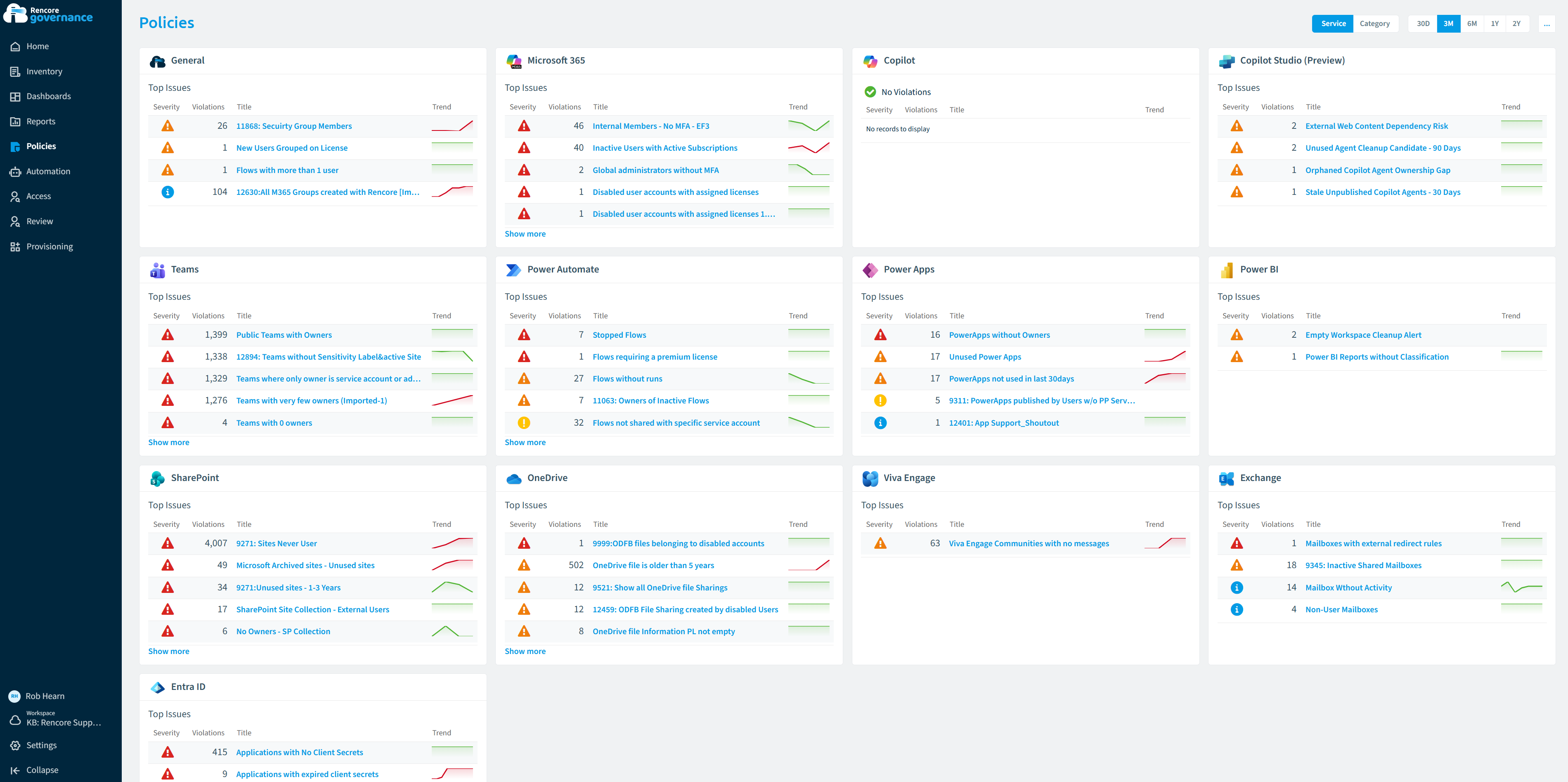
Policies let you define governance rules in Rencore Governance and apply them across your scanned content, either from a template or built from scratch. Each object that breaks a rule is a violation, with a severity that shows how serious it is. Start with a policy templatePolicyA policy is a governance rule that Rencore Governance checks against your inventory, for example Teams without owners.Read more, write a custom policy when no template fits, or turn a report into a policy; then fix the violations by hand or with an automation.
Start with
- Create a policy from a template Switch on a ready-made policy template to find violations across your tenant.
- Create a custom policy Write your own rule when no template checks what you need.
- Create a policy from a report Turn the filters of a report into a policy that flags every match.
- Policies reference The built-in policies Rencore Governance provides, grouped by connector, with the number of policies for each one.
All guides in policies
Create policies 3 guides
Switch on a template, write your own rule, or turn a report into a policy.
-
Create a policy from a template
Switch on a ready-made policy template to find violations across your tenant.
Before you begin: Your Rencore role includes the Create Policy permission.
-
Write your own rule when no template checks what you need.
Before you begin: Your Rencore role includes the Create Policy permission.
-
Turn the filters of a report into a policy that flags every match.
Before you begin: Your Rencore role includes the Create Policy permission. (+1 more)
Solve a governance problem 9 guides
Find one kind of risk, such as oversharing or ownerless TeamsMicrosoft TeamsMicrosoft Teams is the Microsoft 365 app for chat, meetings and team collaboration.Read more, and fix it, from the report to the automation.
-
Find files, sites and Teams that are shared beyond their audience with a report and policies, then remove the sharing…
Before you begin: Your Rencore role needs the permissions to create reports, policies and automations. (+3 more)
4 steps
 SharePoint
 OneDrive
 Teams
Teams -
Find Teams, groups and SharePoint sites with no owner, one owner or only disabled owners, then add an owner or ask…
Before you begin: Your Rencore role needs the permissions to create policies, reviews and automations, and to run built-in actions. (+2 more)
4 steps
TeamsSharePoint Microsoft 365
 -
Find and remove inactive guests
Find guest accounts that have not signed in for months or never accepted their invitation, then disable them or remove…
Before you begin: Your Rencore role needs the permissions to create policies and automations, and to run built-in actions. (+2 more)
3 steps
Microsoft 365TeamsSharePoint
Show 6 guides more
-
Find sites and groups with missing sensitivity labels
Find SharePoint sites, Teams and Microsoft 365 groups with a missing or wrong sensitivity label, and set the right…
Before you begin: Your Rencore role needs the permissions to create reports and policies, and to run built-in actions. (+2 more)
5 steps
SharePointMicrosoft 365Teams -
Find sites close to their storage quota
See SharePoint and OneDrive storage against quota, get a violation before a site or OneDrive is full, and warn the…
Before you begin: Your Rencore role needs the permissions to create reports, policies and automations. (+2 more)
4 steps
SharePointOneDrive -
Govern Power BI Workspaces and guest access
Find Power BI workspaces without administrators, with external access or with no activity, and report on content that…
Before you begin: Your Rencore role needs the permissions to create reports and policies. (+2 more)
4 steps
 Power BI
 -
Find Copilot Studio agents without an active owner or with no use for months, then give them a new owner, quarantine…
Before you begin: Your Rencore role needs the permissions to create reports, policies and automations. (+2 more)
4 steps
 Copilot StudioSharePoint
 -
Find agents that answer from public websites
Find Copilot Studio agents and Copilot connections that use public websites as knowledge, so you can review the source…
Before you begin: Your Rencore role needs the permissions to create policies. (+2 more)
5 steps
Copilot Studio Copilot
 -
Track Copilot Studio agent consumption
See what Copilot Studio pay-as-you-go Plans consume, get a violation when a Plan goes over its limit, and act on the…
Before you begin: Your Rencore role needs the permissions to create reports, policies and automations. (+3 more)
4 steps
Copilot Studio
Import and export 2 guides
Copy policies between workspaces and EnvironmentsEnvironmentAn Environment is the connected Microsoft 365 tenant inside a Workspace.Read more as files.
-
Save policies as a file to copy them to another workspace or Environment.
Before you begin: Your Rencore role includes the Export Policy Schema permission.
-
Add policies exported from another workspace or Environment.
Before you begin: Your Rencore role includes the Import Policy Schema permission. (+1 more)
Frequently asked questions
What is a violation in Rencore Governance?
A violation is an object that breaks a policy rule. Each violation has a severity that shows how serious it is.
What are the ways to create a policy?
You can switch on a policy template, write a custom policy when no template fits, or turn the filters of a report into a policy. Each of these starts with a guide in the Create policies group.
Which permission do I need to create a policy?
Your Rencore role needs the Create Policy permission. This applies to creating a policy from a template, a custom policy, or a policy from a report.
How do I copy policies to another workspace or Environment?
Export the policies as a file, then import that file in the other workspace or Environment. Exporting needs the Export Policy Schema permission, and importing needs the Import Policy Schema permission.
How can I fix the violations that a policy finds?
You can fix violations by hand or with an automation. The guides for solving a governance problem, such as oversharing or Workspaces without owners, show the steps from the report to the automation.