Access
AI summary
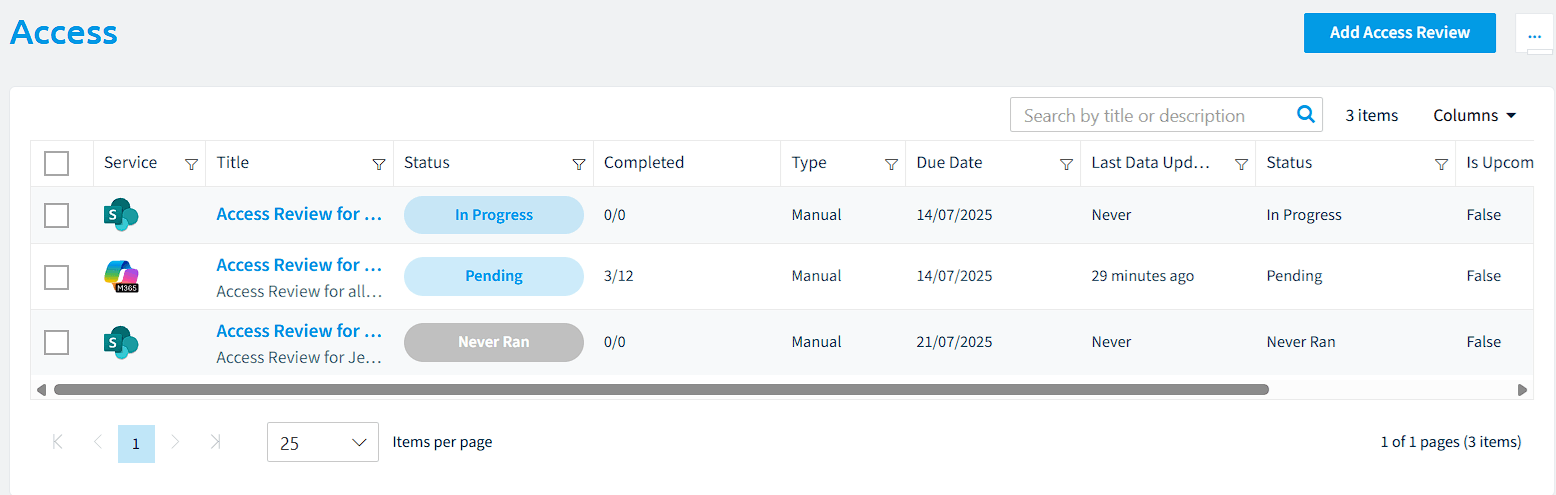
Access is deprecated and will shut down on 31 December 2026, replaced by Reviews. Use these pages to finish or move your existing access reviews, which generate reports on who has access to Teams, SharePoint, and other Microsoft 365 content so content owners can review and update permissions.
Important: Reviews and Access Reviews are separate features. Reviews, data and settings are not shared between them, so manage each review in the feature where you created it. See Reviews for details.
Access is the earlier way to run access reviewsAccess reviewAn access review is a report in the deprecated Access feature that shows who has access to content, for owners to approve.Read more in Rencore Governance. New reviews belong in Reviews, which covers the same need with review cyclesReviewA Review is a recurring or one-off check in which workspace owners confirm who has access to their Microsoft 365 workspaces, directly in the Rencore Teams App.Read more, owner steps in the Rencore Teams AppRencore Teams AppThe Rencore Teams App (formerly Rencore Nova) brings Rencore Governance into Microsoft Teams for the people who own and use workspaces.Read more and automations. Use the pages below only to finish or move the access reviews you still have.
Access reviews let users generate reports detailing which users and groups have access to content for TeamsMicrosoft TeamsMicrosoft Teams is the Microsoft 365 app for chat, meetings and team collaboration.Read more, SharePoint site collectionsSite collectionA site collection is the top-level SharePoint container that holds a root site, its subsites, lists, libraries and files.Read more, Microsoft 365 groupsMicrosoft 365 groupA Microsoft 365 Group is the membership object behind many Microsoft 365 workspaces.Read more, Viva Engage communitiesViva Engage communityA Viva Engage community is a group in Viva Engage where people share posts, files and events around a team, project or interest.Read more, Power AppsPower AppsPower Apps is the Microsoft low-code tool for building business apps. Rencore Governance covers it with the Power Apps connector, part of the Apps, Automation & BI module.Read more, flows and Power BI workspaces.
These access reports can be shared with the respective content owners, managers, or designated users, who can then review and, if necessary, update the access permissions for the content they manage (e.g., team ownersWorkspace ownerA workspace owner is an owner of a Microsoft 365 workspace, such as a Team, a SharePoint site or a group.Read more).
Start with
- Create a review Set up a review schedule: trigger, reviewed objects and steps.
- Create an access review report Deprecated Create an access review report for teams, groups or sites in the deprecated Access feature.
- Approve access reviews Deprecated Confirm or change access in an access review report from the deprecated Access feature.
All guides in access
-
Create an access review report Deprecated
Create an access review report for teams, groups or sites in the deprecated Access feature.
Before you begin: Your Rencore role needs the Create Access Review permission. (+1 more)
-
Approve access reviews Deprecated
Confirm or change access in an access review report from the deprecated Access feature.
Before you begin: Your Rencore role needs the Approve Access Review permission.
-
Export an access review Deprecated
Save an access review as a file to copy it to another workspace or Environment.
Before you begin: Your Rencore role needs the Export Access Review Schema permission.
-
Import an access review Deprecated
Add an access review exported from another workspace or Environment.
Before you begin: Your Rencore role needs the Import Access Review Schema permission. (+1 more)
Frequently asked questions
When will the access feature be shut down?
Access will be shut down on 31 December 2026. It is deprecated and has been replaced by Reviews, so migrate your access review processes to Reviews before that date.
Do reviews and access reviews share data and settings?
No. Reviews and Access Reviews are separate features, and reviews, data and settings are not shared between them. Manage each review in the feature where you created it.
Which feature should I use to create new access reviews?
Use Reviews. It covers the same need as Access with review cycles, owner steps in the Rencore Teams App and automations. Use the Access pages only to finish or move access reviews you still have.
What content can an access review report cover?
An access review report shows which users and groups have access to content for Teams, SharePoint site collections, Microsoft 365 groups, Viva Engage communities, Power Apps, flows and Power BI workspaces.
Which permission does my Rencore role need to approve an access review?
Your Rencore role needs the Approve Access Review permission. Creating a report needs the Create Access Review permission. Exporting and importing a review need the Export Access Review Schema and Import Access Review Schema permissions.