Update Rencore Nova
AI summary
Rencore Nova will shut down December 31, 2026. Before that date, download a manifest file from Rencore Governance and upload it to Teams Admin Center to update the Nova Teams app, then migrate to Rencore Teams App.
Update the Rencore Nova Teams appRencore NovaRencore Nova is a deprecated end-user app, replaced by the Rencore Teams App, that shuts down on 31 December 2026.Read more with a new manifest fileTeams app manifestA Teams app manifest is the file in a Teams app package that describes the app, its icons and its permissions.Read more in the Teams admin centerAdmin centerAn admin center is the web portal where administrators manage one Microsoft service, such as the Microsoft 365 admin center, the Teams admin center or the Microsoft Entra admin center.Read more. The installation takes up to a minute to finish.
Before you begin
- You need the Owner role in Rencore Governance to download the manifest. Only the Owner role has the Manage Nova integration permission. See Rencore roles.
- You need a Teams adminTeams administratorTeams Administrator is a Microsoft Entra admin role that manages Microsoft Teams settings, policies and apps in the Teams admin center.Read more account for your tenant.
- To use Rencore Nova, you need an EnvironmentEnvironmentAn Environment is the connected Microsoft 365 tenant inside a Workspace.Read more in Rencore Governance that is linked to the same tenant where you installed the app.
Steps
-
In Rencore Governance, go to Settings > Environment Settings > Rencore Nova Integration.
-
Click Download Teams App Manifest. This downloads the zip file that contains the Teams App Manifest file.
-
Go to the Teams Admin Center and log in with a Teams admin account for your tenant.
-
Go to Teams Apps > Manage Apps.
-
Search for “Nova” in the search box.

-
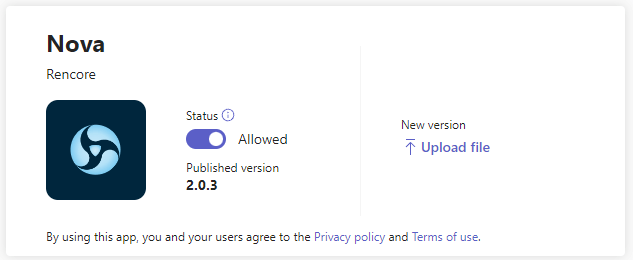
Click Upload file.
-
Select the zip file you downloaded and click Open.
What you see
The installation takes up to a minute to finish.
Frequently asked questions
 Which role do I need to download the Rencore Nova Teams app manifest?
Which role do I need to download the Rencore Nova Teams app manifest?You need the Owner role in Rencore Governance. Only the Owner role has the Manage Nova integration permission. You also need a Teams admin account for your tenant.
How do I update the Rencore Nova Teams app with a new manifest?
How do I update the Rencore Nova Teams app with a new manifest?In Rencore Governance, go to Settings > Environment Settings > Rencore Nova Integration and click Download Teams App Manifest. Then, in the Teams Admin Center, go to Teams Apps > Manage Apps, search for "Nova", click Upload file, and select the downloaded zip file.
What happens to Rencore Nova, and how do I move to the Rencore Teams App?
Rencore Nova is deprecated and will be shut down on 31 December 2026. To migrate, click Settings, then Teams App Settings in Rencore Governance. On the General Settings tab, turn on the Rencore Teams App for test users and groups first, or for the entire organization.
Was this page helpful?
Thanks for the feedback.
Thanks. What was wrong?