Connect a service
 Microsoft 365
  Power Apps
  Power Automate
  Power BI
  Copilot Studio
  Azure
Azure  Microsoft Foundry
  Claude Enterprise
  ChatGPT Enterprise
 AI summary
Connectors scan services like SharePoint, Power BI, and ChatGPT into your governance inventory. To connect a service, you turn on its connector in your Environment and grant access through the appropriate method, whether administrator consent, API keys, or a dedicated account. Each connector has different access requirements depending on the service.
A connector scans one service, such as SharePoint, Power BIPower BIPower BI is the Microsoft service for reports and dashboards over business data.Read more or ChatGPT EnterpriseChatGPT EnterpriseChatGPT Enterprise is the business plan of the ChatGPT AI assistant by OpenAI.Read more, into your inventory. To connect one, you turn it on in your EnvironmentEnvironmentAn Environment is the connected Microsoft 365 tenant inside a Workspace.Read more and give Rencore Governance access to the service. Most Microsoft 365Microsoft 365Microsoft 365 is the Microsoft cloud suite of Teams, SharePoint, OneDrive, Exchange and the Office apps.Read more connectors only need an administrator’s consent. Others need a dedicated account, an app in your own tenant, or API keys. What each kind of access means is explained in Connectors, modules and Preview.
Before you begin
- The Admin or Owner role in Rencore Governance. Admins manage Environment settings such as connectors and consent.
- A connected tenant. See Set up Rencore Governance.
- An administrator of each service you connect. Connecting a service needs an admin of that service, for example a SharePoint administrator for SharePoint or the primary owner of your Claude organization for Claude EnterpriseClaude EnterpriseClaude Enterprise is the business plan of the Claude AI assistant by Anthropic.Read more.
- The module that holds the connector in your Subscription. Apps, Automation & BI and AI & AgentsAdd-on moduleAn add-on module extends Rencore Governance with a group of connectors.Read more are add-on modules on the Premium and Enterprise PlansPlanA Plan is the edition of Rencore Governance in your Subscription: Professional, Premium or Enterprise.Read more. See Add-ons.
Steps
Turn on the connector
- Go to Settings > Environment Settings > Manage Services.
- Toggle the selector for the connector.
- Click Save.
Give access
- Go to Settings > Environment Settings.
- On General Settings, click the ellipses menu ([…]) and select Manage consent.
- On the Scan tab, click Give Consent on the connector.
- Follow the steps for that connector in the table below: sign in with an administrator account, or enter the app details or keys.
- When Connection Successful! is shown, click Save and Close, where the dialog offers it.
If you do not have the administrator account yourself, click Ask admin for consent and send the link to your administrator. Built-in actionsBuilt-in actionA built-in action is a ready-made operation you run directly on inventory objects without building an automation, for example adding a user to a Team.Read more and automations that change objects can need their own consent, given on the AutomationsAutomationAn automation is a workflow Rencore Governance runs on inventory objects when a trigger fires.Read more/Actions tab or the first time you use them.
Notes for each connector
| Connector | What it needs | Steps |
|---|---|---|
| TeamsMicrosoft TeamsMicrosoft Teams is the Microsoft 365 app for chat, meetings and team collaboration.Read more, SharePoint, OneDriveOneDriveOneDrive is the personal file storage of each Microsoft 365 user. The OneDrive connector of Rencore Governance, part of the Digital Workplace module, inventories every OneDrive with its files, folders and file sharing.Read more, ExchangeExchange OnlineExchange Online is the Microsoft 365 mail and calendar service. Rencore Governance covers it with the Exchange connector, part of the Digital Workplace module.Read more, PlannerMicrosoft PlannerMicrosoft Planner is the Microsoft 365 app for task plans and boards. The Planner connector of Rencore Governance, part of the Digital Workplace module, inventories plans.Read more, Viva EngageViva EngageViva Engage, formerly Yammer, is the Microsoft 365 app for company-wide communities.Read more, Entra IDMicrosoft Entra IDMicrosoft Entra ID, formerly Azure Active Directory, is the Microsoft identity service behind every Microsoft 365 tenant.Read more, Microsoft 365, CopilotMicrosoft 365 CopilotMicrosoft 365 Copilot is the AI assistant in the Microsoft 365 apps. Rencore Governance covers it with the Copilot connector, part of the AI & Agents module.Read more | Consent from a Microsoft 365 administrator, globally or per service | Connect a tenant to a Workspace, Required permissions |
| Power AppsPower AppsPower Apps is the Microsoft low-code tool for building business apps. Rencore Governance covers it with the Power Apps connector, part of the Apps, Automation & BI module.Read more, Power AutomatePower AutomatePower Automate, formerly Microsoft Flow, is the Microsoft low-code tool for automated workflows called flows.Read more | Delegated consent from a dedicated account with the Power Platform AdministratorPower Platform administratorPower Platform Administrator is a Microsoft Entra admin role that can manage Power Platform environments, Power Apps, flows and data loss prevention policies in the tenant.Read more role, assigned permanently, the Power Apps and Power Automate licenses, and no Global AdministratorGlobal administratorGlobal Administrator is the Microsoft Entra admin role with access to every administrative feature in the tenant, including giving admin consent to apps for the whole organization.Read more role | Power Platform consent, Consent when the admin consent workflow is turned on |
| Power BI | An Entra ID appApp registrationAn app registration is the global definition of an application in Microsoft Entra ID.Read more you create, then a sign-in with a Fabric Administrator who has a Power BI license | Dataverse and Power BI, Power BI consent |
| Copilot StudioCopilot StudioCopilot Studio is the Microsoft tool for building your own AI agents. Rencore Governance covers it with the Copilot Studio connector, part of the AI & Agents module.Read more | An Entra ID app you create, the “DataverseDataverseDataverse is the Microsoft data platform behind Power Platform apps and environments.Read more” consent, and a PowerShell script run once by a Power Platform Administrator on Windows | Dataverse and Copilot Studio, Copilot Studio consent |
| AzureMicrosoft AzureMicrosoft Azure is the Microsoft cloud platform for virtual machines, web apps and other cloud resources.Read more | An Entra ID app you create, with the Reader role on the subscriptions or management groups to scan | Azure app creation, Azure consent |
| Microsoft FoundryMicrosoft FoundryMicrosoft Foundry, formerly Azure AI Foundry, is the Microsoft Azure platform for building AI apps and agents with large language models.Read more (Preview) | The same Azure app and Azure consent as the Azure connector | Azure consent, Microsoft Foundry |
| Claude Enterprise (Preview) | Up to three Anthropic API keys created by an owner of your Claude Enterprise organization, plus a separate key for the delete automation | Anthropic consent |
| ChatGPT Enterprise (Preview) | Access to your ChatGPT Enterprise workspace through the ChatGPT Compliance API, the CodexChatGPT CodexCodex is the OpenAI coding agent that is part of a ChatGPT Enterprise workspace.Read more analytics API and the workspace log streams | ChatGPT Enterprise (permissions list) |
Copilot Studio and Azure
Copilot Studio reads its Daily Costs data through the Azure scan. To see Daily Costs, connect Azure as well and give the Azure app the Reader role on the subscription.
Microsoft Foundry
Microsoft Foundry is scanned through the Azure consent, the same one the Azure and Copilot Studio connectors use. It fills the inventory with AI hubs, AI projects, AI services, AI agentsAI agentAn AI agent is an assistant that answers questions or carries out tasks for users, often with access to company data.Read more, LLM deployments and fine-tuning jobs. It has no policies, automations or actions.
To turn it on, toggle Azure AI Services in Manage Services. That is the name of the Microsoft Foundry connector in the settings.
The Azure app needs these Azure roles:
- Reader on the subscriptions that hold your Foundry resources. With it, Rencore Governance lists AI hubs, AI projects, AI services and LLM deployments.
- A role that can list the keys of your Azure AI services accounts (the action Microsoft.CognitiveServices/accounts/listKeys/action), such as Cognitive Services User. Rencore Governance uses the account keys to read AI agents and fine-tuning jobs. Reader alone does not allow this, so without such a role these two object typesInventory objectAn inventory object is one item Rencore Governance has scanned from a connector, such as a single Team, SharePoint site collection, user or Power App.Read more are not collected.
Claude Enterprise
Claude Enterprise does not use a Microsoft consent. An owner of your Claude organization turns on the Anthropic APIs and creates the keys in claude.ai, and you enter them on the Scan tab. Each key is optional and covers a different part of the inventory. The full steps are in Anthropic consent.
ChatGPT Enterprise
To turn it on, toggle ChatGPT (Preview) in Manage Services and click Save.
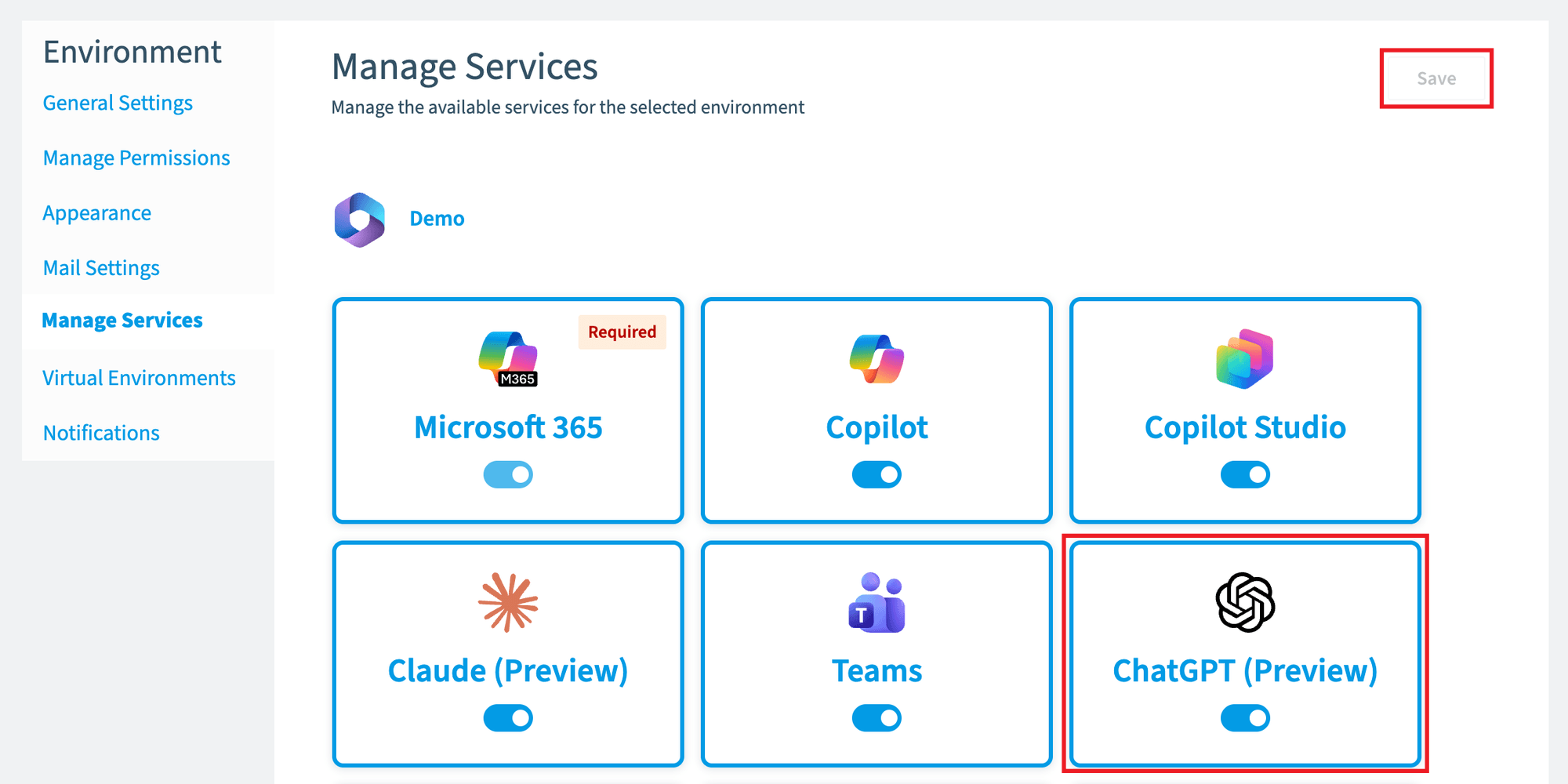
ChatGPT Enterprise does not use a Microsoft consent either. Rencore Governance reads the workspace through the ChatGPT Compliance API, the Codex analytics API and the workspace log streams. It lists conversations as objects, such as who, when, how many messages and which models, and never reads their content. The ChatGPT Enterprise connector page lists every permission it uses.
What you see
After you give access, the next scan of the connector fills the inventory. To check it, click InventoryInventoryThe inventory is the record of every object Rencore Governance scans from your tenant, with their properties and the relations between them.Read more and look at the connector’s tile, or open Inventory Options ([…]) > All scans. If a consent stops working later, the Environment shows a consent warning. See Re-consent permissions.
Frequently asked questions
How do I turn on a connector in my Environment?
Go to Settings > Environment Settings > Manage Services, toggle the selector for the connector, and click Save. After that, give Rencore Governance access to the service through Manage consent on the Scan tab.
What if I do not have the administrator account to give consent?
Click Ask admin for consent on the connector and send the link to your administrator. Connecting a service needs an administrator of that service.
Which Azure roles does the Azure app need for the Microsoft Foundry connector?
Which Azure roles does the Azure app need for the Microsoft Foundry connector?The Azure app needs Reader on the subscriptions that hold your Foundry resources. It also needs a role that can list account keys (Microsoft.CognitiveServices/accounts/listKeys/action), such as Cognitive Services User. Without that role, AI agents and fine-tuning jobs are not collected.
Does the Claude Enterprise connector use a Microsoft consent?
Does the Claude Enterprise connector use a Microsoft consent?No. An owner of your Claude organization turns on the Anthropic APIs and creates the keys in claude.ai. You enter the keys on the Scan tab, and each key is optional and covers a different part of the inventory.
How do I connect ChatGPT Enterprise?
How do I connect ChatGPT Enterprise?Contact Rencore Support. The steps to create the ChatGPT keys and enter them in Rencore Governance are not documented yet. You can turn the connector on by toggling ChatGPT (Preview) in Manage Services and clicking Save.
Was this page helpful?
Thanks for the feedback.
Thanks. What was wrong?
Next steps
- After your first scan: first policies and a first automation.
- Connectors: what each connector scans, with its policies and automations.
- Revoking permissions if you stop using a connector, and Disable a service.