 Power Platform consent


AI summary
Power Platform is Rencore Governance's scanning service for Power Automate and Power Apps data. You must set up a dedicated user account with the Power Platform Administrator role (not Global Administrator), Power Apps and Power Automate licenses, and Multi-Factor Authentication. Microsoft now requires MFA for administrator accounts, and using an incorrectly configured account will cause scans to fail.
The Power PlatformPower PlatformPower Platform is the Microsoft low-code platform where users build their own apps, flows, reports, agents and websites.Read more application is the scanning service used for gathering data about Power AutomatePower AutomatePower Automate, formerly Microsoft Flow, is the Microsoft low-code tool for automated workflows called flows.Read more and Power AppsPower AppsPower Apps is the Microsoft low-code tool for building business apps. Rencore Governance covers it with the Power Apps connector, part of the Apps, Automation & BI module.Read more entities.
It is the only Rencore Governance scanning application that is requiring so-called delegated permissionApplication and delegated permissionsApplication and delegated permissions are the two kinds of Microsoft permissions Rencore Governance asks for.Read more, because Microsoft 365Microsoft 365Microsoft 365 is the Microsoft cloud suite of Teams, SharePoint, OneDrive, Exchange and the Office apps.Read more currently does not allow third parties to connect with application permissions to these services.
This means that the user account used to give the consent will be used also during the scanning process and hence needs to be able to access the resources.
To succeed in connecting to Power Platform, create a dedicated user account to consent which must meet all of the following requirements:
-
The user account has the administrator role: Power Platform Administrator.
Caution: The Power Platform AdministratorPower Platform administratorPower Platform Administrator is a Microsoft Entra admin role that can manage Power Platform environments, Power Apps, flows and data loss prevention policies in the tenant.Read more role needs to be assigned permanently without restrictions!
(e.g. not only temporarily using Privileged Identity Management).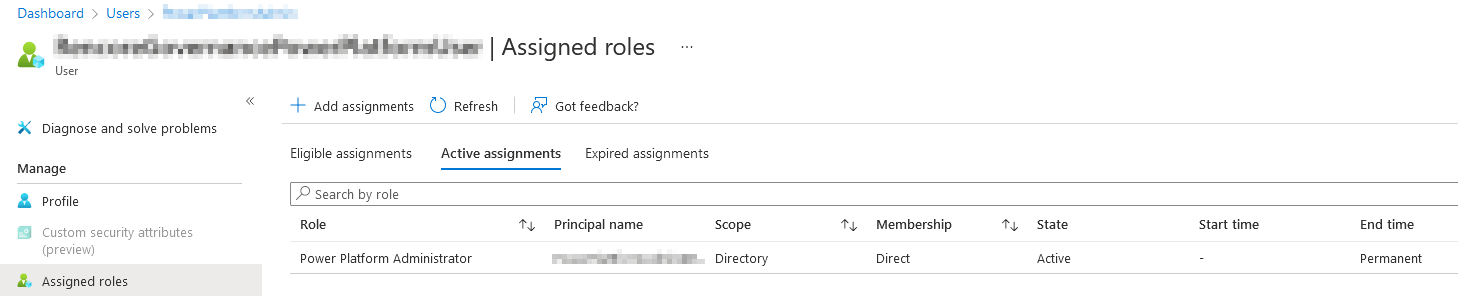
-
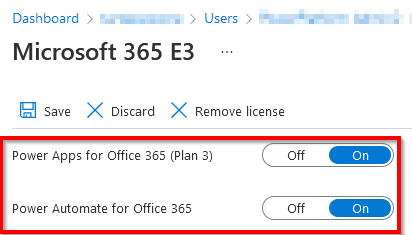
The user account has all of the following licenses assigned to allow access for Power Automate and Power Apps
(e.g. via a Microsoft 365 E3 license)-
Power Apps for Office 365 (Plan 3)
-
Power Automate for Office 365
-
-
The user account must not be a Global AdministratorGlobal administratorGlobal Administrator is the Microsoft Entra admin role with access to every administrative feature in the tenant, including giving admin consent to apps for the whole organization.Read more.
Caution! Microsoft 365 currently does not allow user accounts with the Global Administrator role to use Power Platform Administrator APIs. -
The dedicated user is not part of many groups and does not have many additional roles assigned.
Frequently asked questions
Can I use a global administrator account to provide Power Platform consent?
Can I use a global administrator account to provide Power Platform consent?No. Microsoft 365 does not allow user accounts with the Global Administrator role to use Power Platform Administrator APIs.
What licenses must be assigned to the Power Platform consent account?
What licenses must be assigned to the Power Platform consent account?The user must have Power Apps for Office 365 (Plan 3) and Power Automate for Office 365 licenses assigned.
Is multi-factor authentication required for the Power Platform consent account?
Is multi-factor authentication required for the Power Platform consent account?Yes. Microsoft requires MFA for administrator users. If MFA is not configured, permissions will be revoked.
Was this page helpful?
Thanks for the feedback.
Thanks. What was wrong?