Import an automation
AI summary
Import automation files from other Workspaces or Environments to reuse them. When importing automations triggered on policy violations, the referenced policy is created automatically.
Import an automation file, for example one exported from another WorkspaceWorkspaceA Workspace is the top-level container in Rencore Governance. It holds the settings, users, roles and connected apps for exactly one Environment, the connected Microsoft 365 tenant.Read more or EnvironmentEnvironmentAn Environment is the connected Microsoft 365 tenant inside a Workspace.Read more.
Before you begin
- Your Rencore role includes the Import Automation Schema permission. Owner, Admin and Contributor have it. See Rencore roles.
- You have a .automation (.json) file. See Export an automation.
Steps
-
Click AutomationAutomationAn automation is a workflow Rencore Governance runs on inventory objects when a trigger fires.Read more.
-
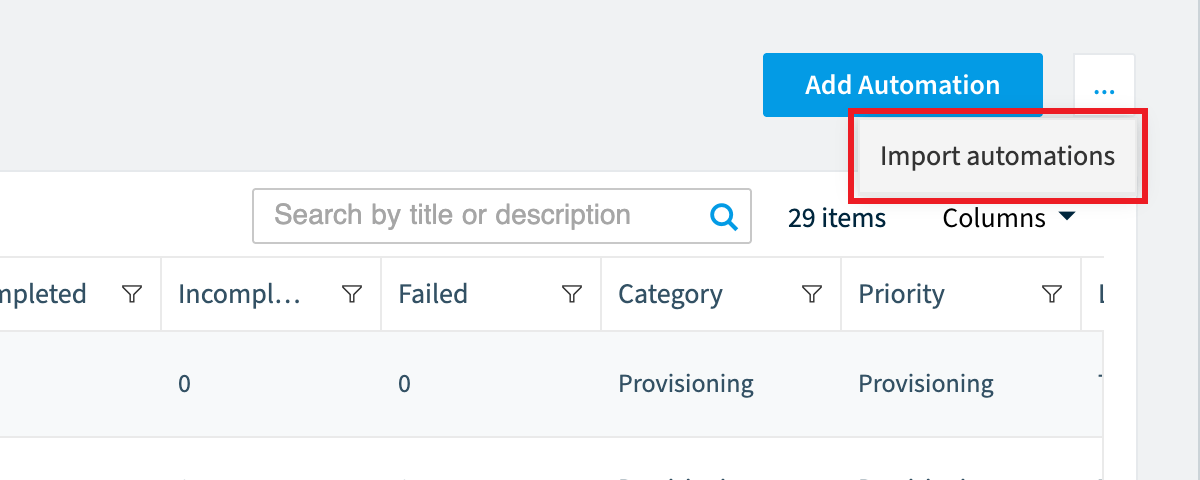
Open the Automation ActionAutomation actionAn automation action is a single operation an automation step performs, such as sending an email or archiving a Team.Read more Menu and click Import automations.
-
Click Browse.
-
Select the .automation (.json) file you want to import.
-
Click Open.
-
Click Import. The automation is imported.
-
If the automation is triggered “On Policy ViolationViolationA violation is an inventory object that matches the rule of an active policy, such as a Team with no owner.Read more”, a dialog states ‘On automation import, policy “<Policyname>” will be created’. Click OK to continue.
Frequently asked questions
Which Rencore roles can import an automation?
Owner, Admin and Contributor can import an automation. Your Rencore role must include the Import Automation Schema permission, and these three roles have it.
What file do I need to import an automation?
You need an .automation (.json) file, for example one exported from another Workspace or Environment. You get this file by exporting an automation.
What happens when I import an automation that is triggered on policy violation?
A dialog states that on automation import, the policy with the given name will be created. Click OK to continue with the import.
Was this page helpful?
Thanks for the feedback.
Thanks. What was wrong?