Integrate Rencore Nova
AI summary
Rencore Nova is deprecated and will shut down on 31 December 2026. You need to migrate to the Rencore Teams App by enabling it in Rencore Governance settings before this deadline.
Connect your EnvironmentEnvironmentAn Environment is the connected Microsoft 365 tenant inside a Workspace.Read more to Rencore NovaRencore NovaRencore Nova is a deprecated end-user app, replaced by the Rencore Teams App, that shuts down on 31 December 2026.Read more and turn on the Teams app for all users of the connected Microsoft 365 tenantMicrosoft 365 tenantA Microsoft 365 tenant is the dedicated instance of Microsoft 365 that holds an organization's users, groups, data and settings.Read more. Do this before you install Rencore Nova in MS Teams.
Before you begin
- To integrate Rencore Nova into your MS Teams, you need to be a Workspace Owner. Only the Owner role has the Manage Nova integration permission. See Rencore roles.
Steps
-
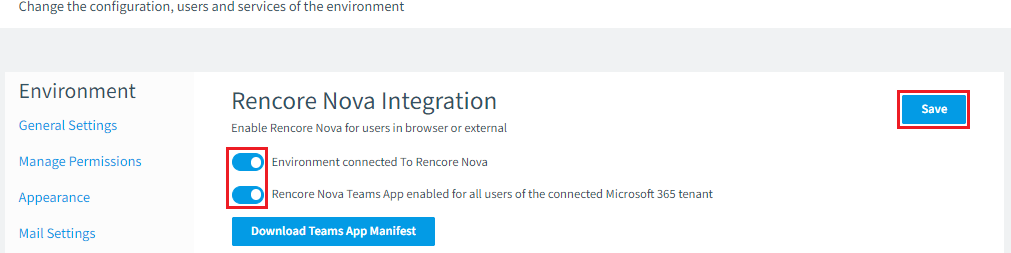
In Rencore Governance, go to Settings > Environment Settings > Rencore Nova Integration.
-
Turn on Environment connected To Rencore Nova, if it is not already on.
-
Turn on Rencore Nova Team App enabled for all users of connected Microsoft 365 tenant.
-
Click Save.
Frequently asked questions
 What role do I need to integrate Rencore Nova into Microsoft Teams?
What role do I need to integrate Rencore Nova into Microsoft Teams?You need to be a Workspace Owner. Only the Owner role has the Manage Nova integration permission.
How do I connect my Environment to Rencore Nova and turn on the Teams app for all users?
How do I connect my Environment to Rencore Nova and turn on the Teams app for all users?In Rencore Governance, go to Settings > Environment Settings > Rencore Nova Integration. Turn on Environment connected To Rencore Nova if it is not already on, turn on Rencore Nova Team App enabled for all users of connected Microsoft 365 tenant, then click Save.
What replaces Rencore Nova, and when will Rencore Nova be shut down?
The Rencore Teams App replaces Rencore Nova, which will be shut down on 31 December 2026. To migrate, click Settings, then Teams App Settings, and on the General Settings tab turn on the Rencore Teams App for test users and groups first, or for the entire organization.
Was this page helpful?
Thanks for the feedback.
Thanks. What was wrong?
Next steps
- To restrict users’ access to Rencore Nova, by the TeamsMicrosoft TeamsMicrosoft Teams is the Microsoft 365 app for chat, meetings and team collaboration.Read more application or by web access, see Restricting Entra ID Users to Rencore Governance & Rencore Nova.
- Install Rencore Nova