Reports and dashboards
AI summary
Reports show your inventory data as charts, lists, tables or KPIs. Dashboards combine multiple reports, policies and KPIs as tiles on one page. You can create both from templates or custom designs, set date ranges, and share them with stakeholders on a schedule.
A report is a saved query over your inventory, shown as a chart, list, table or KPI. A dashboard groups reports, policies and KPIs on one page as tiles.
How it works
Reports
A reportReportA report is a saved query over the inventory that Rencore Governance shows as a chart, list, table or KPI, for example unused SharePoint site collections larger than 1 GB.Read more has a primary object typeInventory objectAn inventory object is one item Rencore Governance has scanned from a connector, such as a single Team, SharePoint site collection, user or Power App.Read more, filters, a visualization and a category. It shows as a bar, column, pie, donut, line or area chart, as KPIs, or as a table or list. You start from the “Report Template LibraryTemplate libraryA template library is the catalog of prebuilt items you start from when you add something new in Rencore Governance.Read more” or build a custom report. From a report you can create a segment or a policy, clone it, export and import it, add it to a dashboard, and share it with stakeholders on a schedule.
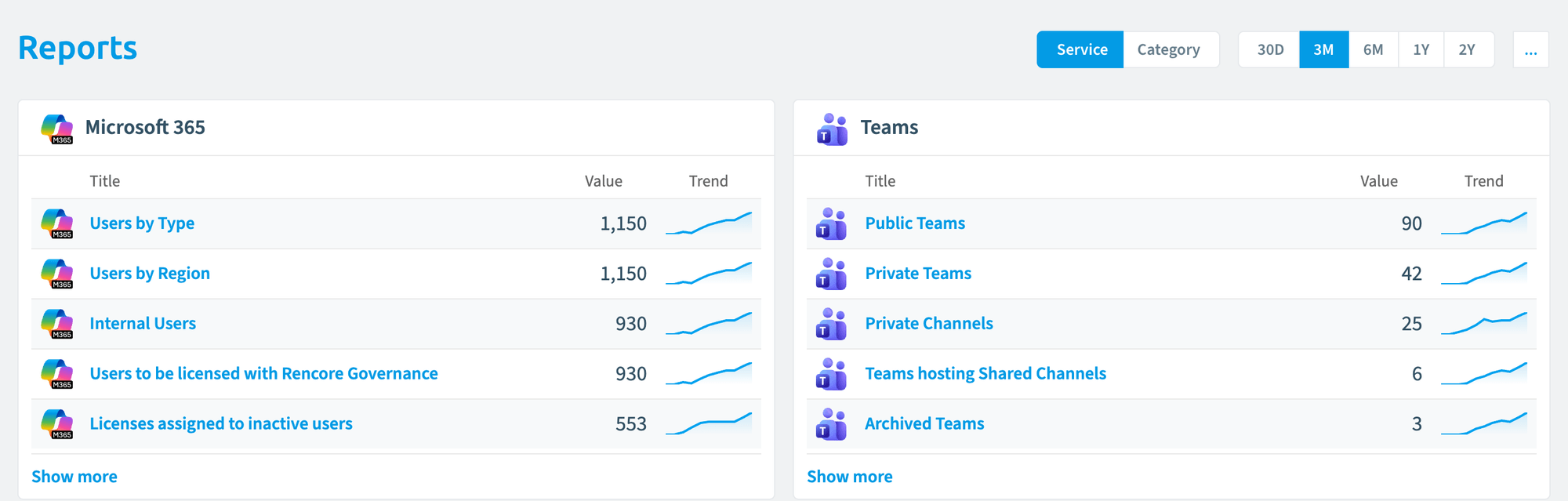
The Reports landing page groups the top five reports of each connector, or of each category if you switch the “Service, Category” selector. Each row shows the report’s value and a trend, with the change as a percentage. The date range selection overrides the date ranges of the individual tiles. It defaults to Last 30 Days and can be set to Last 90 Days, This Month, This Year or a Custom Range. Click a title to open the report. Click its trend to see the report logic and a compact version of the report in a side panel. “Go to Reports” opens the full list. There you search reports by name or description, filter them, choose columns, add a report from the “Report Template Library” or import one. The list shows each report’s connector, title, category, value, trend for the selected period, report type and last change. The menu of each report lets you open it, open it in a new tab, edit it, open its last job, clone it, add it as a tile to a dashboard, export it, share it, manage shared reports, create a segment or a policy from it, and delete it.
Dashboards
A dashboardDashboardA dashboard groups reports, policies and KPIs on one page as tiles, so each stakeholder sees the governance data that matters to them.Read more is a page of tiles. You add a prebuilt dashboard from the “Dashboard Template Library” or create a custom one, then add, resize and move tiles. Tiles come from the “Dashboard Tile Library” or from your own reports. The date range of a dashboard overrides the date ranges of its tiles. It defaults to Last 30 Days and can be set to Last 90 Days, This Month, This Year or a Custom Range. One dashboard is your default, and the Home button always returns you to it.
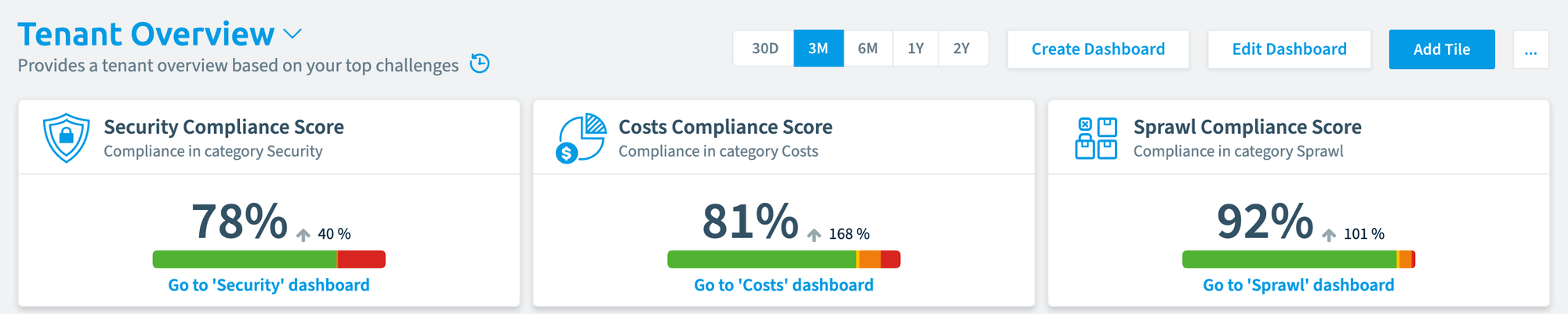
The dashboard menu lets you import, clone, export, share and delete a dashboard, save it as a template, manage dashboards and shared dashboards, and set a dashboard as the default. On a policy tile, hover and choose to go straight to the policy.
Example
Your security lead wants a regular view of external sharingSharing linkA sharing link is a link in SharePoint or OneDrive that grants access to a file or folder, sometimes to people outside your organization.Read more. You add a dashboard from the template library, add tiles for the policy “SharePoint file is shared with external usersExternal userAn external user is an account whose home tenant belongs to another organization, invited into your tenant to work with you.Read more” and for the report “Sites with external sharing enabled”, and share the dashboard with the security lead. The date range is set once on the dashboard, and every tile follows it.
How it relates to other concepts
- Reports and policies are both queries over the inventory. A report shows data. A policy counts every match as a violation with a severity. You can create a policy from a report.
- A segmentSegmentA segment is a saved, rule-based filter over inventory objects, for example every user whose country is the United States.Read more can be created from a report and reused as a filter.
- A Virtual Environment has its own dashboards and reports.
- Rencore NovaRencore NovaRencore Nova is a deprecated end-user app, replaced by the Rencore Teams App, that shuts down on 31 December 2026.Read more showed dashboards to people without access to Rencore Governance. It is deprecated and will be shut down on 31 December 2026.
Frequently asked questions
What is the difference between a report and a policy in Rencore Governance?
Both are queries over the inventory. A report shows data, while a policy counts every match as a violation with a severity. You can create a policy from a report.
Which date ranges can I choose for a dashboard?
The date range defaults to Last 30 Days. You can set it to Last 90 Days, This Month, This Year or a Custom Range. The dashboard date range overrides the date ranges of its tiles.
Can I create a segment from a report?
Yes. A segment can be created from a report and reused as a filter. You find this option in the menu of each report.
What does the home button do on a dashboard?
The Home button always returns you to your default dashboard. You can set any dashboard as the default from the dashboard menu.
Where do dashboard tiles come from?
Tiles come from the Dashboard Tile Library or from your own reports. You can add, resize and move tiles on the dashboard. You can also add a prebuilt dashboard from the Dashboard Template Library.
Was this page helpful?
Thanks for the feedback.
Thanks. What was wrong?
Learn more
- Report guides and Dashboard guides
- Create a report from a template and Create a custom report
- Share a report and Add a report as a tile to a dashboard
- Create a dashboard, Add tiles to a dashboard and Share a dashboard