Provisioning
AI summary
Provisioning automates creation of Teams, SharePoint sites, and other Microsoft 365 workspaces in a governed way. You set up templates that define workspace structure, naming conventions, request form fields, and who can request from each. When users request workspaces, approvers review them if needed, then Rencore Governance creates the workspace.
Provisioning is governed creation of new Microsoft 365 workspaces. People request a Team or SharePoint site from a provisioning template, and Rencore Governance creates it once the request is approved.
The template sets how the workspace is created, who may use the template, which fields the request form asks for and whether someone must approve it.
How it works
- An admin sets up provisioning templatesProvisioning templateA provisioning template defines how a new Microsoft 365 workspace is created through Rencore Governance.Read more, starting from the “Provisioning Template Library”. A template has three parts: Template Settings, Provisioning Settings and Approval. It can apply a PnP provisioning template, suggest Teams channelsChannelA channel is a section inside a Microsoft Teams team where members hold conversations and share files on one topic.Read more and enforce a naming convention.
- A user submits a provisioning requestProvisioning requestA provisioning request is a request to create a new Microsoft 365 workspace, such as a Team, from a provisioning template.Read more from a template, in Rencore Governance or in the Rencore Teams AppRencore Teams AppThe Rencore Teams App (formerly Rencore Nova) brings Rencore Governance into Microsoft Teams for the people who own and use workspaces.Read more.
- If the template needs approval, the request goes to its approvers first. They approve, or decline with a reason, on the Approvals page of the Rencore Teams App.
- Rencore Governance creates the workspace. The requester follows the request under My Requests.
Provisioning is part of the Premium and Enterprise PlansPlanA Plan is the edition of Rencore Governance in your Subscription: Professional, Premium or Enterprise.Read more.
The template libraryTemplate libraryA template library is the catalog of prebuilt items you start from when you add something new in Rencore Governance.Read more holds ready-made templates for TeamsMicrosoft TeamsMicrosoft Teams is the Microsoft 365 app for chat, meetings and team collaboration.Read more (for example Department Workspace, Manage a Project and Onboard Employees), SharePoint sites (Communication Site and Team Site), PlannerMicrosoft PlannerMicrosoft Planner is the Microsoft 365 app for task plans and boards. The Planner connector of Rencore Governance, part of the Digital Workplace module, inventories plans.Read more plans, Viva Engage communitiesViva Engage communityA Viva Engage community is a group in Viva Engage where people share posts, files and events around a team, project or interest.Read more and Microsoft 365 GroupsMicrosoft 365 groupA Microsoft 365 Group is the membership object behind many Microsoft 365 workspaces.Read more. You can also create your own templates, and team templates can use a PnP provisioning template.
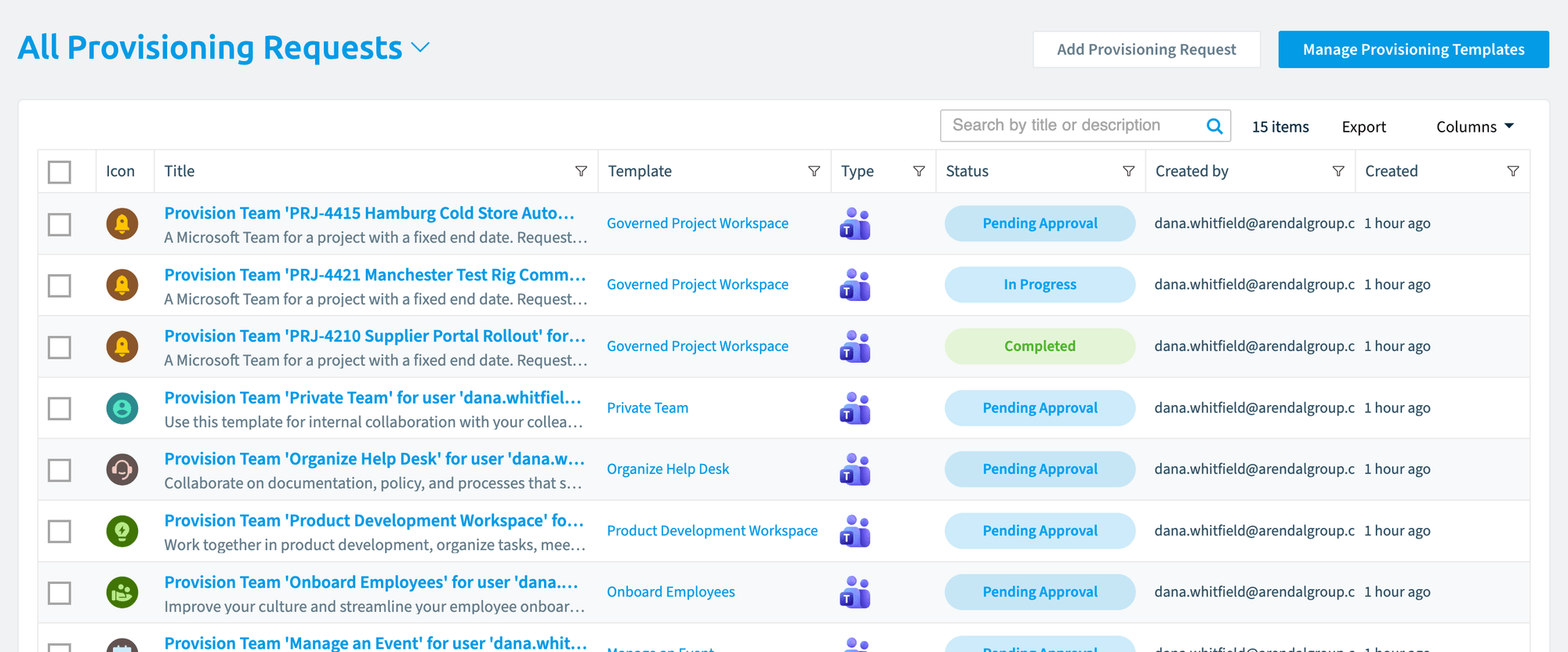
The Provisioning page lists every request, filtered by All, Open or Failed. From here you add a request, and open “Manage Provisioning Templates” to turn templates on or off, add, edit, delete, import, export or stress test them.
Example
Your company wants every project Team to start with the same channels, the same naming convention and an approval from the PMO. You create a template from “Manage a Project”, set the naming convention and the suggested channels, and add the PMO as approvers. Project managers request their Team in the Rencore Teams App, the PMO approves it, and the Team is created the same way every time.
How it relates to other concepts
- Provisioning governs the start of a workspace’s life. Policies and Reviews govern it afterwards.
- Templates run automations with the trigger On form values.
- Custom MetadataCustom MetadataCustom Metadata is a Rencore Governance add-on that adds your own business fields to the inventory, such as cost centers or project codes.Read more can be asked for as fields on the request form, so business context, such as a cost center, is captured when the workspace is created.
- The new workspace appears in the inventory after the next scan.
Frequently asked questions
What does a provisioning template control?
A provisioning template sets how the workspace is created, who may use the template, which fields the request form asks for, and whether someone must approve the request. It has three parts: Template Settings, Provisioning Settings and Approval.
Where do approvers approve or decline a provisioning request?
Approvers approve, or decline with a reason, on the Approvals page of the Rencore Teams App. This applies when the template requires approval, and the request goes to the approvers first.
Can I ask for Custom Metadata, such as a cost center, on the request form?
Yes. Custom Metadata can be asked for as fields on the request form, so business context such as a cost center is captured when the workspace is created.
When does a newly provisioned workspace show up in the inventory?
The new workspace appears in the inventory after the next scan.
How can a requester follow the status of a provisioning request?
The requester follows the request under My Requests. Admins can see every request on the Provisioning page, filtered by All, Open or Failed.
Was this page helpful?
Thanks for the feedback.
Thanks. What was wrong?
Learn more
- Provisioning guides
- Create a provisioning template
- Create a provisioning request
- Use a PnP provisioning template
- Limitations to provisioning naming conventions
- Request a new workspace in the Rencore Teams App and Approve or decline a request