
 SharePoint and OneDrive scanning performance
AI summary
SharePoint and OneDrive scans are now split into two job types: base jobs that scan most artifacts, and Files/Folders jobs for files and file shares. This split allows more parallel execution. Grant admin consent to the new 'Rencore Governance for OneDrive (Full Control)' application to activate this benefit and improve scan performance.
This notice announced a change in October 2025 that has since rolled out to all customers, and it is kept as a record of what changed. The split into base jobs and files and folders jobs is how SharePoint and OneDriveOneDriveOneDrive is the personal file storage of each Microsoft 365 user. The OneDrive connector of Rencore Governance, part of the Digital Workplace module, inventories every OneDrive with its files, folders and file sharing.Read more scans run today. For how scans run in parallel, see Understanding scan buckets and parallel scanning.
Who is affected
- Rolled out: Calendar week 41, 2025
- Impact: All Rencore Governance SharePoint and OneDrive Scans
What changed
We are introducing a more granular job structure for SharePoint and OneDrive scans to improve performance and support future enhancements. The following changes will be implemented:
- SharePoint will be split into two job types:
- SharePoint (base)
- SharePoint Files/Folders
- OneDrive will be split into two job types:
- OneDrive (base)
- OneDrive Files/Folders
To support this, a new Entra IDMicrosoft Entra IDMicrosoft Entra ID, formerly Azure Active Directory, is the Microsoft identity service behind every Microsoft 365 tenant.Read more application will be added: Rencore Governance for OneDrive (Full Control).
- This new AAD App is required for the OneDrive Files/Folders jobs.
- No new SharePoint AAD App is required, as two existing applications already support SharePoint scans.
Impact
- InventoryInventoryThe inventory is the record of every object Rencore Governance scans from your tenant, with their properties and the relations between them.Read more representation will not change.
- Inventory updates will now follow the new job type split:
- Files, Folders, and File Shares: updated by Files/Folders jobs.
- All other artifacts: updated by base jobs.
Performance improvements
Once consent is granted to the new Entra ID application:
- Rencore Governance will be able to execute SharePoint Files and OneDrive Files jobs in parallel with either OneDrive (base) or SharePoint (Base).
- This results in a significant improvement in scan performance.
Currently, Rencore Governance will run jobs in parallel under the following constraints:
- One job from either SharePoint (base) or OneDrive (base)
- One job from either SharePoint Files/Folders or OneDrive Files/Folders
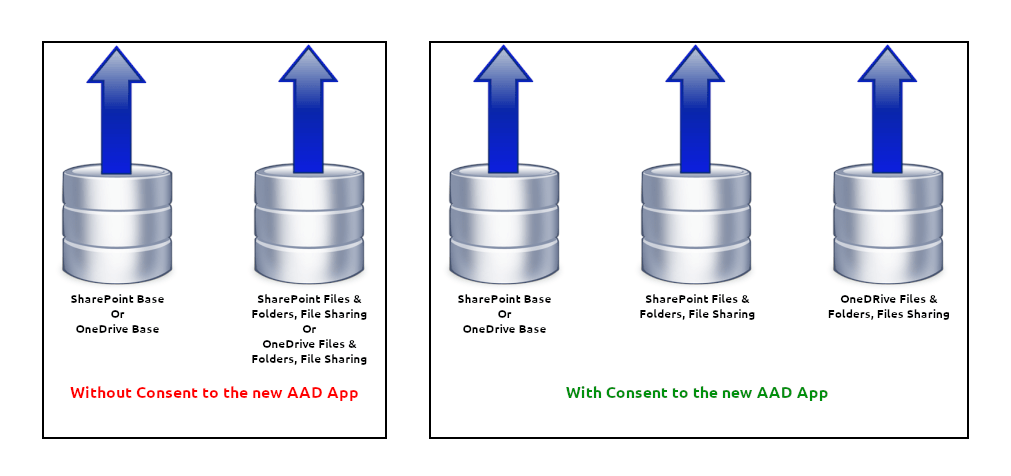
If consent to the new AAD App is not granted, scans will continue to run with the current performance level.
Reason for change
This change is a prerequisite for introducing partial scansPartial scanningPartial scanning is the Rencore Governance scanning engine that updates the inventory while a scan is still running.Read more (Enterprise Scans), a feature designed to reduce time-to-value, allowing faster, more targeted data collection.
What you need to do
Please grant admin consentConsent and reconsentConsent is the permission a Microsoft 365 administrator grants Rencore Governance to scan a tenant.Read more for the new Entra ID application: Rencore Governance for OneDrive (Full Control). Doing so turns on parallel scan execution for Files, Folders, and File SharingSharing linkA sharing link is a link in SharePoint or OneDrive that grants access to a file or folder, sometimes to people outside your organization.Read more and delivers improved performance.
To provide consent for the new AAD app, follow Re-consent permissions and provide consent for OneDrive Permissions.

Frequently asked questions
 Which new Entra ID application do I need to consent to for faster SharePoint and OneDrive scans?
Which new Entra ID application do I need to consent to for faster SharePoint and OneDrive scans?Grant admin consent for Rencore Governance for OneDrive (Full Control). This application is required for the OneDrive Files/Folders jobs. Consent turns on parallel scan execution for Files, Folders, and File Sharing.
Do I need a new Entra ID application for SharePoint files/folders jobs?
Do I need a new Entra ID application for SharePoint files/folders jobs?No. No new SharePoint AAD App is required, because two existing applications already support SharePoint scans.
What happens if I do not grant consent to the new Entra ID application?
What happens if I do not grant consent to the new Entra ID application?Scans continue to run at the current performance level. Rencore Governance only runs the Files/Folders jobs in parallel with the base jobs once consent is granted.
Which inventory items are updated by the files/folders jobs and which by the base jobs?
Files, Folders, and File Shares are updated by the Files/Folders jobs. All other artifacts are updated by the base jobs. The way the Inventory is represented does not change.
Which jobs can Rencore Governance run in parallel during SharePoint and OneDrive scans?
Which jobs can Rencore Governance run in parallel during SharePoint and OneDrive scans?Rencore Governance runs one job from either SharePoint (base) or OneDrive (base), together with one job from either SharePoint Files/Folders or OneDrive Files/Folders. This applies once consent is granted to the new Entra ID application.
Was this page helpful?
Thanks for the feedback.
Thanks. What was wrong?