Reports
AI summary
Reports convert inventory data into charts or lists to identify situations like teams with guests or inactive user licenses. Build reports from templates, share via email and dashboards, or convert filter settings into policies.
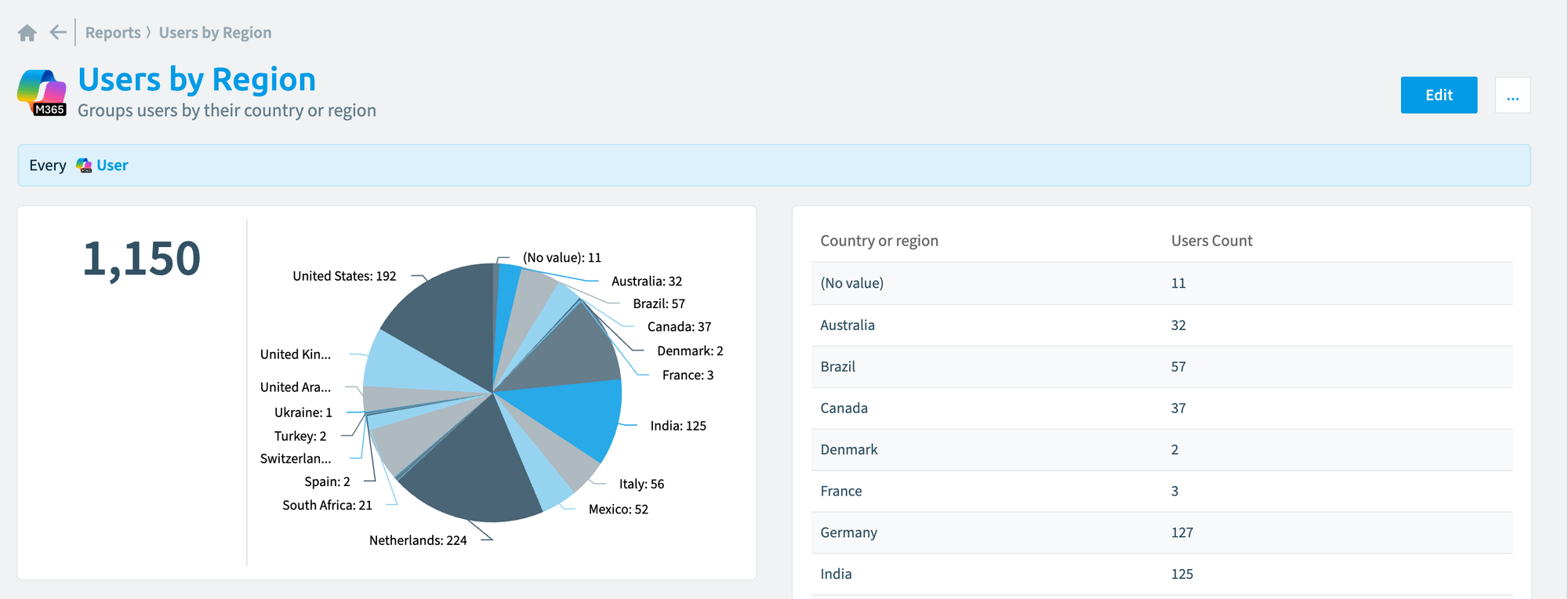
Reports turn inventory data into a chart or a list, such as all teams with guests or the licenses assigned to inactive users. Start from a report templateReportA report is a saved query over the inventory that Rencore Governance shows as a chart, list, table or KPI, for example unused SharePoint site collections larger than 1 GB.Read more or build your own, then share the report by email, show it as a tile on a dashboard, or turn its filters into a segment or a policy. To copy a report to another workspace or EnvironmentEnvironmentAn Environment is the connected Microsoft 365 tenant inside a Workspace.Read more, export it and import it there.
Start with
- Create a report from a template Start a report from one of the ready-made report templates.
- Create a custom report Build a report from scratch with your own columns, filters and chart type.
- Share a report Send a report by email to people with access to Rencore Governance.
- Add a report as a tile to a dashboard Show a report as a tile on a dashboard.
All guides in reports
Create reports 3 guides
Start from a template, build your own, or copy one to change it.
-
Create a report from a template
Start a report from one of the ready-made report templates.
Before you begin: Your Rencore role includes the Create Report permission.
-
Build a report from scratch with your own columns, filters and chart type.
Before you begin: Your Rencore role includes the Create Report permission.
-
Copy a report to change it without touching the original.
Before you begin: Your Rencore role includes the Create Report permission.
Answer a common question 2 guides
Step-by-step reports for questions admins ask often.
-
List who holds each Entra ID directory role, directly or through a group, and get a violation for admins without MFA…
Before you begin: Your Rencore role needs the permissions to create reports and policies. (+1 more)
6 steps
 Entra ID
 Microsoft 365
 -
Build a report that shows who last changed each SharePoint or OneDrive file and when, as of the last scan, for a site…
Before you begin: Your Rencore role needs the permissions to create reports. (+1 more)
8 steps
 SharePoint
 OneDrive
Share reports 2 guides
Send a report by email or show it on a dashboard.
-
Send a report by email to people with access to Rencore Governance.
Before you begin: Your Rencore role includes the Share Report permission.
-
Add a report as a tile to a dashboard
Show a report as a tile on a dashboard.
Before you begin: Your Rencore role includes the Edit Dashboard permission. (+1 more)
Import, export and delete 3 guides
Copy reports between workspaces and Environments, and remove the ones you no longer need.
-
Save a report as a file to copy it to another workspace or Environment.
Before you begin: Your Rencore role includes the Export Report Schema permission.
-
Add a report exported from another workspace or Environment.
Before you begin: Your Rencore role includes the Import Report Schema permission. (+1 more)
-
Remove a report you no longer need.
Before you begin: Your Rencore role includes the Delete Report permission. (+1 more)
Frequently asked questions
How do I copy a report to another workspace or Environment?
Export the report as a file, then import it in the other workspace or Environment. Your Rencore role needs the Export Report Schema permission to export and the Import Report Schema permission to import.
Which permission do I need to create a report?
Your Rencore role needs the Create Report permission. This applies to creating a report from a template, building a custom report, and cloning a report.
How can I change a report without touching the original?
Clone the report. Cloning copies the report so you can change the copy and leave the original as it is. Your Rencore role needs the Create Report permission.
What ways are there to share a report with other people?
You can send a report by email to people with access to Rencore Governance, or show it as a tile on a dashboard. Sharing by email needs the Share Report permission. Adding a tile needs the Edit Dashboard permission.
Can I build a report from scratch instead of using a template?
Yes. You can create a custom report with your own columns, filters and chart type. Your Rencore role needs the Create Report permission.