Switch between Environments
AI summary
Switch to a different Environment or Virtual Environment in your Workspace to view its data. Any Rencore role with access can click the Workspace and Environments selector in the bottom-left corner.
Switch between the EnvironmentsEnvironmentAn Environment is the connected Microsoft 365 tenant inside a Workspace.Read more and Virtual EnvironmentsVirtual EnvironmentA Virtual Environment is a logical segment of the data in one Microsoft 365 tenant, for example a department, region or subsidiary.Read more of a WorkspaceWorkspaceA Workspace is the top-level container in Rencore Governance. It holds the settings, users, roles and connected apps for exactly one Environment, the connected Microsoft 365 tenant.Read more to see the data of another Environment.
Before you begin
- Any Rencore role can switch between the Environments it has access to in the Workspace. See Rencore roles.
Steps
-
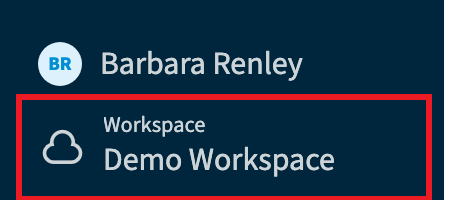
Click on the Workspace & Environments selector in the bottom-left corner of Rencore Governance.
-
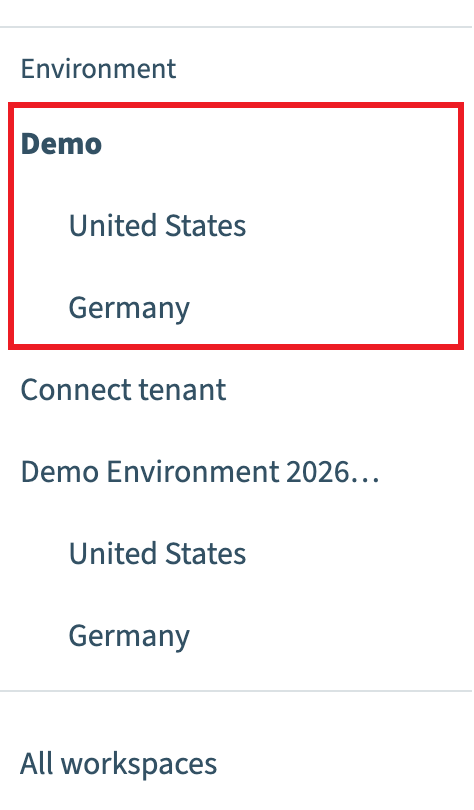
In the Environments selection screen, select any Environment or Virtual Environment.
What you see
Rencore Governance loads the data of the selected Environment in the Workspace.
Frequently asked questions
How do I switch to another Environment in Rencore Governance?
Click the Workspace & Environments selector in the bottom-left corner of Rencore Governance. In the Environments selection screen, select any Environment or Virtual Environment.
Which roles are allowed to switch between Environments?
Any Rencore role can switch between the Environments it has access to in the Workspace.
What happens after I select a different Environment?
Rencore Governance loads the data of the selected Environment in the Workspace, so you see the data of that Environment.
Was this page helpful?
Thanks for the feedback.
Thanks. What was wrong?