Policies and violations
AI summary
A policy is a governance rule you define to find unwanted objects in your inventory, such as Teams with very few owners. Rencore Governance tracks each matching object as a violation and displays violations by severity and category. The Policies page shows your compliance score and can trigger automations to fix violations.
A policy is a governance rule that Rencore Governance checks against your inventory, for example "Teams with very few owners". Every object that matches the rule is a violation.
How it works
Policies
A policy is built on one primary object typeInventory objectAn inventory object is one item Rencore Governance has scanned from a connector, such as a single Team, SharePoint site collection, user or Power App.Read more, such as TeamsMicrosoft TeamsMicrosoft Teams is the Microsoft 365 app for chat, meetings and team collaboration.Read more or users, and a filter that describes the objects you do not want, for example Teams whose owners all have disabled accounts. You build the filter in the Policy BuilderPolicyA policy is a governance rule that Rencore Governance checks against your inventory, for example Teams without owners.Read more and can add conditions on related objectsRelationA relation links one inventory object to another, such as a Team to its owners, members and channels.Read more.
You start from the “Policy Template LibraryTemplate libraryA template library is the catalog of prebuilt items you start from when you add something new in Rencore Governance.Read more”, build a policy from scratch, or create one from a report. When you save a policy, you save it as a draft or turn it on right away. An active policy shows results from the data of the last scan, and is recalculated as scans update the inventory.
Some screens and older pages call policies checks.
Violations
A violation is one object that matches the rule of an active policy. For each policy, Rencore Governance shows the total, new and removed violations and a trend over time. You can summarize violations by a related object, for example one row per site ownerWorkspace ownerA workspace owner is an owner of a Microsoft 365 workspace, such as a Team, a SharePoint site or a group.Read more instead of one per site.
Severity and category
| Property | Values | What it is for |
|---|---|---|
| SeveritySeveritySeverity is the impact level a policy assigns to its violations. A policy has one of five severities, from highest to lowest: Critical, High, Medium, Low and Information.Read more | Information (lowest), Low, Medium, High, Critical (highest) | How much impact a violation has. Sorts the top issues on the Policies page. |
| CategoryCategoryA category groups policies, reports and automations by governance goal, such as Security or Costs.Read more | Security, Costs, Operation, Sprawl, External Access, Adoption, User OffboardingLeaverA leaver is someone who has left your organization but whose account may still hold licenses, workspaces, ownership and OneDrive content.Read more, Response Accuracy | The governance goal. Groups policies on the Policies page and filters the template library. You can also type a custom category. |
Severity applies to policy violationsViolationA violation is an inventory object that matches the rule of an active policy, such as a Team with no owner.Read more. AutomationsAutomationAn automation is a workflow Rencore Governance runs on inventory objects when a trigger fires.Read more and built-in actionsBuilt-in actionA built-in action is a ready-made operation you run directly on inventory objects without building an automation, for example adding a user to a Team.Read more are rated with a criticality levelCriticality levelA criticality level, Low, Medium or High, rates how much impact an automation or built-in action has on your tenant.Read more instead.
The compliance score
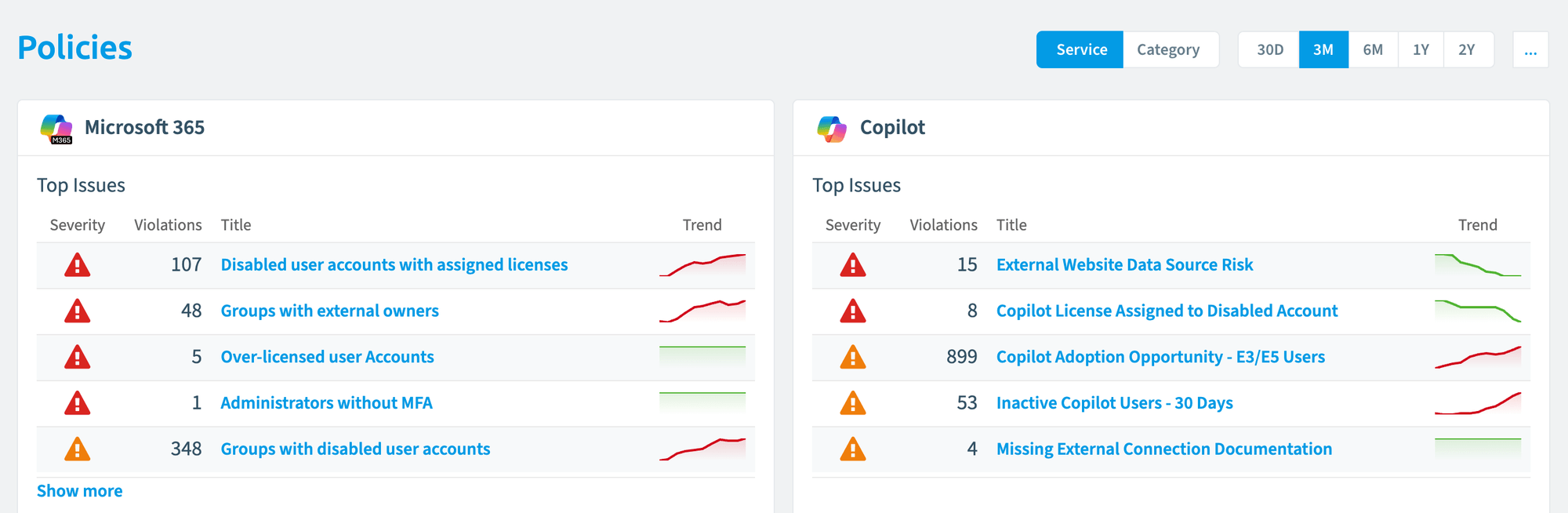
The Policies landing page shows one tile per connector, or per category if you switch the “Service, Category” selector. Each tile shows the compliance scoreCompliance scoreThe compliance score is the percentage gauge on each tile of the Policies landing page.Read more as a gauge with a percentage, and the five policies with the most violations in the selected period, sorted by severity and violation count. The date range selection defaults to Last 30 Days and can be set to Last 90 Days, This Month, This Year or a Custom Range.
Click a policy title to open the policy and its current violations. Click its trend to open a side panel with the policy logic, the total, new and removed violations, how many objects of that type break the rule (for example 807 of 1,150 users), and the automations the policy triggers.
Example
You turn on the template “Teams with very few owners” (severity High). It lists every Team that has one owner or none. Each of those Teams is a violation. The Teams tile on the Policies page shows the policy among its top issues, and its violations count toward the compliance score of that tile. When a Team gets a second owner, it no longer matches the rule and is counted as removed.
How it relates to other concepts
- Policies are queries over the inventory. A report is also a query, but it shows data without counting anything as a violation. You can turn a report into a policy.
- A violation can trigger an automation with the trigger On Policy Violation. It runs after the next scan of the connector, and again for each object as long as it stays a violation. See Built-in actions, automations and automation actions.
- Policy tiles can be added to dashboards, where hovering over a tile takes you to the policy.
- A Virtual Environment has its own policies.
Frequently asked questions
What is the difference between a policy and a violation in Rencore Governance?
A policy is a governance rule checked against your inventory. A violation is one object that matches the rule of an active policy. For example, each Team with one owner or none is a violation of the policy "Teams with very few owners".
Can I save a policy without turning it on?
Yes. When you save a policy, you can save it as a draft or turn it on right away. An active policy shows results from the data of the last scan and is recalculated as scans update the inventory.
What severity levels and categories can a policy have?
Severity runs from Information (lowest) through Low, Medium and High to Critical (highest). Categories are Security, Costs, Operation, Sprawl, External Access, Adoption, User Offboarding and Response Accuracy. You can also type a custom category.
What does the compliance score on the policies page show?
Each tile shows the compliance score as a gauge with a percentage, plus the five policies with the most violations in the selected period. Tiles are per connector, or per category if you switch the selector. The date range defaults to Last 30 Days.
When does an automation run for a policy violation?
An automation with the trigger On Policy Violation runs after the next scan of the connector. It runs again for each object as long as that object stays a violation.
Was this page helpful?
Thanks for the feedback.
Thanks. What was wrong?
Learn more
- Create a policy from a template
- Create a custom policy
- Create a policy from a report
- Export policies and Import policies
- Policy templates reference