Turn on demo mode
AI summary
Turn on Demo Mode to hide banners about tenant connections, expiring subscriptions, use thresholds, and preview features when presenting Rencore to other users. You need Edit Workspace or Edit Environment permission depending on scope.
Turn on Demo modeDemo environment and Demo ModeA demo environment is an Environment filled with demo data instead of tenant data.Read more to hide the banners to connect your tenant, expiring subscriptions, exceeding the use threshold and enabling preview features. Use it when you present the product to other users without showing distracting content.
Before you begin
- Your Rencore role needs the Edit WorkspaceWorkspaceA Workspace is the top-level container in Rencore Governance. It holds the settings, users, roles and connected apps for exactly one Environment, the connected Microsoft 365 tenant.Read more permission to turn on Demo Mode for the Workspace, or the Edit EnvironmentEnvironmentAn Environment is the connected Microsoft 365 tenant inside a Workspace.Read more permission for one Environment. The Admin and Owner roles have both. See Rencore roles.
Steps
-
Click on Settings.
-
Click on Workspace Settings to turn on Demo Mode for the whole Workspace, or Environment Settings to turn it on for the current Environment.
-
Click on the Appearance tab.
-
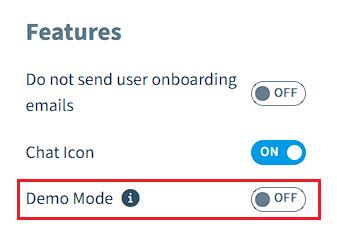
Under Features, turn on the toggle for Demo Mode.
Frequently asked questions
What does demo mode hide in Rencore Governance?
Demo mode hides the banners to connect your tenant, expiring subscriptions, exceeding the use threshold and enabling preview features. Use it when you present the product to other users and want to avoid distracting content.
Which permission do I need to turn on Demo Mode?
You need the Edit Workspace permission to turn on Demo Mode for the Workspace, or the Edit Environment permission for one Environment. The Admin and Owner roles have both permissions.
How do I turn on Demo Mode for only one Environment?
Click Settings, then Environment Settings for the current Environment. Open the Appearance tab and, under Features, turn on the toggle for Demo Mode. Choose Workspace Settings instead to turn it on for the whole Workspace.
Was this page helpful?
Thanks for the feedback.
Thanks. What was wrong?