View automation batches
AI summary
View all runs of a specific automation on the Automation Batch Page, grouped by when they were triggered. Click a batch to see the individual runs it contains.
Open the Automation Batch Page to see all automation runsAutomation batchAn automation batch is the group of automation runs that started from the same trigger at the same time.Read more of one automation, grouped by when they were triggered. Use it to check what each batch did.
Before you begin
- Your Rencore role includes the Read AutomationAutomationAn automation is a workflow Rencore Governance runs on inventory objects when a trigger fires.Read more permission. Owner, Admin, Contributor and Reader have it. See Rencore roles.
Steps
-
Click Automation on the Nav Panel.
-
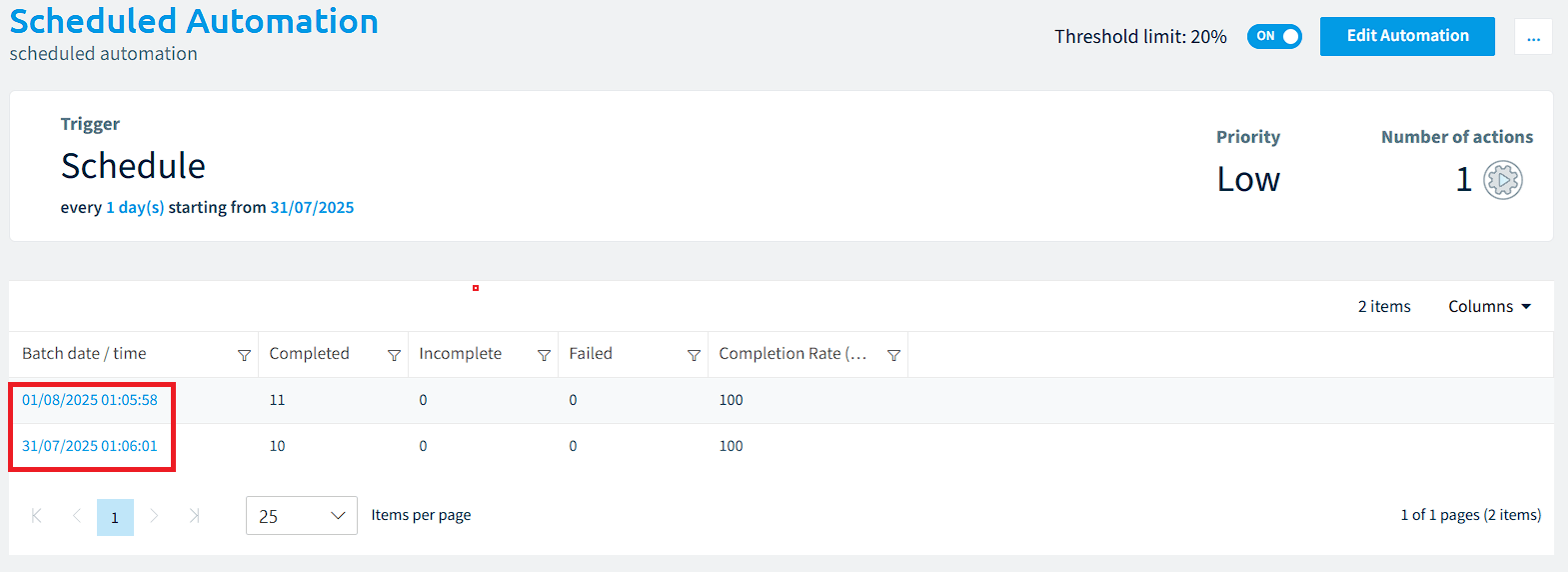
Click an automation. The Automation Batch Page opens.
-
Click a Batch date/time to see all automation runs of that batch.
What you see
The page groups the runs by the GroupId property. This usually corresponds to a unique timestamp for when the automation was triggered, so the runs show grouped by date.
Frequently asked questions
How do I open the automation batch page for an automation?
Click Automation on the Nav Panel, then click the automation you want. The Automation Batch Page opens. Click a Batch date/time to see all automation runs of that batch.
Which Rencore roles can view automation batches?
Owner, Admin, Contributor and Reader can view automation batches. Your Rencore role must include the Read Automation permission, and these four roles have it.
How are automation runs grouped on the automation batch page?
The Automation Batch Page groups the runs by the GroupId property. This usually corresponds to a unique timestamp for when the automation was triggered, so the runs show grouped by date.
Was this page helpful?
Thanks for the feedback.
Thanks. What was wrong?