Profile settings
AI summary
Choose which workspace opens at sign-in and how dates, times, and numbers display. Administrators manage your role and team.
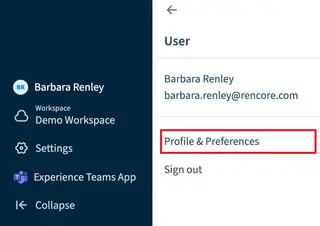
Profile settings are your own preferences and do not change anything for other users. You can choose which workspace opens when you sign in, and how dates, times and numbers are shown. The language follows your browser, as described in Change Language. Your role and team are set by an Owner or Admin under Users & Roles, not here.
Start with
All guides in profile settings
-
Set your default date, time and number format
Pick the date, time and number format you see in Rencore Governance.
Before you begin: Any role can do this.
-
Choose the workspace that opens when you sign in.
Before you begin: Any role can do this. (+1 more)
Frequently asked questions
Do my profile settings change anything for other users?
No. Profile settings are your own preferences and do not change anything for other users. You can set which Workspace opens when you sign in and how dates, times and numbers are shown.
Which role do I need to select a default Workspace or set my date, time and number format?
Any role can do both. You do not need to be an Owner or Admin to choose the Workspace that opens when you sign in or to pick your date, time and number format.
Can I change my role or team in profile settings?
No. An Owner or Admin sets your role and team under Users & Roles, not in profile settings. The language follows your browser, as described in Change Language.