Set your default date, time and number format
AI summary
Choose your preferred region in User Profile > Profile & Preferences to set how dates, times, and numbers display. This personal setting applies to your profile only.
Choose the region whose date, time and number format Rencore Governance uses for you.
Before you begin
- Any role can do this. It is a personal setting in your own profile.
Steps
-
Go to User Profile > Profile & Preferences.
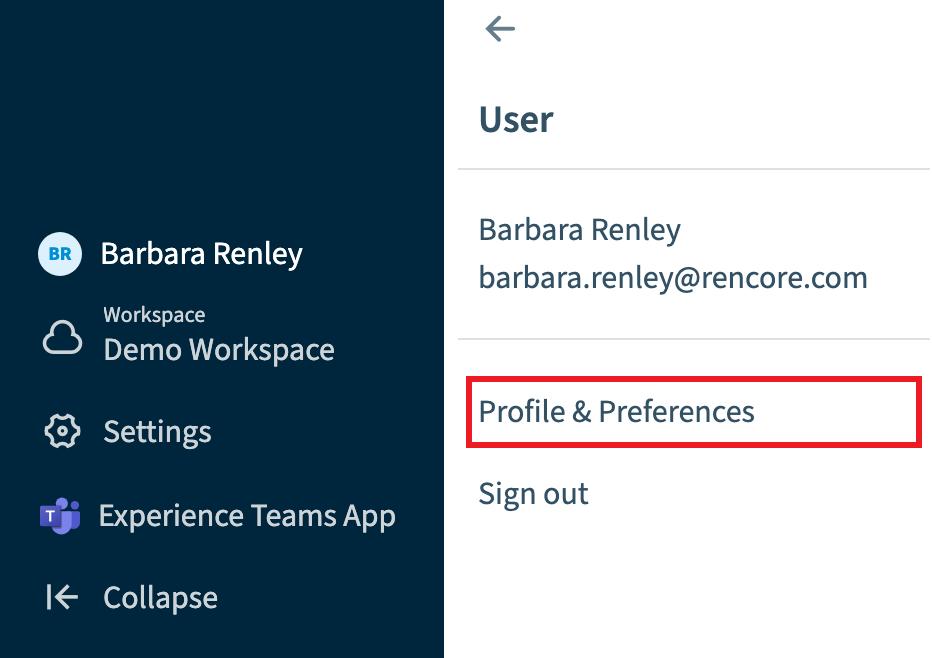
-
Scroll down to the bottom of the Profile screen.
-
Under Date, Time and Number Format, click the drop-down and choose the region you want to use (e.g. English (United Kingdom)).
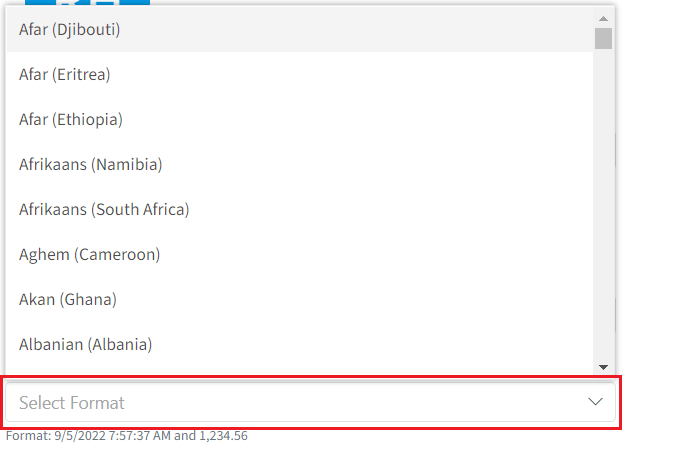
-
Scroll back up to the top of the Profile screen and click Save.
Frequently asked questions
How do I change the date, time and number format that Rencore Governance shows me?
Go to User Profile > Profile & Preferences and scroll to the bottom of the Profile screen. Under Date, Time and Number Format, choose a region from the drop-down. Then scroll back to the top of the Profile screen and click Save.
Do I need a specific role to set my own date and number format?
No. Any role can change this setting. It is a personal setting in your own profile.
Which regions can I pick for the date, time and number format?
You choose a region from the drop-down under Date, Time and Number Format, for example English (United Kingdom). The format of that region is then used for you in Rencore Governance.
Was this page helpful?
Thanks for the feedback.
Thanks. What was wrong?