Select a default Workspace
AI summary
Set which Workspace opens when you sign in to Rencore Governance. This personal setting is useful if you have access to multiple Workspaces.
Choose the WorkspaceWorkspaceA Workspace is the top-level container in Rencore Governance. It holds the settings, users, roles and connected apps for exactly one Environment, the connected Microsoft 365 tenant.Read more that loads when you sign in to Rencore Governance. This is useful when you manage or have access to more than one Workspace.
Before you begin
- Any role can do this. It is a personal setting in your own profile.
- You have access to more than one Workspace.
Steps
-
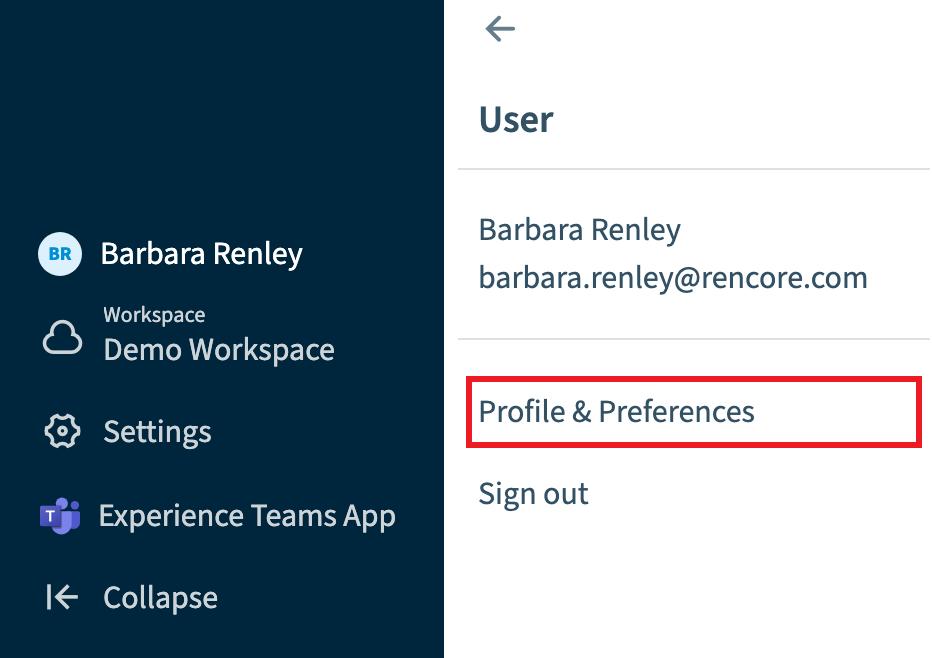
Go to User Profile > Profile & Preferences.
-
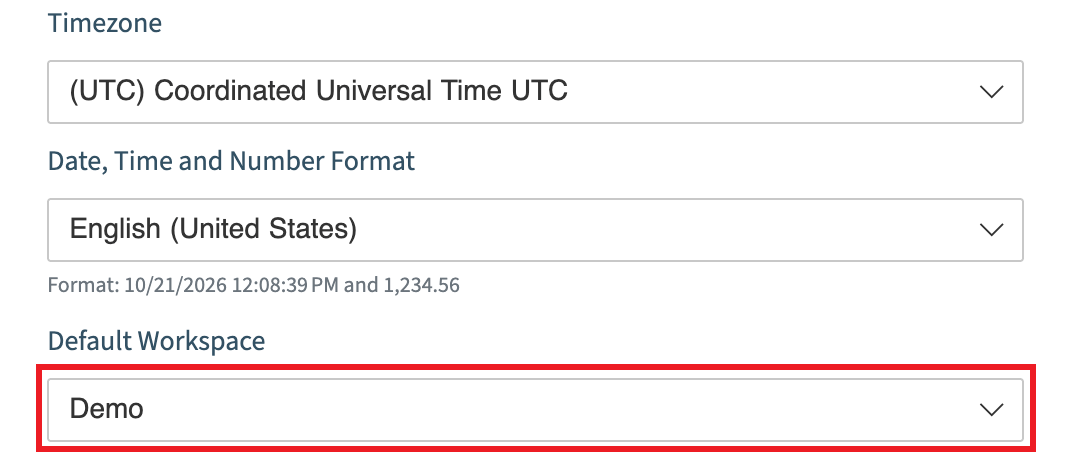
Scroll down to the bottom of the Profile screen.
-
Select the Workspace in the drop-down.
-
Scroll back up to the top of the Profile screen and click Save.
Frequently asked questions
How do I choose which Workspace loads when I sign in to Rencore Governance?
Go to User Profile > Profile & Preferences and scroll to the bottom of the Profile screen. Select the Workspace in the drop-down, then scroll back to the top of the Profile screen and click Save.
Do I need a specific role to set a default Workspace?
No. Any role can set a default Workspace. It is a personal setting in your own profile.
When does it make sense to set a default Workspace?
It is useful when you manage or have access to more than one Workspace. You need access to more than one Workspace to choose a default.
Was this page helpful?
Thanks for the feedback.
Thanks. What was wrong?