Switch between Workspaces
AI summary
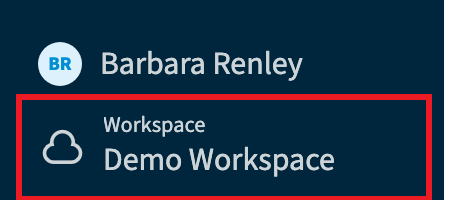
You can switch between Workspaces using the Workspace & Environments selector in the bottom-left corner of Rencore Governance. You need a role in each Workspace to access it.
A user can belong to several WorkspacesWorkspaceA Workspace is the top-level container in Rencore Governance. It holds the settings, users, roles and connected apps for exactly one Environment, the connected Microsoft 365 tenant.Read more. Switch between them to work in another Workspace.
Before you begin
- You have a role in each Workspace you want to open. A Workspace you have not been invited to is not listed. See Rencore roles.
Steps
-
Click on the Workspace & EnvironmentsEnvironmentAn Environment is the connected Microsoft 365 tenant inside a Workspace.Read more selector in the bottom-left corner of Rencore Governance.
-
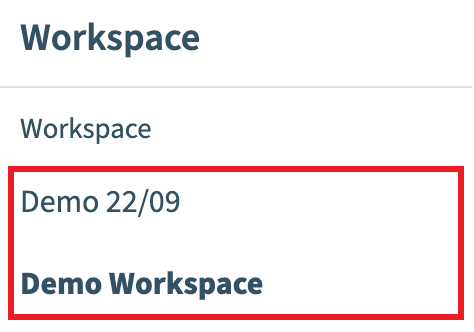
In the Workspace Selection, click on the desired Workspace.
What you see
Rencore Governance loads the selected Workspace.
Frequently asked questions
How do I switch to another Workspace in Rencore Governance?
Click the Workspace & Environments selector in the bottom-left corner of Rencore Governance. Then click the Workspace you want in the Workspace Selection. Rencore Governance loads the selected Workspace.
Why is a Workspace missing from my Workspace selection list?
You have probably not been invited to that Workspace. A Workspace you have not been invited to is not listed, and you need a role in each Workspace you want to open.
Can one user belong to more than one Workspace?
Yes. A user can belong to several Workspaces and can switch between them to work in another Workspace, as long as the user has a role in each one.
Was this page helpful?
Thanks for the feedback.
Thanks. What was wrong?