Search a data grid
AI summary
You can search a data grid to filter items by their Display name; this only filters the current data grid. To search across all areas of Rencore Governance, use the left navigation search instead.
Search a DatagridDatagridA datagrid is the table view Rencore Governance uses for lists of items, such as the objects of an inventory or the violations of a policy.Read more in Rencore Governance to filter it to the items whose Display name matches your search. Datagrid search only filters the Datagrid you are on.
Before you begin
- Any Rencore role that can open the Datagrid can search it. The Reader role can read every area. See Rencore roles.
Steps
-
Go to the desired Datagrid (for example InventoryInventoryThe inventory is the record of every object Rencore Governance scans from your tenant, with their properties and the relations between them.Read more > M365Microsoft 365Microsoft 365 is the Microsoft cloud suite of Teams, SharePoint, OneDrive, Exchange and the Office apps.Read more > Licenses, or Policies > TeamsMicrosoft TeamsMicrosoft Teams is the Microsoft 365 app for chat, meetings and team collaboration.Read more with very Few Owners).
-
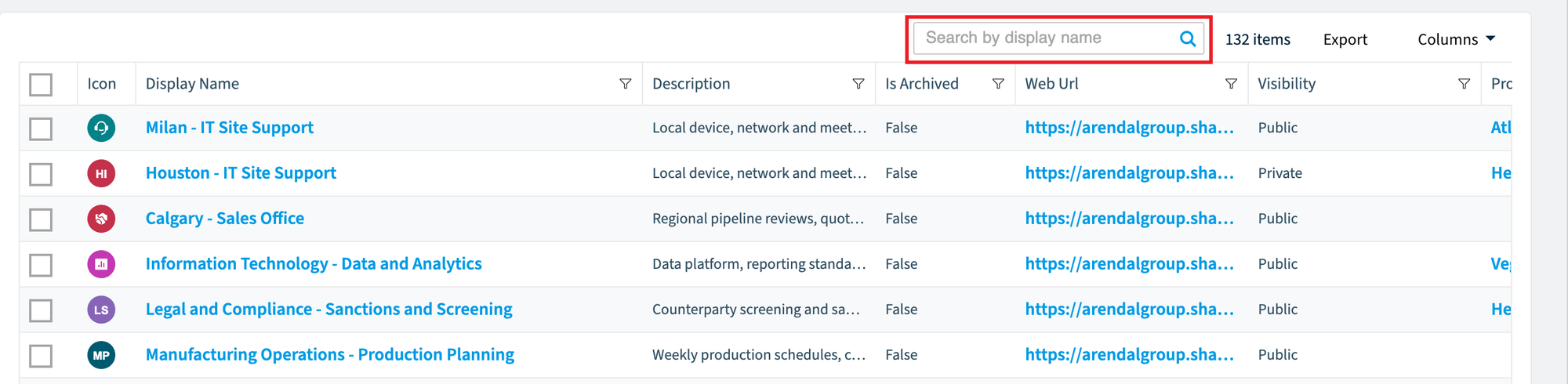
At the top of the Datagrid on the right, click in the search box.
-
Enter the Display name that you want to search and press Enter.
What you see
The Datagrid now filters to the items that match your search.
Frequently asked questions
Which field does datagrid search match against?
Datagrid search filters the Datagrid to the items whose Display name matches your search. Enter the Display name you want to find and press Enter.
Do I need a specific Rencore role to search a datagrid?
No. Any Rencore role that can open the Datagrid can search it. The Reader role can read every area, so it can search too.
How can I find a report, policy, or automation if I do not know which area it is in?
Use Search in the left navigation. Datagrid search only filters the Datagrid you are on, so it does not look in other areas.
Was this page helpful?
Thanks for the feedback.
Thanks. What was wrong?