 Power BI consent
AI summary
Power BI requires you to manually create an Entra ID app before connecting to Rencore Governance, unlike other connectors. Copy the Client Secret when creating the app, then enter the Client ID and Secret in Governance consent settings. The user signing in must have the Fabric Administrator role and a Power BI license.
For Power BIPower BIPower BI is the Microsoft service for reports and dashboards over business data.Read more, you create the Entra ID appApp registrationAn app registration is the global definition of an application in Microsoft Entra ID.Read more yourself in the tenant you want to scan, as described in Create the Power BI app. Then you enter its details in Rencore Governance, as described on this page. Other connectors create their app for you when you give consent.
Enabling the connector
- Click on “Settings” and then”Environment Settings”.
- Click on “Manage Services”.
- Toggle the selector for “Power BI”.
- Click “Save”.
Consenting to the connector.
Before you can provide consent for Power BI, you will need to manually create an Entra IDMicrosoft Entra IDMicrosoft Entra ID, formerly Azure Active Directory, is the Microsoft identity service behind every Microsoft 365 tenant.Read more application as detailed in the Knowledge base article: Create the Power BI app.
Once you have set up the app and have the required details, you will need to:
-
Click on “Settings” and then “Environment Settings”.
-
On “General Settings”, click the ellipses menu ([…]) and select “Manage consent”.
-
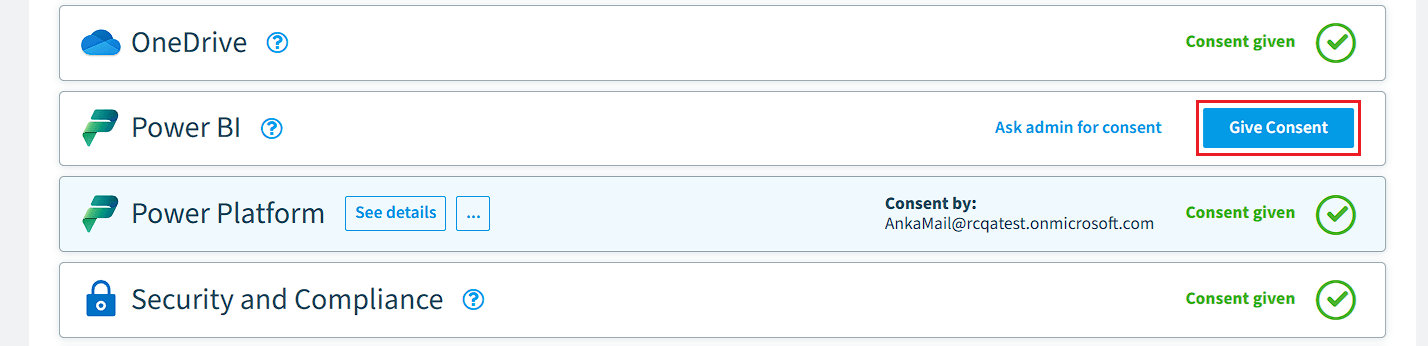
On “Scan”, click “Give Consent” on “Power BI”.
-
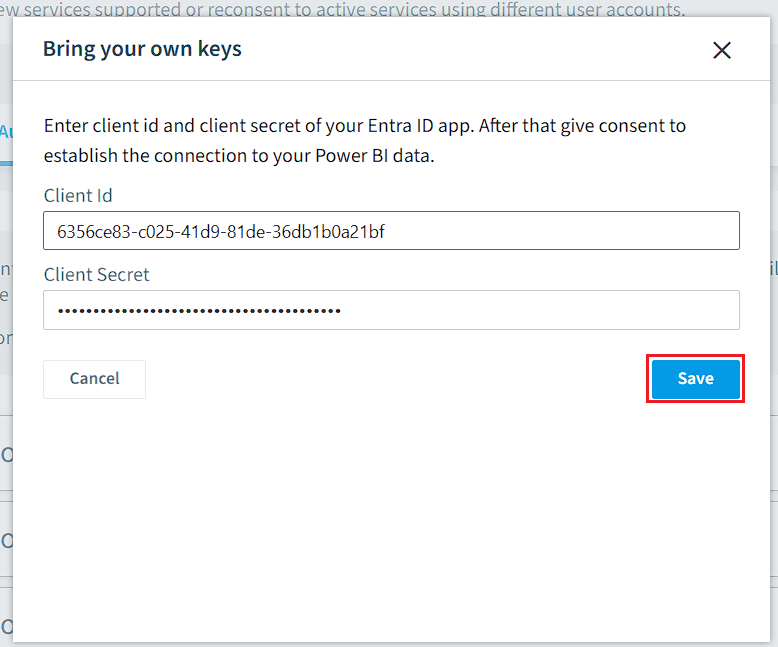
In the new Dialogue, enter the following details:
- Client ID: Enter the application client’s ID.
- Client SecretClient secretA client secret is a password-like string that an app registration uses to prove its identity when it requests a token from Microsoft Entra ID.Read more: Enter the Value that you copied when creating the Client Secret.
-
Click “Save”.
-
Sign in with your user credentials. The user must meet these requirements:
- Must have the Fabric Administrator role, a Microsoft role for Microsoft FabricMicrosoft FabricMicrosoft Fabric is the Microsoft analytics platform for end-to-end data work, with Power BI as one of its workloads.Read more.
- Must have any Power BI (e.g., Pro or Free) app assigned by any license.
-
Once consent is complete, it returns to the “Service consent” page. Power BI will show as “Consent given”.

Frequently asked questions
 Do I need to create an Entra ID app for Power BI?
Do I need to create an Entra ID app for Power BI?Yes. For Power BI, you must manually create an Entra ID application in your tenant. Other connectors create their app automatically when you give consent.
How do I give consent for Power BI in Rencore Governance?
How do I give consent for Power BI in Rencore Governance?Go to Settings > Environment Settings. In General Settings, click the ellipses menu and select Manage consent. Under Scan, click Give Consent on Power BI, enter your Client ID and Client Secret, click Save, then sign in.
What user credentials are needed to give Power BI consent?
What user credentials are needed to give Power BI consent?The user must have the Fabric Administrator role and have a Power BI app assigned by any license (such as Pro or Free).
Was this page helpful?
Thanks for the feedback.
Thanks. What was wrong?