
Custom GPT sharing exposure
AI summary
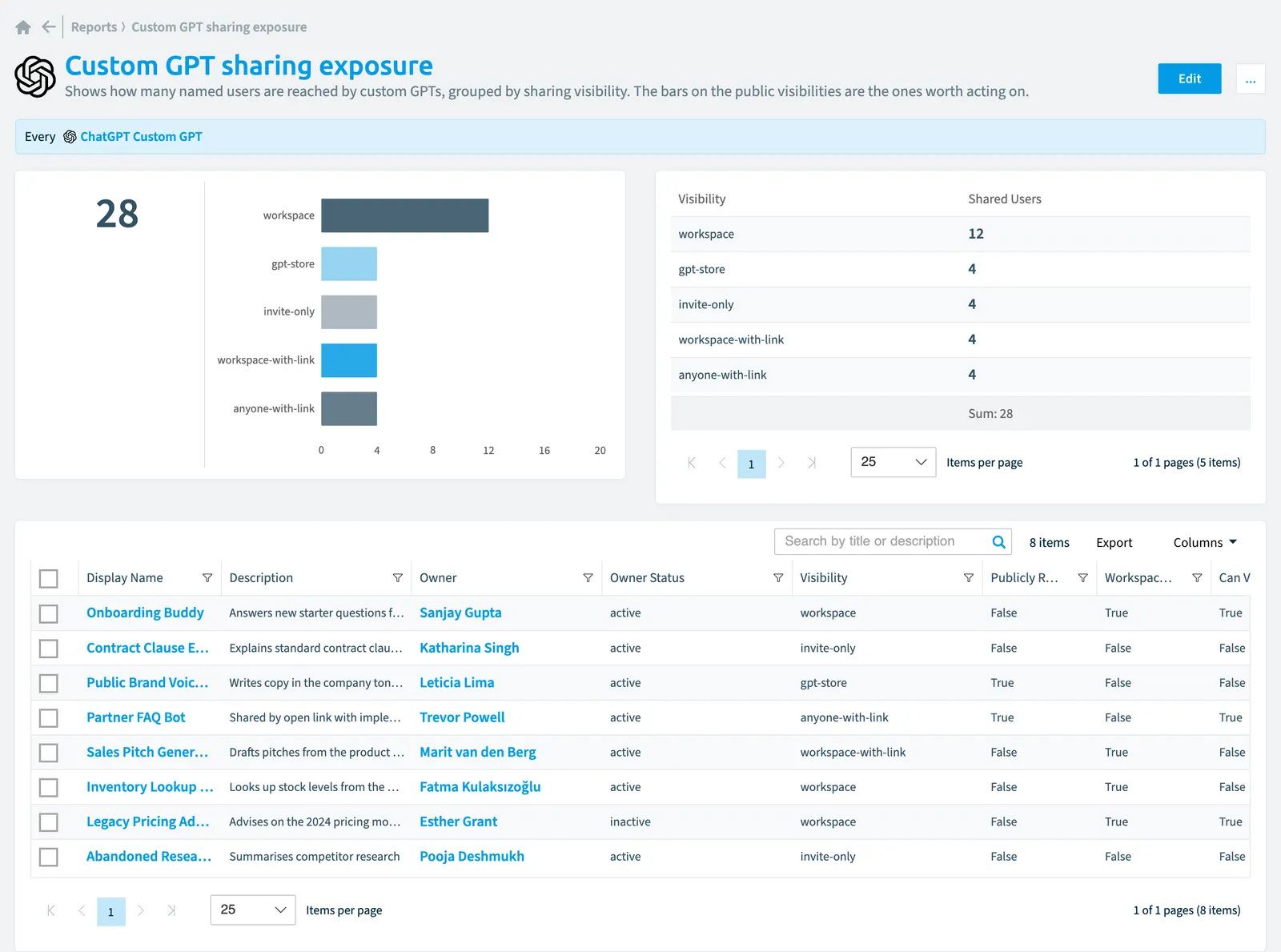
The Custom GPT Sharing Exposure report shows how many named users are reached by each custom GPT, organized by sharing visibility. It highlights custom GPTs shared publicly or broadly so you can review them for potential oversharing.
Shows how many named users are reached by custom GPTsCustom GPTA custom GPT is a version of ChatGPT that someone in your ChatGPT Enterprise workspace configured for one purpose and can share with others.Read more, grouped by sharing visibility. The bars on the public visibilities are the ones worth acting on.
What it shows
The report shows ChatGPT custom GPT objects from the ChatGPT EnterpriseChatGPT EnterpriseChatGPT Enterprise is the business plan of the ChatGPT AI assistant by OpenAI.Read more inventory.
The rule
Every ChatGPT Custom GPT
Chart
| Chart type | Bar chart |
|---|---|
| Grouped by | Visibility |
| Measure | Sum of Shared Users |
| Sorted by | Shared Users, descending |
| Limit | Top 5 |
In Rencore Governance
Details
| Reports on | ChatGPT custom GPT |
|---|---|
| Connector | ChatGPT Enterprise |
| Category | Information Oversharing |
| Chart type | Bar chart |
| Recommended | Yes |
| Status | Preview |
Frequently asked questions
What does the custom GPT sharing exposure report show?
The Custom GPT sharing exposure report: shows how many named users are reached by custom GPTs, grouped by sharing visibility. The bars on the public visibilities are the ones worth acting on.
What is the rule of the custom GPT sharing exposure report?
Every ChatGPT Custom GPT.
Which objects does the custom GPT sharing exposure report use?
The Custom GPT sharing exposure report works on ChatGPT custom GPT objects from the ChatGPT Enterprise inventory and shows them as a bar chart.
Which module includes the custom GPT sharing exposure report?
The Custom GPT sharing exposure report comes with the ChatGPT Enterprise connector (in preview) in the AI & Agents module of Rencore Governance, an add-on module on the Premium and Enterprise Plans.
Was this page helpful?
Thanks for the feedback.
Thanks. What was wrong?