
ChatGPT custom GPT
AI summary
Rencore Governance tracks custom GPTs in your ChatGPT Enterprise workspace, recording properties related to sharing visibility, configuration status, owner status, and security risks like unauthenticated external actions. Built-in policies identify problematic GPTs including those reachable outside your workspace, with inactive owners, or unchanged over 90 days, so you can delete or isolate them.
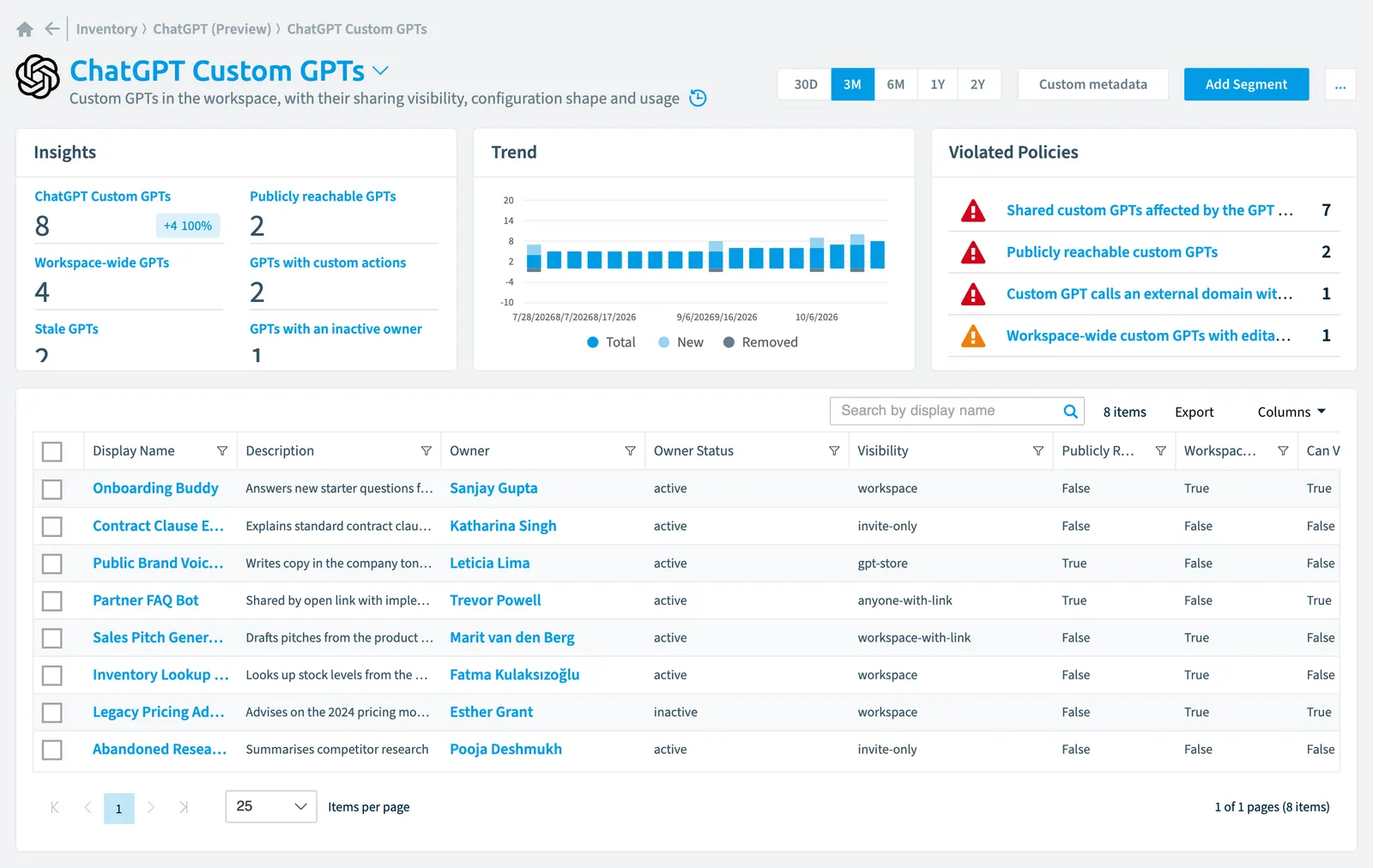
Custom GPTsCustom GPTA custom GPT is a version of ChatGPT that someone in your ChatGPT Enterprise workspace configured for one purpose and can share with others.Read more in the workspace, with their sharing visibility, configuration shape and usage
Part of the ChatGPT Enterprise inventory.
In Rencore Governance
Scan settings
| Default scanning interval | Allowed scanning intervals | Data removal during incremental scan |
|---|---|---|
| Daily | Daily, Weekly, Bi-Weekly, Monthly, Never, Initial | Yes |
Properties
36 properties in 9 groups. Open a group to see its properties.
Name and identity 5
| Property | Type | Description | Automation placeholder |
|---|---|---|---|
| Builder Name | String | The builder name shown to users, which is not always the owner's name. | {{ChatGPTCustomGPT. |
| Config Versions | Int32 | How many configuration versions exist. Instructions themselves are never stored. | {{ChatGPTCustomGPT. |
| Description | String | {{ChatGPTCustomGPT. | |
| Display Name | String | {{ChatGPTCustomGPT. | |
| ID | String | {{ChatGPTCustomGPT. |
Organization and location 3
| Property | Type | Description | Automation placeholder |
|---|---|---|---|
| Workspace Wide | Boolean | True when every workspace member can reach the GPT without being named. | {{ChatGPTCustomGPT. |
| WorkspaceWorkspaceA Workspace is the top-level container in Rencore Governance. It holds the settings, users, roles and connected apps for exactly one Environment, the connected Microsoft 365 tenant.Read more | ChatGPT Workspace | {{ChatGPTCustomGPT. | |
| Workspace Name | String | {{ChatGPTCustomGPT. |
Activity and usage 3
| Property | Type | Description | Automation placeholder |
|---|---|---|---|
| Can Read | Boolean | Whether recipients may use the GPT. | {{ChatGPTCustomGPT. |
| Can View Config | Boolean | Whether recipients may read the configuration, including the instructions. This is the permission that leaks prompt content sideways. | {{ChatGPTCustomGPT. |
| Last scan update | DateTime | Shows when this object was last updated in a scan. If an object is found during a scan but no property has been changed this date will not change. | {{ChatGPTCustomGPT. |
AI and agents 4
| Property | Type | Description | Automation placeholder |
|---|---|---|---|
| Action Domains | String | The external domains the GPT's custom actions call, for comparison against a customer allowlist held as a custom propertyCustom MetadataCustom Metadata is a Rencore Governance add-on that adds your own business fields to the inventory, such as cost centers or project codes.Read more. | {{ChatGPTCustomGPT. |
| Has Custom Actions | Boolean | True when the GPT calls an external domain through a custom action. Every such domain is a third-party data flow. | {{ChatGPTCustomGPT. |
| Knowledge Files | Int32 | How many knowledge files are attached. Counts only; file names and content are never read. | {{ChatGPTCustomGPT. |
| Tools | String | Which built-in tools the GPT has enabled. | {{ChatGPTCustomGPT. |
Dates and scanning 3
| Property | Type | Description | Automation placeholder |
|---|---|---|---|
| Created At | DateTime | {{ChatGPTCustomGPT. | |
| Initially Scanned | DateTime | Shows when this object was initially found in a scan. | {{ChatGPTCustomGPT. |
| Updated At | DateTime | When the configuration was last changed. This is what the stale GPT policy measures. | {{ChatGPTCustomGPT. |
Sharing and access 9
| Property | Type | Description | Automation placeholder |
|---|---|---|---|
| Publicly Reachable | Boolean | True when the GPT is reachable outside the workspace, by link or through the GPT store. | {{ChatGPTCustomGPT. |
| M365 Owner | User | The Entra IDMicrosoft Entra IDMicrosoft Entra ID, formerly Azure Active Directory, is the Microsoft identity service behind every Microsoft 365 tenant.Read more user behind the owner, so a GPT can be read by department. | {{ChatGPTCustomGPT. |
| M365 Owner Name | String | {{ChatGPTCustomGPT. | |
| Owner Status | String | Whether the owner is still an active workspace member. Allowed values: active, inactive, not_in_workspace. | {{ChatGPTCustomGPT. |
| Owner | ChatGPT user | The user who owns the GPT. When they go inactive the GPT is orphaned but keeps working, which is why owner status is worth a policy of its own. | {{ChatGPTCustomGPT. |
| Owner Email | String | {{ChatGPTCustomGPT. | |
| Owner Name | String | {{ChatGPTCustomGPT. | |
| Shared Users | Int32 | How many named users the GPT is shared with. Isolate strips this back to the owner. | {{ChatGPTCustomGPT. |
| Visibility | String | How far the GPT reaches. Anyone-with-link and gpt-store put it outside the workspace entirely; workspace and workspace-with-link expose it to every member. Allowed values: anyone-with-link, gpt-store, invite-only, workspace, workspace-with-link. | {{ChatGPTCustomGPT. |
Security and compliance 7
| Property | Type | Description | Automation placeholder |
|---|---|---|---|
| Key | String | Internal. | {{ChatGPTCustomGPT. |
| Has Unauthenticated Action | Boolean | True when at least one custom action calls its external domain with no authentication configured. | {{ChatGPTCustomGPT. |
| Latest Version Author | ChatGPT user | Who authored the most recent configuration version. An author who is not the owner means shared editing. | {{ChatGPTCustomGPT. |
| Latest Version Author Name | String | {{ChatGPTCustomGPT. | |
| Risk Score | Int32 | Stores risk score | {{ChatGPTCustomGPT. |
| Risk Score Update | DateTime | Stores risk score update | {{ChatGPTCustomGPT. |
| Risk Score Value | String | Stores risk score value like Low_Low | {{ChatGPTCustomGPT. |
Settings 1
| Property | Type | Description | Automation placeholder |
|---|---|---|---|
| Can Write | Boolean | Whether recipients may edit the GPT. | {{ChatGPTCustomGPT. |
Other properties 1
| Property | Type | Description | Automation placeholder |
|---|---|---|---|
| Categories | String | The GPT store categories the GPT is filed under, where it is published. | {{ChatGPTCustomGPT. |
Relations
| Relation | Connector | Description |
|---|---|---|
| ChatGPT conversation | ChatGPT EnterpriseChatGPT EnterpriseChatGPT Enterprise is the business plan of the ChatGPT AI assistant by OpenAI.Read more | Conversations as objects: who, when, how many messages, which models, and which GPT or project - never the content |
| ChatGPT user | ChatGPT Enterprise | |
| ChatGPT user | ChatGPT Enterprise | Every user in the connected ChatGPT workspace, with role, seat, spend and the Entra ID join |
| ChatGPT user | ChatGPT Enterprise | Every user in the connected ChatGPT workspace, with role, seat, spend and the Entra ID join |
| ChatGPT user | ChatGPT Enterprise | The ChatGPT user the GPT is shared with. |
| ChatGPT Workspace | ChatGPT Enterprise | The connected ChatGPT Enterprise workspace, its granted scopes and its coverage gaps |
| User | Microsoft 365Microsoft 365Microsoft 365 is the Microsoft cloud suite of Teams, SharePoint, OneDrive, Exchange and the Office apps.Read more | All users registered in your tenant (internal, external) |
Segments
| Segment | Description |
|---|---|
| GPTs with custom actions | Custom GPTs that call an external domain through a custom action |
| GPTs with an inactive owner | Custom GPTs whose owner is inactive or has left the workspace - orphan candidates for isolate, then delete |
| Publicly reachable GPTs | Custom GPTs reachable outside the workspace, by link or through the GPT store |
| Stale GPTs | Custom GPTs whose configuration has not changed in 90 days. This also flags a GPT that is used daily but never edited, so confirm with the owner before acting on it. |
| Workspace-wide GPTs | Custom GPTs every workspace member can reach without being named |
Actions
- Delete Custom GPT
- Isolate Custom GPT
Policies that check this object
| Policy | Severity | Description |
|---|---|---|
| Custom GPT calls an external domain without authentication | High | Detects custom actions that call an external host with no authentication configured |
| Custom GPT with an inactive owner | Medium | Detects custom GPTs whose owner is inactive or no longer in the workspace |
| Publicly reachable custom GPTs | High | Detects custom GPTs reachable outside the workspace by link or through the GPT store |
| Shared custom GPTs affected by the GPT retirement | High | Detects custom GPTs shared beyond their owner, which stop working when OpenAI retires custom GPTs |
| Stale custom GPT | Low | Detects custom GPTs whose configuration has not changed in 90 days |
| Workspace-wide custom GPTs with editable configuration | Medium | Detects custom GPTs every workspace member can reach and edit |
Frequently asked questions
What is the ChatGPT custom GPT object in Rencore Governance?
What is the ChatGPT custom GPT object in Rencore Governance?Custom GPTs in the workspace, with their sharing visibility, configuration shape and usage. ChatGPT custom GPT is an object type in the ChatGPT Enterprise inventory of Rencore Governance.
Which properties does Rencore Governance collect for ChatGPT custom GPT?
Which properties does Rencore Governance collect for ChatGPT custom GPT?Rencore Governance collects 36 properties for ChatGPT custom GPT, such as Action Domains, Key, Builder Name and 33 more.
Which policies check ChatGPT custom GPT objects?
Which policies check ChatGPT custom GPT objects?6 built-in policies check ChatGPT custom GPT objects, such as Custom GPT calls an external domain without authentication, Custom GPT with an inactive owner and 4 more.
How often is ChatGPT custom GPT scanned?
How often is ChatGPT custom GPT scanned?By default daily. You can change the scan interval of ChatGPT custom GPT objects under Configure objects (daily, weekly, bi-weekly, monthly, never or initial (collected once)). The interval is a target, not a guarantee: a scan can run later than planned.
Which actions can I run on ChatGPT custom GPT objects?
Which actions can I run on ChatGPT custom GPT objects?The built-in actions for ChatGPT custom GPT objects are Delete Custom GPT and Isolate Custom GPT.
Was this page helpful?
Thanks for the feedback.
Thanks. What was wrong?