
User

AI summary
Rencore Governance scans 55 user properties across your Microsoft 365 tenant for both internal and external accounts. Properties are organized into seven categories covering identity, organization and location, activity and usage, dates and scanning, sharing and access, security and compliance, and custom attributes. Each property shows its type and scanning frequency to help you build governance policies and monitor user access.
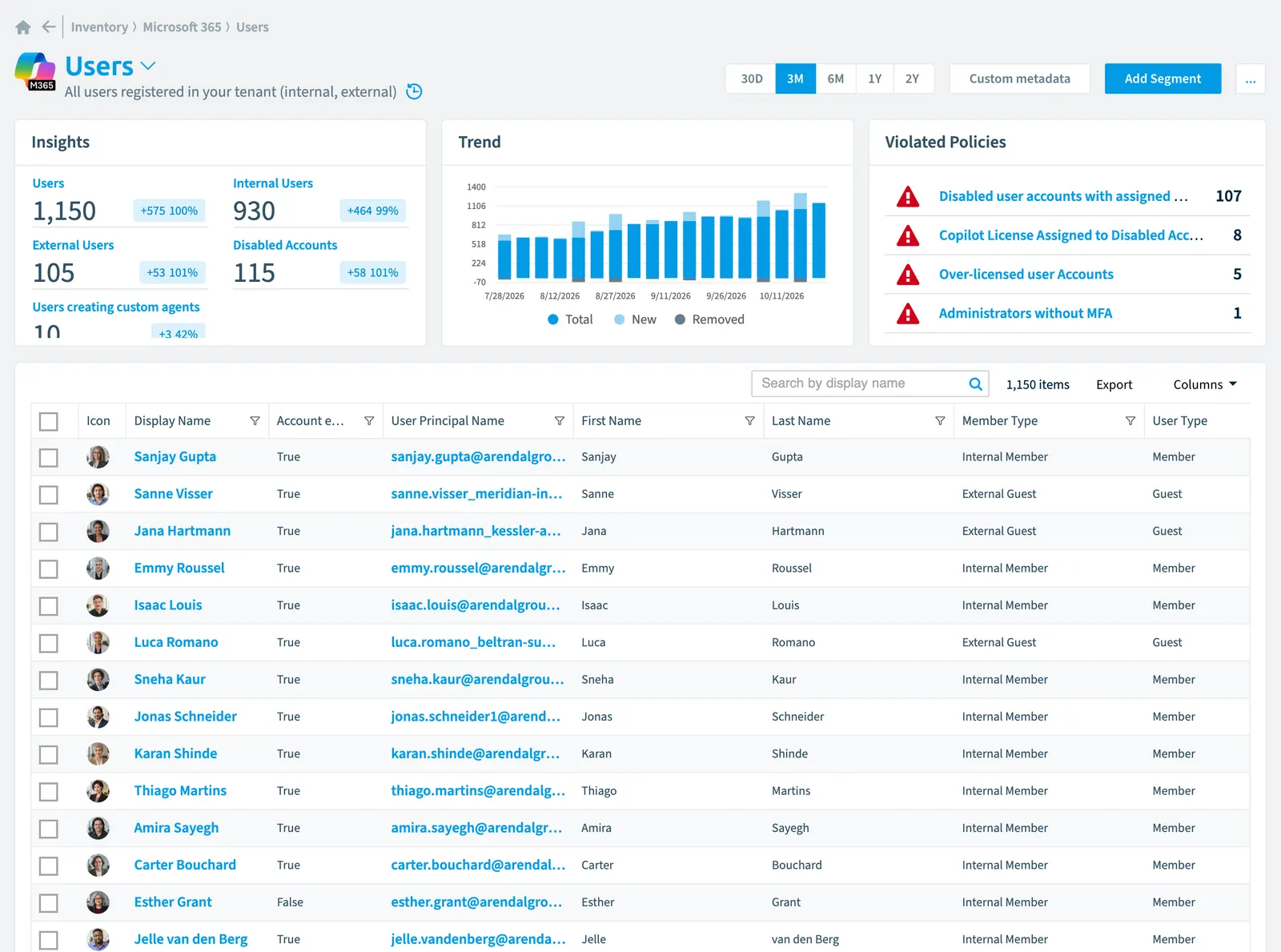
All users registered in your tenant (internal, external)
Part of the Microsoft 365 inventory.
In Rencore Governance
Scan settings
| Default scanning interval | Allowed scanning intervals | Data removal during incremental scan |
|---|---|---|
| Daily | Daily, Weekly, Bi-Weekly, Monthly, Never, Initial | Yes |
Properties
55 properties in 7 groups. Open a group to see its properties.
Name and identity 13
| Property | Type | Description | Automation placeholder |
|---|---|---|---|
| Creation Type | String | Indicates whether the user account was created as a regular school or work account (null), an external account (Invitation), a local account for an Microsoft Entra IDMicrosoft Entra IDMicrosoft Entra ID, formerly Azure Active Directory, is the Microsoft identity service behind every Microsoft 365 tenant.Read more B2C tenant (LocalAccount) or self-service sign-up using email verification (EmailVerified). | {{User. |
| Icon | String | Default scanning intervalScan intervalA scan interval is how often Rencore Governance aims to scan one object type, such as daily or weekly.Read more: Initial. | {{User. |
| Display Name | String | {{User. | |
| First Name | String | The given name (first name) of the user | {{User. |
| Last Name | String | The user's surname | {{User. |
| On-premises Distinguished Name | String | Contains the on-premises Active Directory distinguished name or DN. The property is only populated for customers who are synchronizing their on-premises directory to Microsoft Entra ID via Entra ID Connect. | {{User. |
| On-premises sAMAccountName | String | Contains the on-premises sAMAccountName synchronized from the on-premises directory. The property is only populated for customers who are synchronizing their on-premises directory to Microsoft Entra ID via Entra ID Connect | {{User. |
| Type | String | A custom security attribute that is assigned to a directory object | {{User. |
| User Email | String | The SMTP address for the user | {{User. |
| User Email Domain | String | Email domain of the user. This will only be set if User Email is not empty. | {{User. |
| User Id | String | The unique identifier for the user | {{User. |
| User Principal Name | String | The user principal name (UPN) of the user. The UPN is an Internet-style login name for the user based on the Internet standard RFC 822 | {{User. |
| User Type | String | A String value that can be used to classify user types in your directory | {{User. |
Organization and location 9
| Property | Type | Description | Automation placeholder |
|---|---|---|---|
| City | String | The city in which the user is located | {{User. |
| Company | String | The company name which the user is associated | {{User. |
| Country or region | String | The country/region in which the user is located | {{User. |
| Department | String | The name for the department in which the user works | {{User. |
| Title | String | The user's job title | {{User. |
| Office | String | The office location in the user's place of business | {{User. |
| Preferred data locationData centerThe data center is the Microsoft Azure region where Rencore Governance stores all data of a Workspace.Read more | String | The preferred data location for the user | {{User. |
| State or province | String | The state or province in the user's address | {{User. |
| Usage location | String | A two letter country code (ISO standard 3166) | {{User. |
Activity and usage 5
| Property | Type | Description | Automation placeholder |
|---|---|---|---|
| Last scan update | DateTime | Shows when this object was last updated in a scan. If an object is found during a scan but no property has been changed this date will not change. | {{User. |
| Last Sign-In | DateTime | The last date a user has signed in to M365Microsoft 365Microsoft 365 is the Microsoft cloud suite of Teams, SharePoint, OneDrive, Exchange and the Office apps.Read more. This date can either be the last date a user actively signed in to M365 or when he last had a so called non-interactive sign-in (depending on what is more recent). Interactive sign-in happens by opening the browser and opening the url of an M365 resource (e.g. SharePoint Online). Non-interactive sign-in will happen when users use clients (e.g. Outlook Client) to access tenant resources rather than signing into your tenant directly. The timestamp represents date and time information using ISO 8601 format and is always in UTC time. Default scanning interval: Weekly. | {{User. |
| Last Sign-In (Interactive) | DateTime | The last date a user has signed in to M365 interactively. Interactive sign-in happens by opening the browser and opening the url of an M365 resource (e.g. SharePoint Online). The timestamp represents date and time information using ISO 8601 format and is always in UTC time. Default scanning interval: Weekly. | {{User. |
| Last Sign-In (non-interactive) | DateTime | The last date a user has signed in to M365 non-interactively. Non-interactive sign-in will happen when users use clients (e.g. Outlook Client) to access tenant resources rather than signing into your tenant directly. The timestamp represents date and time information using ISO 8601 format and is always in UTC time. Default scanning interval: Weekly. | {{User. |
| Last Successful Sign-In | DateTime | The date and time of the users most recent successful sign-in activity. The timestamp type represents date and time information using ISO 8601 format and is always in UTC. Default scanning interval: Weekly. | {{User. |
Dates and scanning 2
| Property | Type | Description | Automation placeholder |
|---|---|---|---|
| Created | DateTime | The date and time the user was created | {{User. |
| Initially Scanned | DateTime | Shows when this object was initially found in a scan. | {{User. |
Sharing and access 3
| Property | Type | Description | Automation placeholder |
|---|---|---|---|
| External UserExternal userAn external user is an account whose home tenant belongs to another organization, invited into your tenant to work with you.Read more State | String | For invited users, the state can be PendingAcceptance or Accepted, or null for all other users. | {{User. |
| Is External | Boolean | Is user sign-in as guest | {{User. |
| Member Type | String | A String value that can be used to classify user membership types in your directory Allowed values: External Guest, External Member, Internal Guest, Internal Member. | {{User. |
Security and compliance 8
| Property | Type | Description | Automation placeholder |
|---|---|---|---|
| Account enabled | Boolean | True if the account is enabled; otherwise, false. This property is required when a user is created | {{User. |
| Disable Password Expiration | Boolean | If true password never expires | {{User. |
| Disable Strong Password | Boolean | If true it allows weaker passwords than the default policy to be specified | {{User. |
| onPremises Sync Enabled | Boolean | true if this user object is currently being synced from an on-premises Active Directory (AD); otherwise the user isn't being synced and can be managed in Microsoft Entra ID. | {{User. |
| Last password change date | DateTime | The time when this Entra ID user last changed their password or when their password was created, whichever date the latest action was performed | {{User. |
| Risk Score | Int32 | Stores risk score | {{User. |
| Risk Score Update | DateTime | Stores risk score update | {{User. |
| Risk Score Value | String | Stores risk score value like Low_Low | {{User. |
Custom attributes 15
| Property | Type | Description | Automation placeholder |
|---|---|---|---|
| Extension Attribute 1 | String | This extension attribute is also known as ExchangeExchange OnlineExchange Online is the Microsoft 365 mail and calendar service. Rencore Governance covers it with the Exchange connector, part of the Digital Workplace module.Read more custom attribute 1. For an onPremisesSyncEnabled user, the source of authority for this set of properties is the on-premises and is read-only. For a cloud-only user (where onPremisesSyncEnabled is false), these properties can be set during creation or update of a user object. For a cloud-only user previously synced from on-premises Active Directory, these properties are read-only in Microsoft GraphMicrosoft GraphMicrosoft Graph is the Microsoft API that gives access to the data of the Microsoft 365 services.Read more but can be fully managed through the Exchange Admin CenterAdmin centerAn admin center is the web portal where administrators manage one Microsoft service, such as the Microsoft 365 admin center, the Teams admin center or the Microsoft Entra admin center.Read more or the Exchange Online V2 module in PowerShell. Default scanning interval: Weekly. | {{User. |
| Extension Attribute 10 | String | This extension attribute is also known as Exchange custom attribute 10. For an onPremisesSyncEnabled user, the source of authority for this set of properties is the on-premises and is read-only. For a cloud-only user (where onPremisesSyncEnabled is false), these properties can be set during creation or update of a user object. For a cloud-only user previously synced from on-premises Active Directory, these properties are read-only in Microsoft Graph but can be fully managed through the Exchange Admin Center or the Exchange Online V2 module in PowerShell. | {{User. |
| Extension Attribute 11 | String | This extension attribute is also known as Exchange custom attribute 11. For an onPremisesSyncEnabled user, the source of authority for this set of properties is the on-premises and is read-only. For a cloud-only user (where onPremisesSyncEnabled is false), these properties can be set during creation or update of a user object. For a cloud-only user previously synced from on-premises Active Directory, these properties are read-only in Microsoft Graph but can be fully managed through the Exchange Admin Center or the Exchange Online V2 module in PowerShell. | {{User. |
| Extension Attribute 12 | String | This extension attribute is also known as Exchange custom attribute 12. For an onPremisesSyncEnabled user, the source of authority for this set of properties is the on-premises and is read-only. For a cloud-only user (where onPremisesSyncEnabled is false), these properties can be set during creation or update of a user object. For a cloud-only user previously synced from on-premises Active Directory, these properties are read-only in Microsoft Graph but can be fully managed through the Exchange Admin Center or the Exchange Online V2 module in PowerShell. | {{User. |
| Extension Attribute 13 | String | This extension attribute is also known as Exchange custom attribute 13. For an onPremisesSyncEnabled user, the source of authority for this set of properties is the on-premises and is read-only. For a cloud-only user (where onPremisesSyncEnabled is false), these properties can be set during creation or update of a user object. For a cloud-only user previously synced from on-premises Active Directory, these properties are read-only in Microsoft Graph but can be fully managed through the Exchange Admin Center or the Exchange Online V2 module in PowerShell. | {{User. |
| Extension Attribute 14 | String | This extension attribute is also known as Exchange custom attribute 14. For an onPremisesSyncEnabled user, the source of authority for this set of properties is the on-premises and is read-only. For a cloud-only user (where onPremisesSyncEnabled is false), these properties can be set during creation or update of a user object. For a cloud-only user previously synced from on-premises Active Directory, these properties are read-only in Microsoft Graph but can be fully managed through the Exchange Admin Center or the Exchange Online V2 module in PowerShell. | {{User. |
| Extension Attribute 15 | String | This extension attribute is also known as Exchange custom attribute 15. For an onPremisesSyncEnabled user, the source of authority for this set of properties is the on-premises and is read-only. For a cloud-only user (where onPremisesSyncEnabled is false), these properties can be set during creation or update of a user object. For a cloud-only user previously synced from on-premises Active Directory, these properties are read-only in Microsoft Graph but can be fully managed through the Exchange Admin Center or the Exchange Online V2 module in PowerShell. | {{User. |
| Extension Attribute 2 | String | This extension attribute is also known as Exchange custom attribute 2. For an onPremisesSyncEnabled user, the source of authority for this set of properties is the on-premises and is read-only. For a cloud-only user (where onPremisesSyncEnabled is false), these properties can be set during creation or update of a user object. For a cloud-only user previously synced from on-premises Active Directory, these properties are read-only in Microsoft Graph but can be fully managed through the Exchange Admin Center or the Exchange Online V2 module in PowerShell. | {{User. |
| Extension Attribute 3 | String | This extension attribute is also known as Exchange custom attribute 3. For an onPremisesSyncEnabled user, the source of authority for this set of properties is the on-premises and is read-only. For a cloud-only user (where onPremisesSyncEnabled is false), these properties can be set during creation or update of a user object. For a cloud-only user previously synced from on-premises Active Directory, these properties are read-only in Microsoft Graph but can be fully managed through the Exchange Admin Center or the Exchange Online V2 module in PowerShell. | {{User. |
| Extension Attribute 4 | String | This extension attribute is also known as Exchange custom attribute 4. For an onPremisesSyncEnabled user, the source of authority for this set of properties is the on-premises and is read-only. For a cloud-only user (where onPremisesSyncEnabled is false), these properties can be set during creation or update of a user object. For a cloud-only user previously synced from on-premises Active Directory, these properties are read-only in Microsoft Graph but can be fully managed through the Exchange Admin Center or the Exchange Online V2 module in PowerShell. | {{User. |
| Extension Attribute 5 | String | This extension attribute is also known as Exchange custom attribute 5. For an onPremisesSyncEnabled user, the source of authority for this set of properties is the on-premises and is read-only. For a cloud-only user (where onPremisesSyncEnabled is false), these properties can be set during creation or update of a user object. For a cloud-only user previously synced from on-premises Active Directory, these properties are read-only in Microsoft Graph but can be fully managed through the Exchange Admin Center or the Exchange Online V2 module in PowerShell. | {{User. |
| Extension Attribute 6 | String | This extension attribute is also known as Exchange custom attribute 6. For an onPremisesSyncEnabled user, the source of authority for this set of properties is the on-premises and is read-only. For a cloud-only user (where onPremisesSyncEnabled is false), these properties can be set during creation or update of a user object. For a cloud-only user previously synced from on-premises Active Directory, these properties are read-only in Microsoft Graph but can be fully managed through the Exchange Admin Center or the Exchange Online V2 module in PowerShell. | {{User. |
| Extension Attribute 7 | String | This extension attribute is also known as Exchange custom attribute 7. For an onPremisesSyncEnabled user, the source of authority for this set of properties is the on-premises and is read-only. For a cloud-only user (where onPremisesSyncEnabled is false), these properties can be set during creation or update of a user object. For a cloud-only user previously synced from on-premises Active Directory, these properties are read-only in Microsoft Graph but can be fully managed through the Exchange Admin Center or the Exchange Online V2 module in PowerShell. | {{User. |
| Extension Attribute 8 | String | This extension attribute is also known as Exchange custom attribute 8. For an onPremisesSyncEnabled user, the source of authority for this set of properties is the on-premises and is read-only. For a cloud-only user (where onPremisesSyncEnabled is false), these properties can be set during creation or update of a user object. For a cloud-only user previously synced from on-premises Active Directory, these properties are read-only in Microsoft Graph but can be fully managed through the Exchange Admin Center or the Exchange Online V2 module in PowerShell. | {{User. |
| Extension Attribute 9 | String | This extension attribute is also known as Exchange custom attribute 9. For an onPremisesSyncEnabled user, the source of authority for this set of properties is the on-premises and is read-only. For a cloud-only user (where onPremisesSyncEnabled is false), these properties can be set during creation or update of a user object. For a cloud-only user previously synced from on-premises Active Directory, these properties are read-only in Microsoft Graph but can be fully managed through the Exchange Admin Center or the Exchange Online V2 module in PowerShell. | {{User. |
Relations
| Relation | Connector | Description |
|---|---|---|
| Resource Group | AzureMicrosoft AzureMicrosoft Azure is the Microsoft cloud platform for virtual machines, web apps and other cloud resources.Read more | Azure resource groups in which the user is an owner |
| Application registration | Entra ID | Entra ID enterprise applicationsEnterprise applicationAn enterprise application is the local instance of an app in a Microsoft Entra tenant, its service principal, where admins control who can sign in and which permissions it holds.Read more owned by the user |
| App role assignment | Entra ID | Entra ID AppApp registrationAn app registration is the global definition of an application in Microsoft Entra ID.Read more role assignments owned by the user |
| Device | Entra ID | Entra ID devices owned by user |
| Device | Entra ID | Entra ID devices used by the user |
| Directory role | Entra ID | Entra ID directory rolesDirectory roleA directory role is a Microsoft Entra admin role, such as Global Administrator or Teams Administrator, that grants a set of permissions across the tenant.Read more for which the user is a member (direct or via security groupSecurity groupA security group is a Microsoft Entra group that gives a set of users access to resources.Read more) |
| Enterprise application | Entra ID | Entra ID App registrations owned by the user |
| OAuth2 permission grant | Entra ID | All OAuth permission grants in Entra ID |
| Risky Entra ID sign-in | Entra ID | Shows Risky Entra ID Sign-Ins |
| User registration credential | Entra ID | All Entra ID registration credentials of a user (MFAMultifactor authenticationMultifactor authentication asks a user for a second form of verification, such as a code on their phone or a fingerprint, in addition to the password.Read more, Admin, Auth methods) |
| AI agent | Microsoft FoundryMicrosoft FoundryMicrosoft Foundry, formerly Azure AI Foundry, is the Microsoft Azure platform for building AI apps and agents with large language models.Read more | Azure AI projects are used to organize your work and save state while building customized AI apps |
| AI agent | Microsoft Foundry | Azure AI projects are used to organize your work and save state while building customized AI apps |
| LLM deployment | Microsoft Foundry | Azure AI Foundry supports deploying large language models (LLMs), flows, and web apps. Deploying an LLM or flow makes it available for use in a website, an application, or other production environments. |
| LLM deployment | Microsoft Foundry | Azure AI Foundry supports deploying large language models (LLMs), flows, and web apps. Deploying an LLM or flow makes it available for use in a website, an application, or other production environments. |
| AI hub | Microsoft Foundry | Azure AI hub which are the primary top-level Azure resources for Azure AI Foundry |
| AI hub | Microsoft Foundry | Azure AI hub which are the primary top-level Azure resources for Azure AI Foundry |
| AI project | Microsoft Foundry | AI projects in which user is an owner |
| AI project | Microsoft Foundry | Azure AI projects are used to organize your work and save state while building customized AI apps |
| AI project | Microsoft Foundry | Azure AI projects are used to organize your work and save state while building customized AI apps |
| AI service | Microsoft Foundry | Cloud-based artificial intelligence (AI) services that help developers build cognitive intelligence into applications |
| AI service | Microsoft Foundry | Cloud-based artificial intelligence (AI) services that help developers build cognitive intelligence into applications |
| ChatGPT activity | ChatGPT EnterpriseChatGPT EnterpriseChatGPT Enterprise is the business plan of the ChatGPT AI assistant by OpenAI.Read more | Ingested ChatGPT activity: who did what and when, retained beyond OpenAI's 30-day window |
| ChatGPT agent | ChatGPT Enterprise | Agents published into the ChatGPT workspace, with their skills, connectors, run history and spend |
| ChatGPT app link | ChatGPT Enterprise | Third-party apps and MCP servers linked to ChatGPT accounts, derived from link and unlink events |
| ChatGPT automation | ChatGPT Enterprise | Scheduled automations owned by ChatGPT users |
| ChatGPT canvas | ChatGPT Enterprise | Canvases owned by ChatGPT users, by version count and last update |
| ChatGPT Codex daily usage | ChatGPT Enterprise | CodexChatGPT CodexCodex is the OpenAI coding agent that is part of a ChatGPT Enterprise workspace.Read more usage per user per day, with credits, cost, tokens and code attribution |
| ChatGPT Codex device | ChatGPT Enterprise | Phones and tablets paired to drive Codex remote control |
| ChatGPT Codex Environment | ChatGPT Enterprise | Codex sandboxes, the repositories they reach and how widely they are shared |
| ChatGPT Codex machine | ChatGPT Enterprise | Developer machines running Codex remote control |
| ChatGPT Codex task | ChatGPT Enterprise | Codex cloud tasks, by creator, source and environment |
| ChatGPT connector scope | ChatGPT Enterprise | External data sources attached to ChatGPT projects, who added them and whether they still sync |
| ChatGPT conversation | ChatGPT Enterprise | Conversations as objects: who, when, how many messages, which models, and which GPT or project - never the content |
| ChatGPT cost line | ChatGPT Enterprise | Daily ChatGPT cost lines by user, group, agent, product, surface and model |
| ChatGPT custom GPT | ChatGPT Enterprise | Custom GPTsCustom GPTA custom GPT is a version of ChatGPT that someone in your ChatGPT Enterprise workspace configured for one purpose and can share with others.Read more in the workspace, with their sharing visibility, configuration shape and usage |
| ChatGPT library file | ChatGPT Enterprise | Files in ChatGPT user libraries, by owner, size, state and lifecycle |
| ChatGPT limit increase request | ChatGPT Enterprise | Requests for a higher ChatGPT spend cap, and how they were resolved |
| ChatGPT memory | ChatGPT Enterprise | Per-user memory footprint in ChatGPT, as counts and dates only |
| ChatGPT plugin | ChatGPT Enterprise | Plugins in the ChatGPT workspace, their discoverability and the MCP servers and skills they bundle |
| ChatGPT project | ChatGPT Enterprise | ChatGPT projects, with their sharing visibility, tools, connector scopes and usage |
| ChatGPT recording | ChatGPT Enterprise | Recordings owned by ChatGPT users, by duration and date only - transcripts are never read |
| ChatGPT service account | ChatGPT Enterprise | Non-human identities in the ChatGPT workspace, with their credentials and share targets |
| ChatGPT service account share | ChatGPT Enterprise | Principals a ChatGPT service account is shared with, and the role they hold on it |
| ChatGPT skill | ChatGPT Enterprise | Skills available to ChatGPT workspace agents, with their creator and attachments |
| ChatGPT user | ChatGPT Enterprise | Every user in the connected ChatGPT workspace, with role, seat, spend and the Entra ID join |
| ChatGPT user usage and limit | ChatGPT Enterprise | Each member's monthly spend cap, where it comes from, and live month-to-date usage |
| Claude activity | Claude EnterpriseClaude EnterpriseClaude Enterprise is the business plan of the Claude AI assistant by Anthropic.Read more | Anthropic activity feed: who did what and when across the Claude Enterprise organizations |
| Claude chat | Claude Enterprise | All chats of the Claude Enterprise organization related to claude.ai excluding Claude Cowork and Claude Code |
| Claude Code artifact | Claude Enterprise | Published Claude Code artifacts in the Claude Enterprise organization with metadata only |
| Claude connector usage | Claude Enterprise | Per-connector and user usage of integrations and MCP servers in Chats, Code sessions, Cowork sessions and Claude in Office, with the read/write split and the kind of login used |
| Claude local session | Claude Enterprise | Claude Cowork and Claude Code sessions on the users' machine |
| Claude plugin usage | Claude Enterprise | Per-plugin and user installs and invocations of Claude Code and Cowork plugins, with the plugin identity and the marketplace it comes from |
| Claude project | Claude Enterprise | All projects of the Claude Enterprise organization related to claude.ai excluding Claude Cowork and Claude Code |
| Claude remote session | Claude Enterprise | Claude Cowork sessions running in Anthropic's managed environments |
| Claude remote session | Claude Enterprise | Claude Cowork sessions running in Anthropic's managed environments |
| Claude skill usage | Claude Enterprise | Per-skill and user usage in Chats, Code sessions, and Cowork sessions for all skills |
| Claude spend limit | Claude Enterprise | Each Enterprise member's effective spend limit: amount, period, source (seat-tier default vs explicitly set), and period-to-date spend |
| Claude user cost | Claude Enterprise | Per-user, per-product (Chat, Code, Cowork) cost with actual vs. list amount and request counts |
| Claude user | Claude Enterprise | Every member across organizations |
| Claude user usage | Claude Enterprise | Per-user, per-product (Chat, Code, Cowork) token consumption split by input, cache and output tokens |
| M365 Copilot session | CopilotMicrosoft 365 CopilotMicrosoft 365 Copilot is the AI assistant in the Microsoft 365 apps. Rencore Governance covers it with the Copilot connector, part of the AI & Agents module.Read more | All Microsoft 365 Copilot sessions. |
| Copilot user activity (report) | Copilot | Get the most recent activity data for enabled users of Microsoft 365 Copilot apps. |
| Action | Copilot StudioCopilot StudioCopilot Studio is the Microsoft tool for building your own AI agents. Rencore Governance covers it with the Copilot Studio connector, part of the AI & Agents module.Read more | Actions used by Copilot AgentCopilot Studio agentA Copilot Studio agent is an AI agent someone built in Microsoft Copilot Studio.Read more |
| Action | Copilot Studio | Actions used by Copilot Agent |
| Agent flow | Copilot Studio | Agent FlowsFlowA flow is a Power Automate workflow, made of a trigger and actions, that runs a task automatically across apps and services.Read more created inside Copilot Studio. |
| Agent flow | Copilot Studio | Agent Flows created inside Copilot Studio. |
| Agent flow | Copilot Studio | Agent Flows created inside Copilot Studio. |
| Knowledge | Copilot Studio | Used knowledge in Copliot Agent |
| Knowledge | Copilot Studio | Used knowledge in Copliot Agent |
| Pay-as-you-go Plan | Copilot Studio | A pay-as-you-go planPay-as-you-go planA pay-as-you-go plan links one or more Power Platform environments to an Azure subscription.Read more is a group of one or more environments that you can configure to bill to Azure. |
| Pay-as-you-go Plan | Copilot Studio | A pay-as-you-go plan is a group of one or more environments that you can configure to bill to Azure. |
| Topic | Copilot Studio | Topics of Copilot Agent |
| Topic | Copilot Studio | Topics of Copilot Agent |
| Trigger | Copilot Studio | Triggers that start a Copilot agent |
| Trigger | Copilot Studio | Triggers that start a Copilot agent |
| Copilot agent | Copilot Studio | Agents to which the user has access |
| Copilot agent | Copilot Studio | Agents created inside Copilot Studio. |
| Copilot agent | Copilot Studio | Agents created inside Copilot Studio. |
| Copilot agent | Copilot Studio | Agents created inside Copilot Studio. |
| Copilot agent | Copilot Studio | Agents created inside Copilot Studio. |
| Redirect rule | Exchange | All registered Exchange mailbox redirect rulesRedirect ruleA redirect rule forwards or redirects the incoming email of a mailbox to another recipient.Read more |
| Mailbox | Exchange | All Exchange mailboxes of your users, rooms & equipment |
| Group | Microsoft 365 | Groups where the user is a member |
| Group | Microsoft 365 | Groups where the user is an owner |
| Subscription | Microsoft 365 | Microsoft 365 subscriptions licensed to the user |
| Rooms & equipment | Microsoft 365 | Rooms or Equipment assigned to the user account |
| Service assignment | Microsoft 365 | Details when a service or app has been assigned to the user |
| App | Microsoft 365 | Microsoft 365 apps licensed to the user |
| User activity | Microsoft 365 | Details when a Microsoft 365 service has been used the last time by a specific user |
| User | Microsoft 365 | Manager of the user (directly reporting to) |
| OneDrive | OneDriveOneDriveOneDrive is the personal file storage of each Microsoft 365 user. The OneDrive connector of Rencore Governance, part of the Digital Workplace module, inventories every OneDrive with its files, folders and file sharing.Read more | All of your users OneDrives in your tenant |
| File | OneDrive | All OneDrive files stored in a library of a OneDrive |
| File | OneDrive | All OneDrive files stored in a library of a OneDrive |
| Folder | OneDrive | All OneDrive folders stored in a library of a OneDrive |
| Folder | OneDrive | All OneDrive folders stored in a library of a OneDrive |
| File sharing | OneDrive | OneDrive files shared by the user |
| File sharing | OneDrive | OneDrive files shared with the user (direct or via security group) |
| File sharing | OneDrive | OneDrive file sharingsSharing linkA sharing link is a link in SharePoint or OneDrive that grants access to a file or folder, sometimes to people outside your organization.Read more modified by the user |
| Plan | PlannerMicrosoft PlannerMicrosoft Planner is the Microsoft 365 app for task plans and boards. The Planner connector of Rencore Governance, part of the Digital Workplace module, inventories plans.Read more | Plans where the user is a member |
| Plan | Planner | Plans where the user is an owner |
| Plan | Planner | All Planner plans |
| Plan | Planner | Plans which are shared with the user |
| Power app (canvas app) | Power AppsPower AppsPower Apps is the Microsoft low-code tool for building business apps. Rencore Governance covers it with the Power Apps connector, part of the Apps, Automation & BI module.Read more | Power Apps co-owned by the user (direct or via security group) |
| Power app (canvas app) | Power Apps | Power Apps created by the user |
| Power app (canvas app) | Power Apps | Power Apps that were last modified by the user |
| Power app (canvas app) | Power Apps | Power Apps owned by the user |
| Power app (canvas app) | Power Apps | Power Apps co-owned by the user (direct or via security group) |
| Power app (canvas app) | Power Apps | Power Apps that were last published by the user |
| Power app (canvas app) | Power Apps | Power Apps that the user is allowed to use (direct or via security group) |
| Power app (canvas app) | Power Apps | Power Apps that the user is allowed to use (direct or via security group) |
| Environment | Power Apps | Power Platform environmentsPower Platform environmentA Power Platform environment is a container in Microsoft Power Platform that holds apps, flows, agents and their data, often with its own Dataverse database.Read more created by the user |
| Environment | Power Apps | Power Platform environments last modified by the user |
| Connection | Power AutomatePower AutomatePower Automate, formerly Microsoft Flow, is the Microsoft low-code tool for automated workflows called flows.Read more | Flow ConnectionsConnectionA connection is the stored, signed-in link that a Power App or a flow uses to reach a data source through a connector.Read more authenticated by the user |
| Connection | Power Automate | Flow Connections created by the user |
| Flow | Power Automate | Flows owned by the user (direct or via security group) |
| Flow | Power Automate | Flows owned by the user (direct or via security group) |
| Flow | Power Automate | Flows that the user is allowed to use (direct or via security group) |
| Flow | Power Automate | All Power Automate Flows in your tenant |
| Flow | Power Automate | Flows which the user is allowed to use (direct) |
| Activity event | Power BIPower BIPower BI is the Microsoft service for reports and dashboards over business data.Read more | Lists activity events for PowerBI |
| App | Power BI | Apps in PowerBI |
| Artifacts published to web | Power BI | Lists artifacts published to Web for PowerBI |
| Dashboard | Power BI | DashboardsDashboardA dashboard groups reports, policies and KPIs on one page as tiles, so each stakeholder sees the governance data that matters to them.Read more for which user is owner |
| Dashboard | Power BI | Dashboards for which user has read access |
| Dashboard | Power BI | Dashboards for which user has read and copy access |
| Dashboard | Power BI | Dashboards for which user has read and reshare access |
| Dashboard | Power BI | Dashboards for which user has read and write access |
| Dashboard | Power BI | Dashboards which are subscribed by the user |
| Dataflow | Power BI | Lists dataflows for PowerBI |
| Dataflow | Power BI | Lists dataflows for PowerBI |
| Dataset | Power BI | Lists datasets for PowerBI |
| Datamart | Power BI | Lists datamarts for PowerBI |
| Datamart | Power BI | Lists datamarts for PowerBI |
| Pipeline | Power BI | Lists pipelines for PowerBI |
| Pipeline | Power BI | Lists pipelines for PowerBI |
| Report | Power BI | Reports for which user is owner |
| Report | Power BI | Reports for which user has read access |
| Report | Power BI | Reports for which user has read and copy access |
| Report | Power BI | Reports for which user has read and reshare access |
| Report | Power BI | Reports for which user has read and write access |
| Report | Power BI | Lists reports for PowerBI |
| Report | Power BI | Lists reports for PowerBI |
| Report | Power BI | Lists reports for PowerBI |
| Report | Power BI | Reports which are subscribed by the user |
| Workspace | Power BI | WorkspacesWorkspaceA Workspace is the top-level container in Rencore Governance. It holds the settings, users, roles and connected apps for exactly one Environment, the connected Microsoft 365 tenant.Read more in which user is admin |
| Workspace | Power BI | Workspaces in which user is contributor |
| Workspace | Power BI | Workspaces in which user is member |
| Workspace | Power BI | Workspaces in which user is viewer |
| SharePoint group | SharePoint | SharePoint Group with an access |
| SharePoint agent | SharePoint | SharePoint agents inside a list |
| SharePoint agent | SharePoint | SharePoint agents inside a list |
| File sharing | SharePoint | SharePoint files shared by the user |
| File sharing | SharePoint | SharePoint files shared with the user (direct or via security group) |
| File sharing | SharePoint | SharePoint file sharings modified by the user |
| List/library | SharePoint | Lists in which user has access to (direct or via security group) |
| File | SharePoint | File in which user has access to (direct or via security group) |
| File | SharePoint | All SharePoint files stored in a library of a SharePoint site |
| File | SharePoint | All SharePoint files stored in a library of a SharePoint site |
| Folder | SharePoint | Folder in which user has access to (direct or via security group) |
| Folder | SharePoint | All SharePoint folders stored in a library of a SharePoint site |
| Folder | SharePoint | All SharePoint folders stored in a library of a SharePoint site |
| Site collection | SharePoint | Site which user has access to |
| Site collection | SharePoint | Site collectionsSite collectionA site collection is the top-level SharePoint container that holds a root site, its subsites, lists, libraries and files.Read more in which user is admin (direct or via security group) |
| Site collection | SharePoint | Site collections in which user is member (direct or via security group) |
| Site collection | SharePoint | Site collections in which user is owner (direct or via security group) |
| Site collection | SharePoint | Site collections in which user is visitor (direct or via security group) |
| SharePoint special group | SharePoint | Special groups which related to user |
| Site | SharePoint | Sites in which user is admin (direct or via security group) |
| Site | SharePoint | Sites in which user is member (direct or via security group) |
| Site | SharePoint | Sites in which user is owner (direct or via security group) |
| Site | SharePoint | Sites in which user is visitor (direct or via security group) |
| Site | SharePoint | Web which user has access to |
| Channel | TeamsMicrosoft TeamsMicrosoft Teams is the Microsoft 365 app for chat, meetings and team collaboration.Read more | Private Teams channelsChannelA channel is a section inside a Microsoft Teams team where members hold conversations and share files on one topic.Read more where the user is member |
| Channel | Teams | Shared Channels in which user is member |
| Channel | Teams | Shared Channels in which user is owner |
| Channel | Teams | Channels in which user is owner |
| Team | Teams | Teams in which the user is a member or a guest (for external users) |
| Team | Teams | Teams in which the user is an owner |
| User activity | Teams | Details about the activity of the user in Teams |
| Device usage | Teams | Details which devices the user uses to access Teams |
| Community | Viva EngageViva EngageViva Engage, formerly Yammer, is the Microsoft 365 app for company-wide communities.Read more | Community in which the user is a member |
| Community | Viva Engage | Community in which the user is an owner |
Segments
| Segment | Description |
|---|---|
| External users | Shows all external users |
| Internal users | Shows all internal users |
| Disabled accounts | Shows all disabled users |
| Users creating custom agents | Unique users which are creating agents in last 30 days |
Actions
- Add or remove a SharePoint Site Collection Administrator
- Add or remove member to/from a Community
- Add or remove owner to/from a Community
- Delete User Account
- Disable User Account
- Enable User Account
- Add or remove owner user to/from a Flow
- Add or remove run-only user to/from a Flow
- Add member user to a group
- Add owner user to a group
- Add or remove owner user to/from a Power App
- Add or remove run-only user to/from a Power App
- Add or remove member to/from a Team
- Add or remove member to/from a Team Channel
- Add or remove owner to/from a Team
- Add or remove owner to/from a Team Channel
- Add subscriptions for a user
- Add user to a group
- Add user to a SharePoint Site
- Add user to a Team
- Remove user from a group
- Remove user from a SharePoint Site
- Remove user from a SharePoint Site Collection
- Remove user from a Team
- Remove subscriptions for a user
Policies that check this object
| Policy | Severity | Description |
|---|---|---|
| Copilot adoption opportunity - E3/E5 users | Medium | Identifies E3/E5 licensed usersLicensed userA licensed user is a user of the connected tenant that counts toward your Rencore Governance Subscription.Read more eligible for Copilot, helping prioritize rollout to users with necessary prerequisites. |
| Copilot license assigned to disabled account | High | Flags disabled accounts retaining active Copilot licenses, enabling immediate cost recovery through license reassignment. |
| Inactive Copilot users - 30 days | Medium | Reports on users with unused Copilot licenses for 30+ days, enabling proactive engagement or license reallocation. This policy only works correctly with non-anonymized data. |
| Excessive draft agent creation pattern | Medium | Flags users creating 5+ unpublished agents, indicating potential training needs or cleanup requirements |
| External users | Information | Shows external users (users with user type 'Guest') |
| External users with pending acceptance | Low | External users which have not accepted invitation to your tenant |
| Users with Power Platform Premium license | Information | Users with assigned Premium License for Power PlatformPower PlatformPower Platform is the Microsoft low-code platform where users build their own apps, flows, reports, agents and websites.Read more (per user plan) |
| Users with E3 license not using Outlook in last 12 month | Low | Show Users with E3 license not using Outlook in last 12 month. |
| Users with passwords not changed in last 6 months | Medium | Shows users that have not changed their password for more than 6 months |
| Disabled user accounts | Medium | Shows all disabled user accounts |
| Admin accounts with an Office 365 E3 license assigned | Medium | Admin accounts with an Office 365 E3 license assigned (Note: please adjust the email address, prefix or postfix to your company settings) |
| Administrators without MFA | High | Shows administrators that have not activated multi factor authentication |
| External users invited 3 month ago with pending acceptance | Low | Shows external users invited more than 3 month ago that have not accepted invitation to the tenant |
| Disabled user accounts with assigned licenses | High | Shows disabled user accounts which have any licenses assigned |
| Global administrators without MFA | High | Shows global administratorsGlobal administratorGlobal Administrator is the Microsoft Entra admin role with access to every administrative feature in the tenant, including giving admin consent to apps for the whole organization.Read more that have not activated multi factor authentication |
| Guest users with a Dynamics license assigned | Medium | Guest users with a Dynamics license assigned |
| Inactive external users | Medium | Shows external users that have not signed in for more than 6 month |
| Inactive internal users | Medium | Shows internal users that have not signed in for more than 6 month |
| Over-licensed user accounts | High | User accounts that have more than one License assigned with overlapping apps. |
| Users who are creating Microsoft Loop Teams components | Medium | A list of users that are creating Microsoft Loop components in their OneDrive |
Frequently asked questions
What is the user object in Rencore Governance?
All users registered in your tenant (internal, external). User is an object type in the Microsoft 365 inventory of Rencore Governance.
Which properties does Rencore Governance collect for user?
Rencore Governance collects 55 properties for User, such as Account enabled, City, Company and 52 more.
Which policies check user objects?
20 built-in policies check User objects, such as Copilot adoption opportunity - E3/E5 users, Copilot license assigned to disabled account and 18 more.
How often is user scanned?
By default daily. You can change the scan interval of User objects under Configure objects (daily, weekly, bi-weekly, monthly, never or initial (collected once)). The interval is a target, not a guarantee: a scan can run later than planned.
Which actions can I run on user objects?
The built-in actions for User objects are Add or remove a SharePoint Site Collection Administrator, Add or remove member to/from a Community, Add or remove owner to/from a Community and 22 more.
Was this page helpful?
Thanks for the feedback.
Thanks. What was wrong?