
Application registration
AI summary
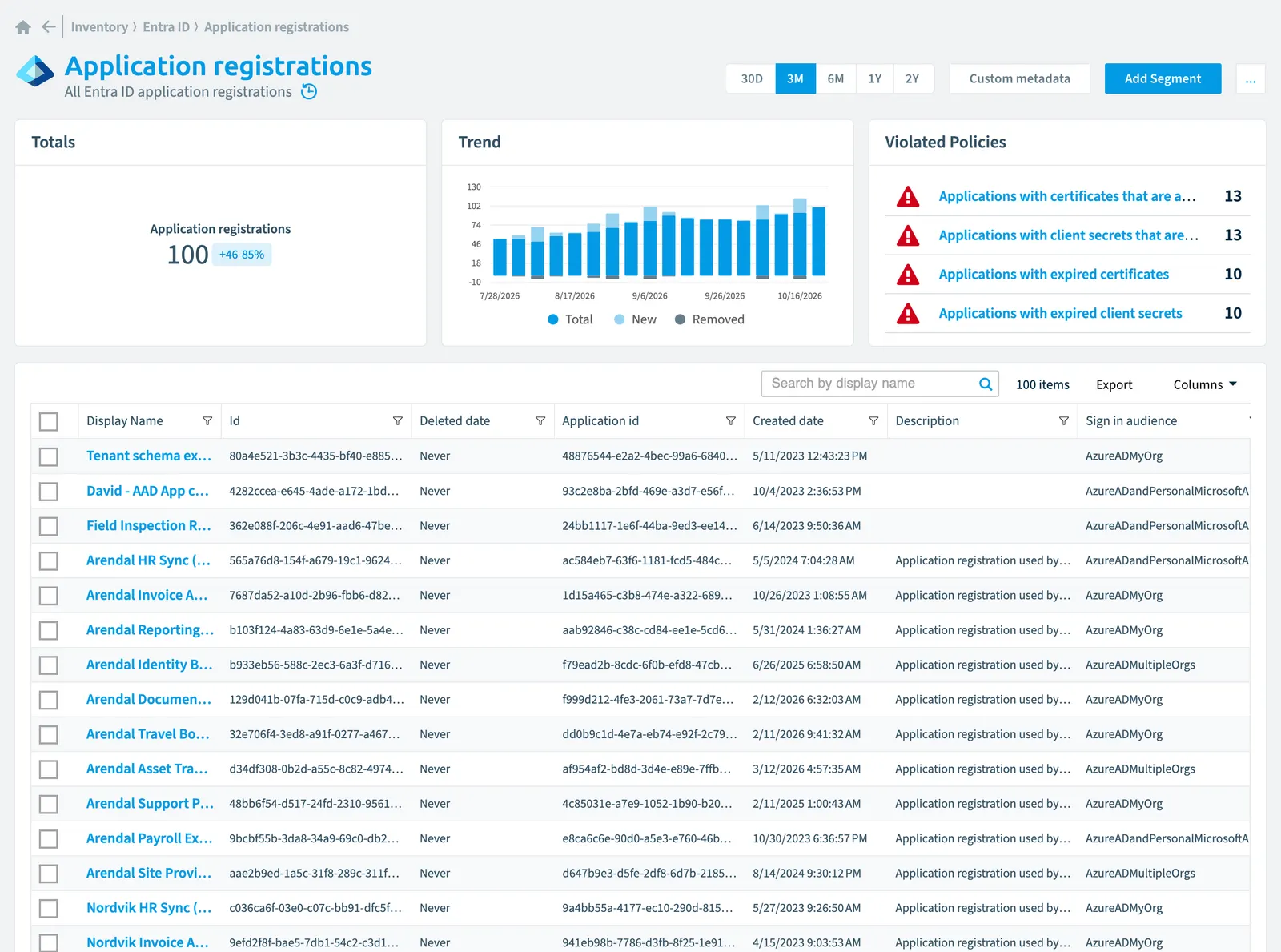
Rencore Governance inventories Entra ID application registrations and scans them every two weeks by default. The system tracks properties like application IDs, creation dates, risk scores, and verified publishers, and includes built-in policies that flag expiring or expired certificates and client secrets, and registrations without owners.
All Entra IDMicrosoft Entra IDMicrosoft Entra ID, formerly Azure Active Directory, is the Microsoft identity service behind every Microsoft 365 tenant.Read more application registrationsApp registrationAn app registration is the global definition of an application in Microsoft Entra ID.Read more
Part of the Entra ID inventory.
In Rencore Governance
Scan settings
| Default scanning interval | Allowed scanning intervals | Data removal during incremental scan |
|---|---|---|
| Bi-Weekly | Daily, Weekly, Bi-Weekly, Monthly, Never, Initial | Yes |
Properties
| Property | Type | Description | Automation placeholder |
|---|---|---|---|
| Application id | String | The unique identifier for the application that is assigned to an application by Entra ID. | {{Applicationregistration. |
| Id | String | The unique identifier for the application. | {{Applicationregistration. |
| Created date | DateTime | The date and time the application was registered. The DateTimeOffset type represents date and time information using ISO 8601 format and is always in UTC time. For example, midnight UTC on Jan 1, 2014 is 2014-01-01T00:00:00Z. | {{Applicationregistration. |
| Initially Scanned | DateTime | Shows when this object was initially found in a scan. | {{Applicationregistration. |
| Deleted date | DateTime | The date and time the application was deleted. The DateTimeOffset type represents date and time information using ISO 8601 format and is always in UTC time. For example, midnight UTC on Jan 1, 2014 is 2014-01-01T00:00:00Z. | {{Applicationregistration. |
| Description | String | Free text field to provide a description of the application object to end users. | {{Applicationregistration. |
| Display Name | String | {{Applicationregistration. | |
| Last scan update | DateTime | Shows when this object was last updated in a scan. If an object is found during a scan but no property has been changed this date will not change. | {{Applicationregistration. |
| Risk Score | Int32 | Stores risk score | {{Applicationregistration. |
| Risk Score Update | DateTime | Stores risk score update | {{Applicationregistration. |
| Risk Score Value | String | Stores risk score value like Low_Low | {{Applicationregistration. |
| Sign in audience | String | Specifies the Microsoft accounts that are supported for the current application. The possible values are: AzureADMyOrg, AzureADMultipleOrgs, AzureADandPersonalMicrosoftAccount (default), and PersonalMicrosoftAccount. | {{Applicationregistration. |
| Verified publisher | Verified publisher | Specifies the verified publisher of the application. | {{Applicationregistration. |
| Verified publisher name | String | The verified publisher name from the app publisher's Partner Center account. | {{Applicationregistration. |
Relations
| Relation | Connector | Description |
|---|---|---|
| Registration certificate | Entra ID | All application registration certificate of Entra ID |
| Client secret | Entra ID | All client secretsClient secretA client secret is a password-like string that an app registration uses to prove its identity when it requests a token from Microsoft Entra ID.Read more registered in Entra ID |
| Verified publisher | Entra ID | All verified publishers of application registrations in Entra ID |
| Verified publisher | Entra ID | All verified publishers of application registrations in Entra ID |
| User | Microsoft 365Microsoft 365Microsoft 365 is the Microsoft cloud suite of Teams, SharePoint, OneDrive, Exchange and the Office apps.Read more | Owners of Entra ID application |
Segments
This object does currently not have any segments.
Actions
This object does currently not have any actions.
Policies that check this object
| Policy | Severity | Description |
|---|---|---|
| Applications with client secrets that are about to expire | High | Shows Entra ID applications where client secrets expire in the next 30 days |
| Applications with expired certificates | High | Shows Entra ID applications with expired certificates |
| Applications with expired client secrets | High | Shows Entra ID applications with expired client secrets |
| Application registrations without owners | Medium | Shows Application registrations without any owners |
| Applications with certificates that are about to expire | High | Shows Entra ID applications where certificates expire in the next 30 days |
Frequently asked questions
What is the application registration object in Rencore Governance?
All Entra ID application registrations. Application registration is an object type in the Entra ID inventory of Rencore Governance.
Which properties does Rencore Governance collect for application registration?
Rencore Governance collects 14 properties for Application registration, such as Application id, Id, Created date and 11 more.
Which policies check application registration objects?
5 built-in policies check Application registration objects, such as Applications with client secrets that are about to expire, Applications with expired certificates and 3 more.
How often is application registration scanned?
By default bi-weekly. You can change the scan interval of Application registration objects under Configure objects (daily, weekly, bi-weekly, monthly, never or initial (collected once)). The interval is a target, not a guarantee: a scan can run later than planned.
Which module includes the Entra ID connector?
Which module includes the Entra ID connector?The Entra ID connector is part of the Digital Workplace module of Rencore Governance, which every Plan includes. The connector is generally available.
Was this page helpful?
Thanks for the feedback.
Thanks. What was wrong?