
Enterprise application
AI summary
Rencore Governance tracks Enterprise Applications registered in Entra ID, with 31 properties organized across 7 groups covering identity, security, authentication, and usage. For each application, you see authentication URLs, certificate details, ownership information, and sign-in activity. Built-in policies automatically check for security risks like expired credentials, missing owners, and overly broad permissions.
All registered Enterprise ApplicationsEnterprise applicationAn enterprise application is the local instance of an app in a Microsoft Entra tenant, its service principal, where admins control who can sign in and which permissions it holds.Read more in Entra IDMicrosoft Entra IDMicrosoft Entra ID, formerly Azure Active Directory, is the Microsoft identity service behind every Microsoft 365 tenant.Read more
Part of the Entra ID inventory.
In Rencore Governance
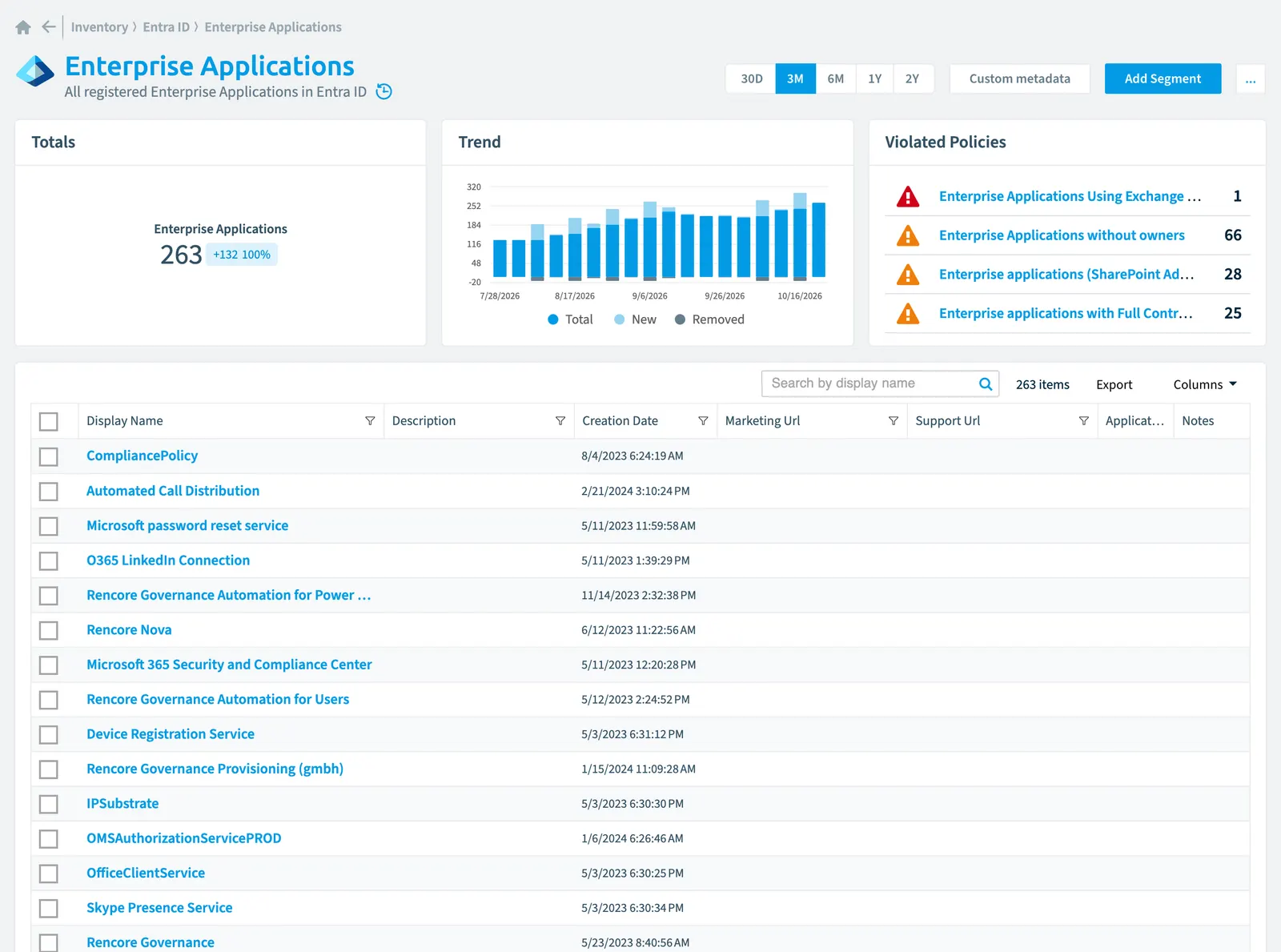
Scan settings
| Default scanning interval | Allowed scanning intervals | Data removal during incremental scan |
|---|---|---|
| Monthly | Daily, Weekly, Bi-Weekly, Monthly, Never, Initial | Yes |
Properties
31 properties in 7 groups. Open a group to see its properties.
Name and identity 14
| Property | Type | Description | Automation placeholder |
|---|---|---|---|
| App Description | String | The description exposed by the associated application. | {{EnterpriseApplication. |
| App Display Name | String | The display name exposed by the associated application. | {{EnterpriseApplication. |
| App Id | String | The unique identifier for the associated application (its appId property). | {{EnterpriseApplication. |
| Description | String | Free text field to provide an internal end-user facing description of the service principal. End-user portals such MyApps will display the application description in this field. | {{EnterpriseApplication. |
| Display Name | String | {{EnterpriseApplication. | |
| Id | String | The unique identifier for the application. | {{EnterpriseApplication. |
| Login Url | String | Specifies the URL where the service provider redirects the user to Entra ID to authenticate. Entra ID uses the URL to launch the application from Microsoft 365Microsoft 365Microsoft 365 is the Microsoft cloud suite of Teams, SharePoint, OneDrive, Exchange and the Office apps.Read more or the Entra ID My Apps. When blank, Entra ID performs IdP-initiated sign-on for applications configured with SAML-based single sign-on. The user launches the application from Microsoft 365, the Entra ID My Apps, or the Entra ID SSO URL. | {{EnterpriseApplication. |
| Logo Url | String | CDN URL to the application's logo. | {{EnterpriseApplication. |
| Logout Url | String | Specifies the URL that will be used by Microsoft's authorization service to logout an user using OpenId Connect front-channel, back-channel or SAML logout protocols. | {{EnterpriseApplication. |
| Marketing Url | String | Link to the application's marketing page. | {{EnterpriseApplication. |
| Privacy Statement Url | String | Link to the application's privacy statement. | {{EnterpriseApplication. |
| Service Principal Type | String | Indicates the type of service principal, set by Microsoft Entra ID internally. Values: Application (represents an app or service), ManagedIdentity (can be granted access but can't be modified directly), Legacy (created before app registrationsApp registrationAn app registration is the global definition of an application in Microsoft Entra ID.Read more, no associated app registration), ServiceIdentity (represents an agent identity), SocialIdp (internal use). | {{EnterpriseApplication. |
| Support Url | String | Link to the application's support page. | {{EnterpriseApplication. |
| Terms Of Service Url | String | Link to the application's terms of service statement. | {{EnterpriseApplication. |
Organization and location 2
| Property | Type | Description | Automation placeholder |
|---|---|---|---|
| App Owner Organization Id | String | Contains the tenant idTenant IDThe tenant ID is the GUID that identifies your Microsoft Entra tenant.Read more where the application is registered. This is applicable only to service principals backed by applications. | {{EnterpriseApplication. |
| Notification Email Addresses | String[] | Specifies the list of email addresses where Entra ID sends a notification when the active certificate is near the expiration date. This is only for the certificates used to sign the SAML token issued for Entra ID Gallery applications. | {{EnterpriseApplication. |
Activity and usage 2
| Property | Type | Description | Automation placeholder |
|---|---|---|---|
| Last scan update | DateTime | Shows when this object was last updated in a scan. If an object is found during a scan but no property has been changed this date will not change. | {{EnterpriseApplication. |
| Last Sign-In | DateTime | Date and time last sign-in to the application. This date is calculated by last-sign in found for the application and can be caused by User sign-ins (interactive and non-interactive), Service principal sign-ins or Managed identity sign-ins. Default scanning intervalScan intervalA scan interval is how often Rencore Governance aims to scan one object type, such as daily or weekly.Read more: Never. | {{EnterpriseApplication. |
Dates and scanning 2
| Property | Type | Description | Automation placeholder |
|---|---|---|---|
| Creation Date | DateTime | The date and time the application was registered. The DateTimeOffset type represents date and time information using ISO 8601 format and is always in UTC time. For example, midnight UTC on Jan 1, 2014 is 2014-01-01T00:00:00Z. | {{EnterpriseApplication. |
| Initially Scanned | DateTime | Shows when this object was initially found in a scan. | {{EnterpriseApplication. |
Sharing and access 1
| Property | Type | Description | Automation placeholder |
|---|---|---|---|
| Sign In Audience | String | Specifies the Microsoft accounts that are supported for the current application. | {{EnterpriseApplication. |
Security and compliance 7
| Property | Type | Description | Automation placeholder |
|---|---|---|---|
| Account Enabled | Boolean | true if the service principal account is enabled; otherwise, false. | {{EnterpriseApplication. |
| App Role Assignment Required | String | Specifies whether users or other service principals need to be granted an app role assignment for this service principal before users can sign in or apps can get tokens. | {{EnterpriseApplication. |
| Risk Score | Int32 | Stores risk score | {{EnterpriseApplication. |
| Risk Score Update | DateTime | Stores risk score update | {{EnterpriseApplication. |
| Risk Score Value | String | Stores risk score value like Low_Low | {{EnterpriseApplication. |
| Verified Publisher | Enterprise application verified publisher | The ID of the verified publisher. | {{EnterpriseApplication. |
| Verified Publisher name | String | The display name of the verified publisher. | {{EnterpriseApplication. |
Other properties 3
| Property | Type | Description | Automation placeholder |
|---|---|---|---|
| Home Page | String | Home page or landing page of the application. | {{EnterpriseApplication. |
| Application Notes | String | Free text field to capture information about the service principal, typically used for operational purposes. | {{EnterpriseApplication. |
| Visible To Users | Boolean | If this option is set to true, then assigned users will see the application on My Apps and O365 app launcher. If this option is set to false, then no users will see this application on their My Apps and O365 launcher. | {{EnterpriseApplication. |
Relations
| Relation | Connector | Description |
|---|---|---|
| App role assignment | Entra ID | App Role Assignment where Enterprise Application is a resource |
| App role assignment | Entra ID | App Role Assignment where Enterprise Application is service principal |
| App role | Entra ID | |
| Enterprise registration certificate | Entra ID | All enterprise application registration certificate of Entra ID |
| Enterprise app client secret | Entra ID | All enterprise applications client secretsClient secretA client secret is a password-like string that an app registration uses to prove its identity when it requests a token from Microsoft Entra ID.Read more registered in Entra ID |
| Enterprise application verified publisher | Entra ID | All verified publishers of enterprise applications in Entra ID |
| Enterprise application verified publisher | Entra ID | All verified publishers of enterprise applications in Entra ID |
| Enterprise application OAuth2 permission scope | Entra ID | All enterprise application OAuth2 permission scopes in Entra ID |
| OAuth2 permission grant | Entra ID | OAuth2 Permission Grant where Enterprise Application is a client |
| OAuth2 permission grant | Entra ID | OAuth2 Permission Grant where Enterprise Application is a resorce |
| OAuth2 permission scope | Entra ID | All OAuth permission scopes in Entra ID |
| Copilot agent | Copilot StudioCopilot StudioCopilot Studio is the Microsoft tool for building your own AI agents. Rencore Governance covers it with the Copilot Studio connector, part of the AI & Agents module.Read more | Agents created inside Copilot Studio. |
| User | Microsoft 365 |
Segments
This object does currently not have any segments.
Actions
This object does currently not have any actions.
Policies that check this object
| Policy | Severity | Description |
|---|---|---|
| Enterprise applications using Exchange Web Services (EWS) | High | This policy detects app registrations in Microsoft Entra ID with the EWS.AccessAsUser.All delegated API permission, which will be deprecated by Microsoft in October 2026. |
| Enterprise applications that use SharePoint Online permissions | Information | Shows Enterprise applications that use SharePoint Online permissions |
| Enterprise applications with full control or write permissions | Medium | Shows Enterprise applications with permissions that contain the words FullControl or Write |
| Enterprise applications without owners | Medium | Shows Enterprise Applications without owners (excluding first-party Microsoft apps) |
| Enterprise applications (SharePoint add-ins) with certificates or client secrets | Medium | Shows Enterprise applications with certificates or client secrets. In most cases these applications are SharePoint Add-Ins |
| Enterprise applications that use Microsoft Graph permissions | Information | Shows Entra ID apps that use Microsoft GraphMicrosoft GraphMicrosoft Graph is the Microsoft API that gives access to the data of the Microsoft 365 services.Read more permissions |
| Enterprise applications (SharePoint add-ins) with expired certificates or client secrets | Medium | Shows Enterprise applications with expired certificates or client secrets. In most cases these applications are SharePoint Add-Ins |
Frequently asked questions
What is the enterprise application object in Rencore Governance?
All registered Enterprise Applications in Entra ID. Enterprise application is an object type in the Entra ID inventory of Rencore Governance.
Which properties does Rencore Governance collect for enterprise application?
Rencore Governance collects 31 properties for Enterprise application, such as Account Enabled, App Description, App Display Name and 28 more.
Which policies check enterprise application objects?
7 built-in policies check Enterprise application objects, such as Enterprise applications using Exchange Web Services (EWS), Enterprise applications that use SharePoint Online permissions and 5 more.
How often is enterprise application scanned?
By default monthly. You can change the scan interval of Enterprise application objects under Configure objects (daily, weekly, bi-weekly, monthly, never or initial (collected once)). The interval is a target, not a guarantee: a scan can run later than planned.
Which module includes the Entra ID connector?
Which module includes the Entra ID connector?The Entra ID connector is part of the Digital Workplace module of Rencore Governance, which every Plan includes. The connector is generally available.
Was this page helpful?
Thanks for the feedback.
Thanks. What was wrong?