
Risky Entra ID sign-in
AI summary
Rencore Governance tracks risky Entra ID sign-ins by collecting 47 properties organized across six categories: name and identity, location, activity, scanning dates, security and compliance, and other properties. These include device details, threat intelligence, risk levels, and IP reputation data that help you identify and respond to suspicious sign-in activity in your tenant.
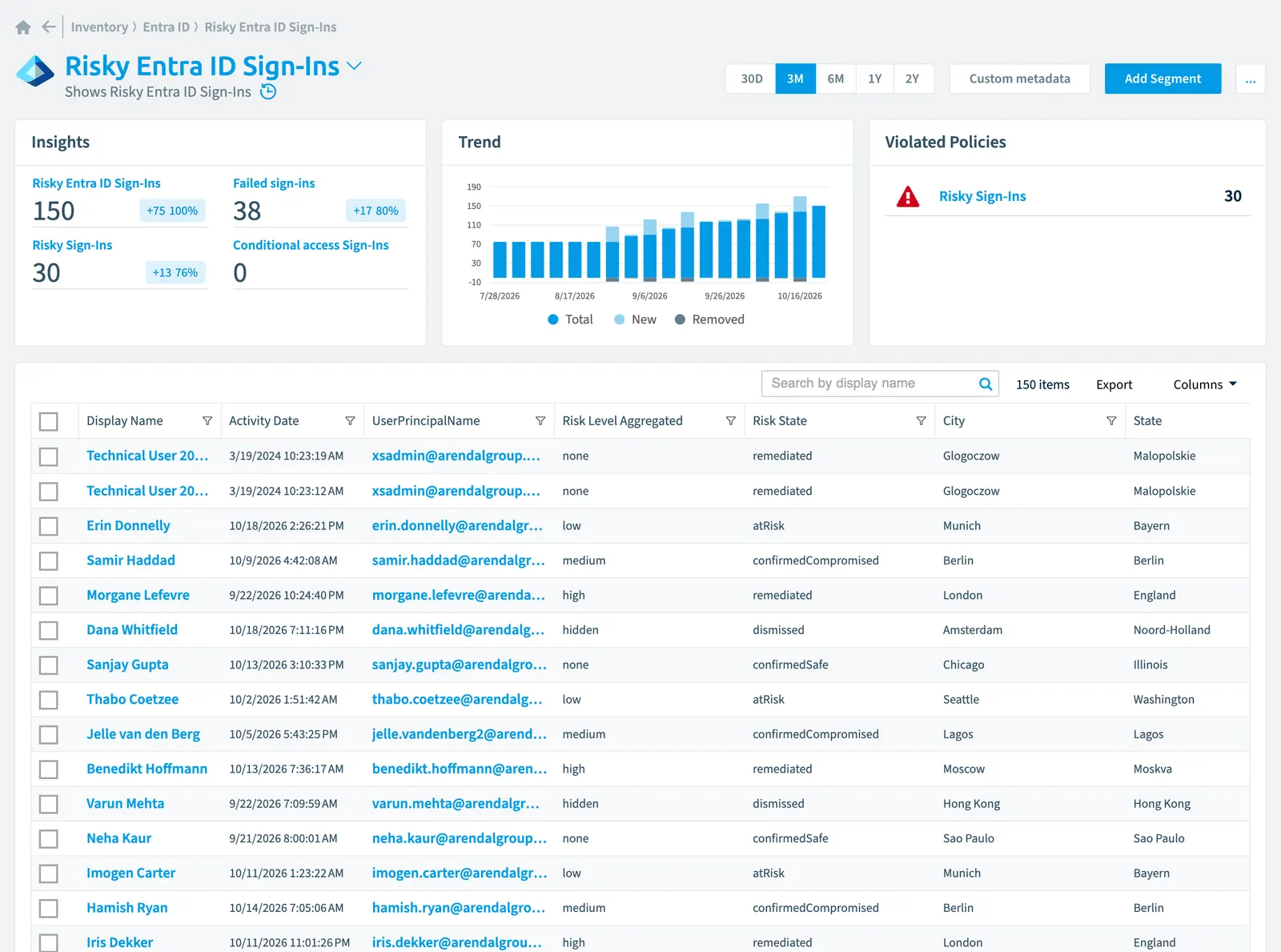
Shows Risky Entra IDMicrosoft Entra IDMicrosoft Entra ID, formerly Azure Active Directory, is the Microsoft identity service behind every Microsoft 365 tenant.Read more Sign-Ins
Part of the Entra ID inventory.
In Rencore Governance
Scan settings
| Default scanning interval | Allowed scanning intervals | Data removal during incremental scan |
|---|---|---|
| Daily | Daily, Weekly, Bi-Weekly, Monthly, Never, Initial | No |
Properties
47 properties in 6 groups. Open a group to see its properties.
Name and identity 9
| Property | Type | Description | Automation placeholder |
|---|---|---|---|
| App Display Name | String | App name displayed in the Azure Portal. | {{RiskyEntraIDSignIn. |
| App Id | String | Unique GUID representing the app ID in the Microsoft Entra ID. | {{RiskyEntraIDSignIn. |
| Correlation Id | String | The request ID sent from the client when the sign-in is initiated; used to troubleshoot sign-in activity. | {{RiskyEntraIDSignIn. |
| Device Id | String | Refers to the UniqueID of the device used for signing in. | {{RiskyEntraIDSignIn. |
| Display Name | String | {{RiskyEntraIDSignIn. | |
| Id | String | Unique ID representing the sign-in activity. | {{RiskyEntraIDSignIn. |
| User Id | String | ID of the user that initiated the sign-in. | {{RiskyEntraIDSignIn. |
| User Name | String | Sign-Ins of the user | {{RiskyEntraIDSignIn. |
| UserPrincipalName | String | User principal name of the user that initiated the sign-in. | {{RiskyEntraIDSignIn. |
Organization and location 8
| Property | Type | Description | Automation placeholder |
|---|---|---|---|
| Anonymized IP Address | String | Indicates sign-ins from an anonymous IP address, for example, using an anonymous browser or VPN. | {{RiskyEntraIDSignIn. |
| City | String | Provides the city where the sign-in originated. This is calculated using latitude/longitude information from the sign-in activity. | {{RiskyEntraIDSignIn. |
| Country Or Region | String | Provides the country code info (2 letter code) where the sign-in originated. This is calculated using latitude/longitude information from the sign-in activity. | {{RiskyEntraIDSignIn. |
| Ip Address | String | IP address of the client used to sign in. | {{RiskyEntraIDSignIn. |
| Malicious IP Address | String | Indicates sign-ins from a malicious IP address. An IP address is considered malicious based on high failure rates because of invalid credentials received from the IP address or other IP reputation sources. | {{RiskyEntraIDSignIn. |
| Malware Infected IP Address | String | Indicates sign-ins from IP addresses infected with malware. Deprecated and no longer generated for new detections. | {{RiskyEntraIDSignIn. |
| State | String | Provides the State where the sign-in originated. This is calculated using latitude/longitude information from the sign-in activity. | {{RiskyEntraIDSignIn. |
| Suspicious IP Address | String | Identifies logins from IP addresses that are known to be malicious at the time of the sign in. | {{RiskyEntraIDSignIn. |
Activity and usage 5
| Property | Type | Description | Automation placeholder |
|---|---|---|---|
| Activity Date | DateTime | Date and time (UTC) the sign-in was initiated. Example: midnight on Jan 1, 2014 is reported as 2014-01-01T00:00:00Z. | {{RiskyEntraIDSignIn. |
| Client App Used | String | Identifies the client used for the sign-in activity. Modern authentication clients include Browser and modern clients. Legacy authentication clients include Exchange ActiveSync, IMAP, MAPI, SMTP, POP, and other clients. | {{RiskyEntraIDSignIn. |
| Error Code | String | Provides the 5-6 digit error code that's generated during a sign-in failure. | {{RiskyEntraIDSignIn. |
| Is Interactive | String | Indicates if a sign-in is interactive or not. | {{RiskyEntraIDSignIn. |
| Last scan update | DateTime | Shows when this object was last updated in a scan. If an object is found during a scan but no property has been changed this date will not change. | {{RiskyEntraIDSignIn. |
Dates and scanning 1
| Property | Type | Description | Automation placeholder |
|---|---|---|---|
| Initially Scanned | DateTime | Shows when this object was initially found in a scan. | {{RiskyEntraIDSignIn. |
Security and compliance 10
| Property | Type | Description | Automation placeholder |
|---|---|---|---|
| Conditional Access Status | String | Reports status of an activated conditional access policy. Possible values are: success, failure, notApplied, and unknownFutureValue. Allowed values: Failure, NotApplied, Success, UnknownFutureValue. | {{RiskyEntraIDSignIn. |
| Investigations Threat Intelligence | String | Indicates a sign-in activity that is unusual for the given user or is consistent with known attack patterns based on Microsoft's internal and external threat intelligence sources. | {{RiskyEntraIDSignIn. |
| Leaked Credentials | String | Indicates that the user's valid credentials have been leaked. This sharing is typically done by posting publicly on the dark web, paste sites, or by trading and selling the credentials on the black market. When the Microsoft leaked credentials service acquires user credentials from the dark web, paste sites, or other sources, they are checked against Entra ID users' current valid credentials to find valid matches. | {{RiskyEntraIDSignIn. |
| Risk Detail | String | Provides the 'reason' behind a specific state of a risky user, sign-in or a risk event. The possible values are: none, adminGeneratedTemporaryPassword, userPerformedSecuredPasswordChange, userPerformedSecuredPasswordReset, adminConfirmedSigninSafe, aiConfirmedSigninSafe, userPassedMFADrivenByRiskBasedPolicy, adminDismissedAllRiskForUser, adminConfirmedSigninCompromised, unknownFutureValue. The value none means that no action has been performed on the user or sign-in so far. Allowed values: AdminConfirmedSigninCompromised, AdminConfirmedSigninSafe, AdminDismissedAllRiskForUser, AdminGeneratedTemporaryPassword, AiConfirmedSigninSafe, None, UnknownFutureValue, UserPassedMFADrivenByRiskBasedPolicy, UserPerformedSecuredPasswordChange, UserPerformedSecuredPasswordReset. | {{RiskyEntraIDSignIn. |
| Risk Level Aggregated | String | Aggregated risk level. The possible values are: none, low, medium, high, hidden, and unknownFutureValue. The value hidden means the user or sign-in was not enabled for Entra ID Identity Protection. Allowed values: Hidden, High, Low, Medium, None, UnknownFutureValue. | {{RiskyEntraIDSignIn. |
| Risk Level During SignIn | String | Risk level during sign-in. The possible values are: none, low, medium, high, hidden, and unknownFutureValue. The value hidden means the user or sign-in was not enabled for Entra ID Identity Protection. Allowed values: Hidden, High, Low, Medium, None, UnknownFutureValue. | {{RiskyEntraIDSignIn. |
| Risk Score | Int32 | Stores risk score | {{RiskyEntraIDSignIn. |
| Risk Score Update | DateTime | Stores risk score update | {{RiskyEntraIDSignIn. |
| Risk Score Value | String | Stores risk score value like Low_Low | {{RiskyEntraIDSignIn. |
| Risk State | String | Reports status of the risky user, sign-in, or a risk event. The possible values are: none, confirmedSafe, remediated, dismissed, atRisk, confirmedCompromised, unknownFutureValue. Allowed values: atRisk, confirmedCompromised, confirmedSafe, dismissed, none, remediated, unknownFutureValue. | {{RiskyEntraIDSignIn. |
Other properties 14
| Property | Type | Description | Automation placeholder |
|---|---|---|---|
| Additional Details | String | Provides additional details on the sign-in activity. | {{RiskyEntraIDSignIn. |
| Browser | String | Indicates the browser information of the used for signing in. | {{RiskyEntraIDSignIn. |
| Device is compliant | Boolean | Indicates whether the device is compliant. | {{RiskyEntraIDSignIn. |
| Device is managed | Boolean | Indicates whether the device is managed. | {{RiskyEntraIDSignIn. |
| Display Name Device | String | Refers to the name of the device used for signing in. | {{RiskyEntraIDSignIn. |
| Failure Reason | String | Provides the error message or the reason for failure for the corresponding sign-in activity. | {{RiskyEntraIDSignIn. |
| Generic | String | Indicates that the user was not enabled for Identity Protection. | {{RiskyEntraIDSignIn. |
| Latitude | Double | The latitude, in decimal, for the item. | {{RiskyEntraIDSignIn. |
| Longitude | Double | The longitude, in decimal, for the item. | {{RiskyEntraIDSignIn. |
| Operating System | String | Indicates the operating system name and version used for signing in. | {{RiskyEntraIDSignIn. |
| Unfamiliar Features | String | Indicates sign-ins with characteristics that deviate from past sign-in properties. | {{RiskyEntraIDSignIn. |
| Unknown Future Value | String | Evolvable enumeration sentinel value. Do not use. | {{RiskyEntraIDSignIn. |
| Unlikely Travel | String | Identifies two sign-ins originating from geographically distant locations, where at least one of the locations may also be atypical for the user, given past behavior. | {{RiskyEntraIDSignIn. |
| User | User | Sign-Ins of the user | {{RiskyEntraIDSignIn. |
Relations
| Relation | Connector | Description |
|---|---|---|
| User | Microsoft 365Microsoft 365Microsoft 365 is the Microsoft cloud suite of Teams, SharePoint, OneDrive, Exchange and the Office apps.Read more | All users registered in your tenant (internal, external) |
Segments
| Segment | Description |
|---|---|
| Conditional access sign-ins | Shows Sign-Ins using conditional access |
| Failed sign-ins | Shows unsuccesfull sign-ins |
| Risky sign-ins | Shows Sign-Ins with Risk State "At Risk" |
Actions
This object does currently not have any actions.
Policies that check this object
| Policy | Severity | Description |
|---|---|---|
| Risky sign-ins | High | Shows Sign-Ins with risk state "At Risk" |
Frequently asked questions
What is the risky Entra ID sign-in object in Rencore Governance?
What is the risky Entra ID sign-in object in Rencore Governance?Shows Risky Entra ID Sign-Ins. Risky Entra ID sign-in is an object type in the Entra ID inventory of Rencore Governance.
Which properties does Rencore Governance collect for risky Entra ID sign-in?
Which properties does Rencore Governance collect for risky Entra ID sign-in?Rencore Governance collects 47 properties for Risky Entra ID sign-in, such as Activity Date, Additional Details, Anonymized IP Address and 44 more.
Which policies check risky Entra ID sign-in objects?
Which policies check risky Entra ID sign-in objects?1 built-in policy checks Risky Entra ID sign-in objects, such as Risky sign-ins.
How often is risky Entra ID sign-in scanned?
How often is risky Entra ID sign-in scanned?By default daily. You can change the scan interval of Risky Entra ID sign-in objects under Configure objects (daily, weekly, bi-weekly, monthly, never or initial (collected once)). The interval is a target, not a guarantee: a scan can run later than planned.
Which module includes the Entra ID connector?
Which module includes the Entra ID connector?The Entra ID connector is part of the Digital Workplace module of Rencore Governance, which every Plan includes. The connector is generally available.
Was this page helpful?
Thanks for the feedback.
Thanks. What was wrong?