
Copilot agent
AI summary
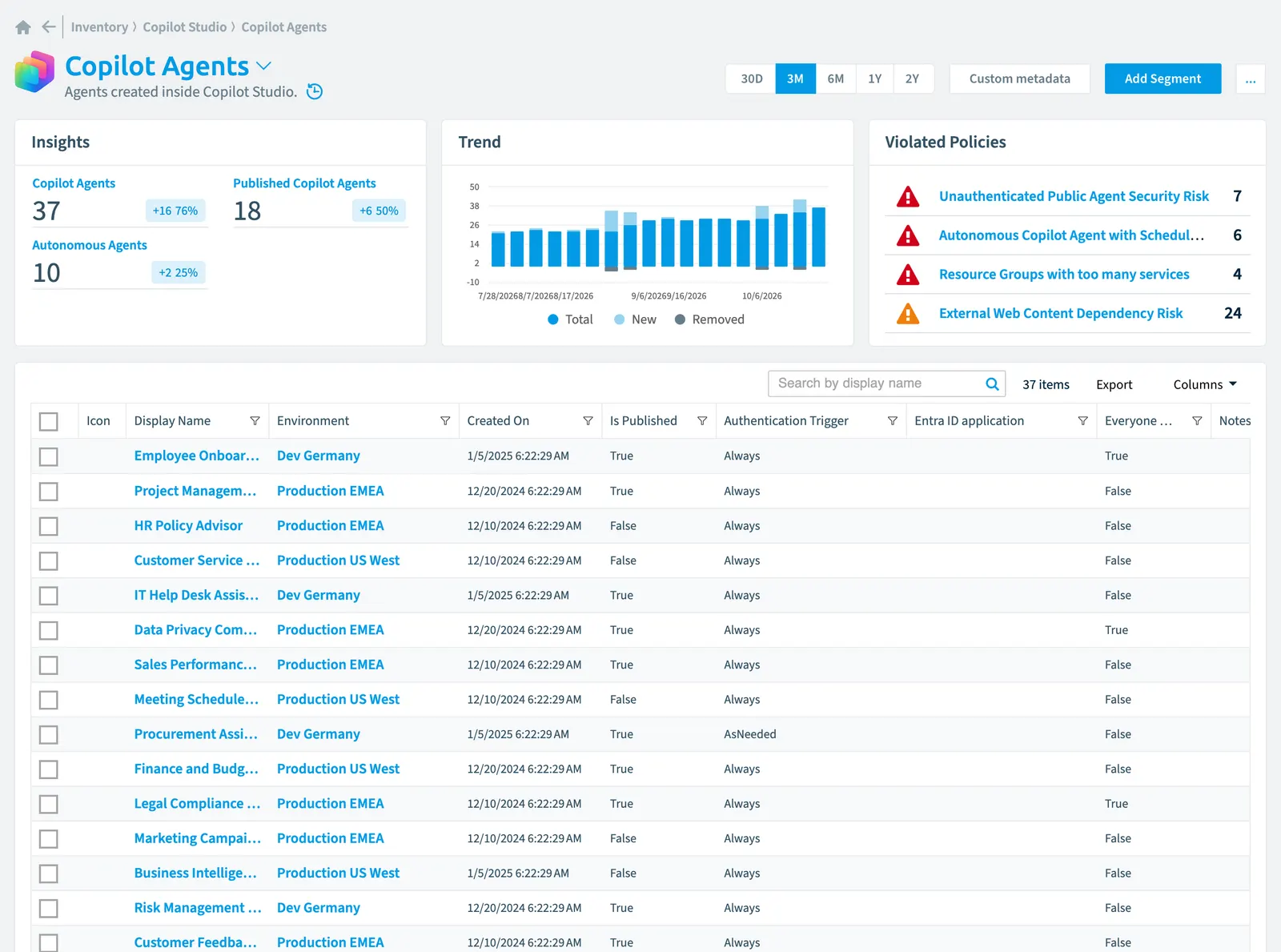
Copilot agents are AI assistants created in Copilot Studio that Rencore Governance tracks as part of your inventory. You can monitor these agents using 42 tracked properties in categories like security, sharing, compliance, and usage. Governance policies help you identify risks including unauthenticated public access, automated execution without oversight, and abandoned agents consuming resources.
Agents created inside Copilot StudioCopilot StudioCopilot Studio is the Microsoft tool for building your own AI agents. Rencore Governance covers it with the Copilot Studio connector, part of the AI & Agents module.Read more.
Part of the Copilot Studio inventory.
In Rencore Governance
Scan settings
| Default scanning interval | Allowed scanning intervals | Data removal during incremental scan |
|---|---|---|
| Daily | Daily, Weekly, Bi-Weekly, Monthly, Never, Initial | Yes |
Properties
42 properties in 9 groups. Open a group to see its properties.
Name and identity 8
| Property | Type | Description | Automation placeholder |
|---|---|---|---|
| Icon | String | {{CopilotAgent. | |
| Display Name | String | {{CopilotAgent. | |
| Entra IDMicrosoft Entra IDMicrosoft Entra ID, formerly Azure Active Directory, is the Microsoft identity service behind every Microsoft 365 tenant.Read more application | String | The connected Entra ID application for authentication of the bot. | {{CopilotAgent. |
| Entra ID application | String | The connected Entra ID application for authentication of the bot. | {{CopilotAgent. |
| Id | String | Id of the Chatbot. | {{CopilotAgent. |
| Owned By Name | String | Agents owned by the user | {{CopilotAgent. |
| Published By Name | String | Agents published by the user | {{CopilotAgent. |
| Solution Id | String | Solution Id of the Chatbot. | {{CopilotAgent. |
Organization and location 4
| Property | Type | Description | Automation placeholder |
|---|---|---|---|
| EnvironmentEnvironmentAn Environment is the connected Microsoft 365 tenant inside a Workspace.Read more | Environment | Parent Environment. | {{CopilotAgent. |
| Environment Id | String | Id of Environment. | {{CopilotAgent. |
| Environment Name | String | Parent Environment. | {{CopilotAgent. |
| State Code | String | Status of the Chatbot. | {{CopilotAgent. |
Activity and usage 3
| Property | Type | Description | Automation placeholder |
|---|---|---|---|
| Component state | String | Status of the Chatbot. | {{CopilotAgent. |
| Last scan update | DateTime | Shows when this object was last updated in a scan. If an object is found during a scan but no property has been changed this date will not change. | {{CopilotAgent. |
| Status Code | String | Status of the Chatbot. | {{CopilotAgent. |
AI and agents 2
| Property | Type | Description | Automation placeholder |
|---|---|---|---|
| Available in M365 Copilot | Boolean | True if agent is available in Microsoft 365 CopilotMicrosoft 365 CopilotMicrosoft 365 Copilot is the AI assistant in the Microsoft 365 apps. Rencore Governance covers it with the Copilot connector, part of the AI & Agents module.Read more. | {{CopilotAgent. |
| Agent ID | String | {{CopilotAgent. |
Dates and scanning 3
| Property | Type | Description | Automation placeholder |
|---|---|---|---|
| Created On | DateTime | Date and time when the record was created. | {{CopilotAgent. |
| Initially Scanned | DateTime | Shows when this object was initially found in a scan. | {{CopilotAgent. |
| Modified On | DateTime | Date and time when the record was last modified. | {{CopilotAgent. |
Sharing and access 5
| Property | Type | Description | Automation placeholder |
|---|---|---|---|
| Created By | User | Agents created by the user | {{CopilotAgent. |
| Created By Name | String | Agents created by the user | {{CopilotAgent. |
| Everyone access | Boolean | The access to this bot by the whole organization | {{CopilotAgent. |
| Modified By | User | Agents modified by the user | {{CopilotAgent. |
| Modified By Name | String | Agents modified by the user | {{CopilotAgent. |
Security and compliance 9
| Property | Type | Description | Automation placeholder |
|---|---|---|---|
| Access Control Policy | String | The access to this bot by the whole organization Allowed values: Any, Chatbot readers, Group membership. | {{CopilotAgent. |
| Authentication Mode | String | Defines how the bot should be authenticated to the user. | {{CopilotAgent. |
| Authentication Trigger | String | Defines at which point authentication for the bot should be triggered. Security can be enforced at the bot entry point, removing the need for explicit authentication nodes in the dialog flow. | {{CopilotAgent. |
| Generative | Boolean | Use generative AI to respond with the best combination of actions, topics, and knowledge. | {{CopilotAgent. |
| Image input | Boolean | True if users can upload images that agents can analyze and use to provide responses. | {{CopilotAgent. |
| Enhanced search results | Boolean | True if agent can provide improved search performance for Microsoft 365 Copilot tenants. | {{CopilotAgent. |
| Risk Score | Int32 | Stores risk score | {{CopilotAgent. |
| Risk Score Update | DateTime | Stores risk score update | {{CopilotAgent. |
| Risk Score Value | String | Stores risk score value like Low_Low | {{CopilotAgent. |
Settings 4
| Property | Type | Description | Automation placeholder |
|---|---|---|---|
| Content moderation | String | Defines how strict should the content moderation be. | {{CopilotAgent. |
| Is Published | Boolean | True when agent has been published. | {{CopilotAgent. |
| Language | Int32 | Language of the Chatbot. | {{CopilotAgent. |
| Template | String | Template of the Chatbot. | {{CopilotAgent. |
Other properties 4
| Property | Type | Description | Automation placeholder |
|---|---|---|---|
| Entra ID application | Enterprise application | The connected Entra ID application for authentication of the bot. | {{CopilotAgent. |
| Owned By | User | Agents owned by the user | {{CopilotAgent. |
| Published By | User | Agents published by the user | {{CopilotAgent. |
| Published On | DateTime | Date and time when the record was last published. | {{CopilotAgent. |
Relations
| Relation | Connector | Description |
|---|---|---|
| Enterprise application | Entra ID | All registered Enterprise ApplicationsEnterprise applicationAn enterprise application is the local instance of an app in a Microsoft Entra tenant, its service principal, where admins control who can sign in and which permissions it holds.Read more in Entra ID |
| Action | Copilot Studio | Actions used by Copilot AgentCopilot Studio agentA Copilot Studio agent is an AI agent someone built in Microsoft Copilot Studio.Read more |
| Agent conversation | Copilot Studio | Conversations of users with agent |
| Environment | Copilot Studio | All Copilot environments in your tenant |
| Knowledge | Copilot Studio | Used knowledge in Copliot Agent |
| Topic | Copilot Studio | Topics of Copilot Agent |
| Trigger | Copilot Studio | Triggers that start a Copilot agent |
| User | Microsoft 365Microsoft 365Microsoft 365 is the Microsoft cloud suite of Teams, SharePoint, OneDrive, Exchange and the Office apps.Read more | Users which can use the agent |
| User | Microsoft 365 | All users registered in your tenant (internal, external) |
| User | Microsoft 365 | All users registered in your tenant (internal, external) |
| User | Microsoft 365 | All users registered in your tenant (internal, external) |
| User | Microsoft 365 | All users registered in your tenant (internal, external) |
Segments
| Segment | Description |
|---|---|
| Autonomous agents | Shows agents that have an external trigger like email or recurrance |
| Published Copilot agents | List agents that are currently published |
Actions
This object does currently not have any actions.
Policies that check this object
| Policy | Severity | Description |
|---|---|---|
| Resource Groups with too many services | High | For better cost control move AI services into separate resource groups |
| Autonomous Copilot agent risk | Medium | Identifies agents operating without user interaction via email or scheduled triggers, requiring additional oversight |
| Autonomous Copilot agent with scheduled trigger | High | Flags agents with automated recurring execution that may generate uncontrolled costs without human oversight |
| External web content dependency risk | Medium | Identifies agents relying on public websites as knowledge sourcesKnowledge sourceA knowledge source is data that a Copilot Studio agent uses to answer, such as public websites, SharePoint and OneDrive, Dataverse or uploaded files.Read more, creating reliability and content control risks |
| Orphaned Copilot agent ownership gap | Medium | Detects agents without assigned owners or only disabled owners, creating accountability gaps for maintenance, costs, and compliance |
| Stale unpublished Copilot agents - 30 days | Medium | Identifies agents created but unpublished for 30+ days, indicating abandoned development efforts consuming resources |
| Unauthenticated public agent security risk | High | Identifies agents exposed publicly without authentication requirements, creating security risks requiring remediation |
| Unused agent cleanup candidate - 90 days | Medium | Flags inactive agents with no usage for 90+ days as candidates for cleanup to reduce sprawl |
Frequently asked questions
 What is the Copilot agent object in Rencore Governance?
What is the Copilot agent object in Rencore Governance?Agents created inside Copilot Studio. Copilot agent is an object type in the Copilot Studio inventory of Rencore Governance.
Which properties does Rencore Governance collect for Copilot agent?
Which properties does Rencore Governance collect for Copilot agent?Rencore Governance collects 42 properties for Copilot agent, such as Access Control Policy, Authentication Mode, Authentication Trigger and 37 more.
Which policies check Copilot agent objects?
Which policies check Copilot agent objects?8 built-in policies check Copilot agent objects, such as Resource Groups with too many services, Autonomous Copilot agent risk and 6 more.
How often is Copilot agent scanned?
How often is Copilot agent scanned?By default daily. You can change the scan interval of Copilot agent objects under Configure objects (daily, weekly, bi-weekly, monthly, never or initial (collected once)). The interval is a target, not a guarantee: a scan can run later than planned.
Which module includes the Copilot Studio connector?
Which module includes the Copilot Studio connector?The Copilot Studio connector is part of the AI & Agents module of Rencore Governance, an add-on module on the Premium and Enterprise Plans. The connector is generally available.
Was this page helpful?
Thanks for the feedback.
Thanks. What was wrong?