
Workspace
AI summary
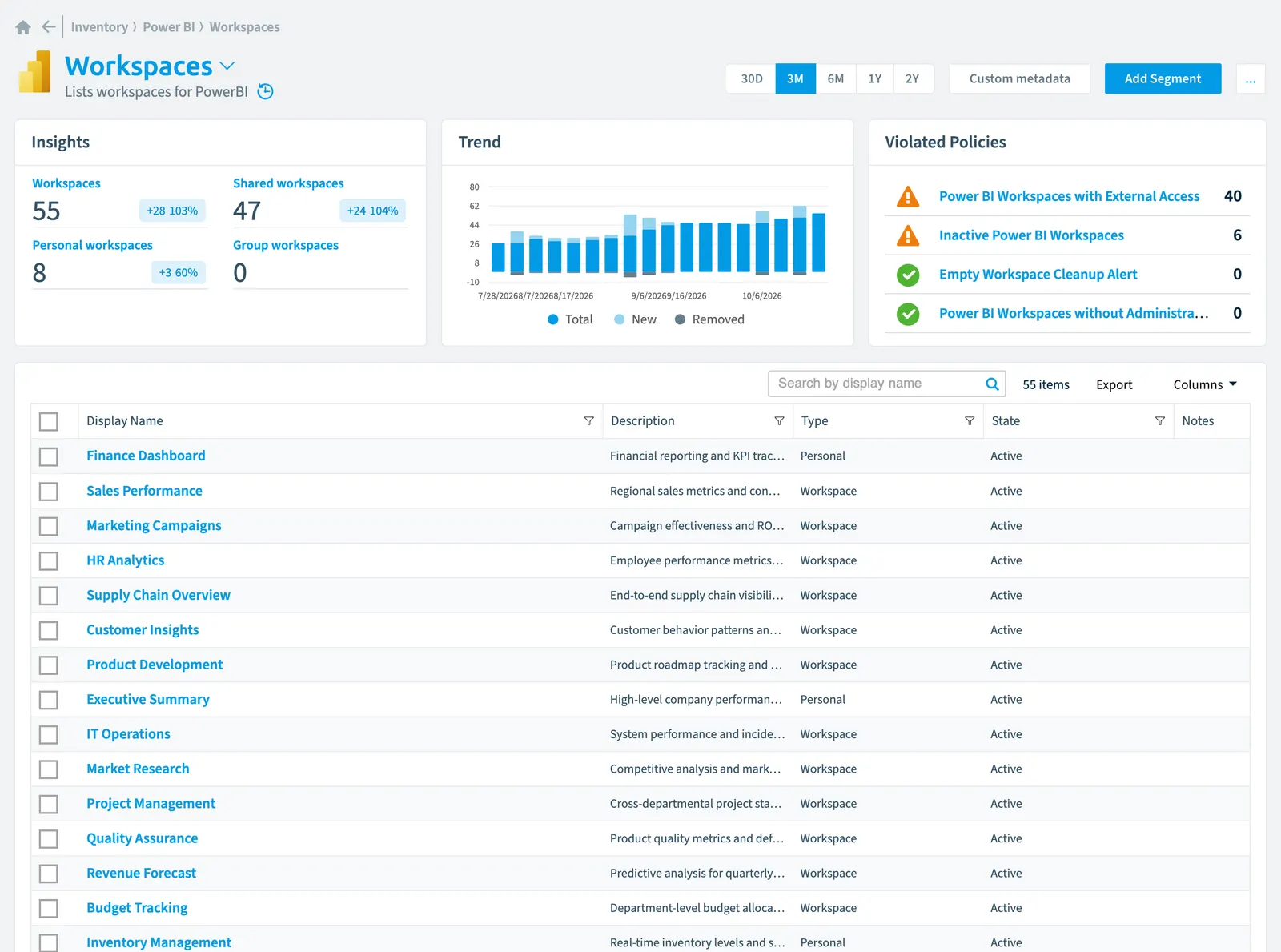
The Workspace object tracks Power BI workspaces in your inventory, capturing properties like capacity assignments, storage formats, creation dates, and risk scores. It connects to related users, groups, and Power BI artifacts such as datasets, reports, and dashboards. Built-in policies help you identify unused workspaces, monitor external access, and flag workspaces lacking administrative oversight.
Lists workspaces for PowerBIPower BIPower BI is the Microsoft service for reports and dashboards over business data.Read more
Part of the Power BI inventory.
In Rencore Governance
Scan settings
| Default scanning interval | Allowed scanning intervals | Data removal during incremental scan |
|---|---|---|
| Daily | Daily, Weekly, Bi-Weekly, Monthly, Never, Initial | Yes |
Properties
| Property | Type | Description | Automation placeholder |
|---|---|---|---|
| Capacity Id | Capacity | The capacity ID. | {{Workspace. |
| Capacity Id | String | The capacity ID. | {{Workspace. |
| Initially Scanned | DateTime | Shows when this object was initially found in a scan. | {{Workspace. |
| Default Dataset Storage Format | String | The default dataset storage format in the workspace. Returned only when isOnDedicatedCapacity is true. | {{Workspace. |
| Description | String | The group description | {{Workspace. |
| Display Name | String | {{Workspace. | |
| Id | String | The workspace ID. | {{Workspace. |
| Is On Dedicated Capacity | Boolean | Whether the group is assigned to a dedicated capacity. | {{Workspace. |
| Last scan update | DateTime | Shows when this object was last updated in a scan. If an object is found during a scan but no property has been changed this date will not change. | {{Workspace. |
| Risk Score | Int32 | Stores risk score | {{Workspace. |
| Risk Score Update | DateTime | Stores risk score update | {{Workspace. |
| Risk Score Value | String | Stores risk score value like Low_Low | {{Workspace. |
| State | String | The group state. | {{Workspace. |
| Type | String | The type of group being returned. Allowed values: Group, Personal, PersonalGroup, WorkspaceWorkspaceA Workspace is the top-level container in Rencore Governance. It holds the settings, users, roles and connected apps for exactly one Environment, the connected Microsoft 365 tenant.Read more. | {{Workspace. |
Relations
| Relation | Connector | Description |
|---|---|---|
| Group | Microsoft 365Microsoft 365Microsoft 365 is the Microsoft cloud suite of Teams, SharePoint, OneDrive, Exchange and the Office apps.Read more | Groups whose members are admins of the workspace |
| Group | Microsoft 365 | Groups whose members are contributors of the workspace |
| Group | Microsoft 365 | Groups whose members are members of the workspace |
| Group | Microsoft 365 | Groups whose members are viewers of the workspace |
| User | Microsoft 365 | Users which are admins of the workspace |
| User | Microsoft 365 | Users which are contributors of the workspace |
| User | Microsoft 365 | Users which are members of the workspace |
| User | Microsoft 365 | Users which are viewers of the workspace |
| Activity event | Power BI | Lists activity events for PowerBI |
| App | Power BI | Apps in PowerBI |
| Capacity | Power BI | Lists capacities for PowerBI |
| Dashboard | Power BI | Lists dashboards for PowerBI |
| Dataflow | Power BI | Lists dataflows for PowerBI |
| Dataset | Power BI | Lists datasets for PowerBI |
| Datamart | Power BI | Lists datamarts for PowerBI |
| Pipeline | Power BI | Lists pipelines for PowerBI |
| Report | Power BI | Lists reports for PowerBI |
| Unused artifact | Power BI | List datasets, reports, and dashboards that have not been used within 30 days. |
Segments
| Segment | Description |
|---|---|
| Group workspaces | V1 version of shared workspace (will be deprecated after migration to latest version of shared workspace) |
| Personal workspaces | Shows personal workspaces which are special type of workspace |
| Shared workspaces | Shows shared workspaces or simple workspaces used to share content with other users in the organization |
Actions
This object does currently not have any actions.
Policies that check this object
| Policy | Severity | Description |
|---|---|---|
| Empty Workspace cleanup alert | Medium | Identifies unused workspace containers that should be removed to maintain environment cleanliness |
| Inactive Power BI Workspaces | Medium | Identifies workspaces without user activity that may be candidates for archiving or consolidation (30 days) |
| Power BI Workspaces with external access | Medium | Identifies workspaces where external usersExternal userAn external user is an account whose home tenant belongs to another organization, invited into your tenant to work with you.Read more have been granted access rights |
| Power BI Workspaces without administrators | Medium | Identifies workspaces lacking designated administrative ownership, creating accountability risks |
Frequently asked questions
What is the Workspace object in Rencore Governance?
Lists workspaces for PowerBI. Workspace is an object type in the Power BI inventory of Rencore Governance.
Which properties does Rencore Governance collect for Workspace?
Rencore Governance collects 14 properties for Workspace, such as Capacity Id, Initially Scanned, Default Dataset Storage Format and 10 more.
Which policies check Workspace objects?
4 built-in policies check Workspace objects, such as Empty Workspace cleanup alert, Inactive Power BI Workspaces and 2 more.
How often is Workspace scanned?
By default daily. You can change the scan interval of Workspace objects under Configure objects (daily, weekly, bi-weekly, monthly, never or initial (collected once)). The interval is a target, not a guarantee: a scan can run later than planned.
Which module includes the Power BI connector?
Which module includes the Power BI connector?The Power BI connector is part of the Apps, Automation & BI module of Rencore Governance, an add-on module on the Premium and Enterprise Plans. The connector is generally available.
Was this page helpful?
Thanks for the feedback.
Thanks. What was wrong?