
Group

AI summary
Entra ID groups, including Security and Microsoft 365 groups, are cataloged in Rencore Governance as part of your Microsoft 365 inventory. The inventory tracks group properties like membership type and privacy settings, relationships to users and SharePoint sites, and available actions such as managing owners and setting sensitivity labels. Pre-built policies help identify governance risks like groups with disabled member accounts or external owners.
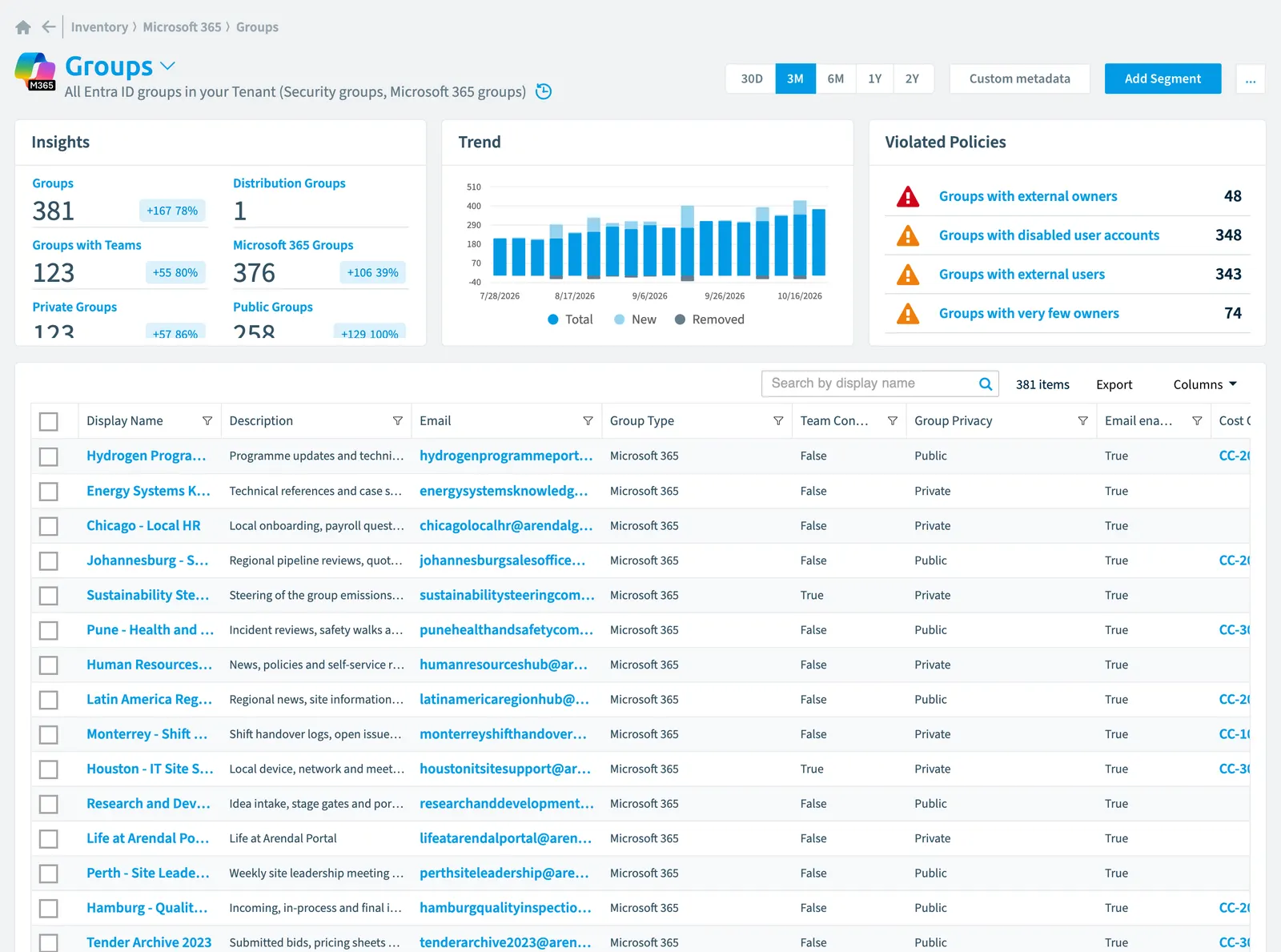
All Entra IDMicrosoft Entra IDMicrosoft Entra ID, formerly Azure Active Directory, is the Microsoft identity service behind every Microsoft 365 tenant.Read more groups in your Tenant (Security groupsSecurity groupA security group is a Microsoft Entra group that gives a set of users access to resources.Read more, Microsoft 365 groupsMicrosoft 365 groupA Microsoft 365 Group is the membership object behind many Microsoft 365 workspaces.Read more)
Part of the Microsoft 365 inventory.
In Rencore Governance
Scan settings
| Default scanning interval | Allowed scanning intervals | Data removal during incremental scan |
|---|---|---|
| Daily | Daily, Weekly, Bi-Weekly, Monthly, Never, Initial | No |
Properties
| Property | Type | Description | Automation placeholder |
|---|---|---|---|
| Classification | String | Describes a classification for the group (such as low, medium or high business impact) | {{Group. |
| Initially Scanned | DateTime | Shows when this object was initially found in a scan. | {{Group. |
| Description | String | An optional description for the group | {{Group. |
| Display Name | String | {{Group. | |
| String | The SMTP address for the group, for example | {{Group. | |
| Email enabled | Boolean | Specifies whether the group is mail-enabled | {{Group. |
| Expiration Date | DateTime | Timestamp of when the group is set to expire | {{Group. |
| Created Date | DateTime | Timestamp of when the group was created | {{Group. |
| Group Id | String | The unique identifier for the group | {{Group. |
| Group Privacy | String | Specifies the group join policy and group content visibility for groups Allowed values: Hidden Membership, Private, Public. | {{Group. |
| Group Type | String | Specifies the group type and its membership Allowed values: Distribution Group, Microsoft 365Microsoft 365Microsoft 365 is the Microsoft cloud suite of Teams, SharePoint, OneDrive, Exchange and the Office apps.Read more, Security Group. | {{Group. |
| onPremises Sync Enabled | Boolean | true if this user object is currently being synced from an on-premises Active Directory (AD); otherwise the user isn't being synced and can be managed in Microsoft Entra ID. | {{Group. |
| Last scan update | DateTime | Shows when this object was last updated in a scan. If an object is found during a scan but no property has been changed this date will not change. | {{Group. |
| MailNickname | String | The mail alias for the group, unique for Microsoft 365 groups in the organization. Maximum length is 64 characters. | {{Group. |
| Membership Type | String | Specifies the group membership type. Allowed values: Assigned, Dynamic. | {{Group. |
| Preferred Data LocationData centerThe data center is the Microsoft Azure region where Rencore Governance stores all data of a Workspace.Read more | String | The preferred data location for the Microsoft 365 group. By default, the group inherits the group creator's preferred data location. | {{Group. |
| Risk Score | Int32 | Stores risk score | {{Group. |
| Risk Score Update | DateTime | Stores risk score update | {{Group. |
| Risk Score Value | String | Stores risk score value like Low_Low | {{Group. |
| Security Identifier | String | Contains the on-premises security identifier (SID) for the group that was synchronized from on-premises to the cloud. | {{Group. |
| Team Connected | Boolean | Specifies Team as group resources that are provisioned as part of creating a Microsoft 365 group | {{Group. |
| SharePoint Site | Site | Default scanning intervalScan intervalA scan interval is how often Rencore Governance aims to scan one object type, such as daily or weekly.Read more: Monthly. | {{Group. |
| SharePoint Site Url | String | {{Group. |
Relations
| Relation | Connector | Description |
|---|---|---|
| App role assignment | Entra ID | All app role assignments in Entra ID |
| Directory role | Entra ID | Memberships of the groups in directory rolesDirectory roleA directory role is a Microsoft Entra admin role, such as Global Administrator or Teams Administrator, that grants a set of permissions across the tenant.Read more |
| Group | Microsoft 365 | |
| Sensitivity label | Microsoft 365 | Sensitivity labelSensitivity labelA sensitivity label is a Microsoft Purview classification, such as Confidential or Internal, that an organization applies to content and to containers such as Teams and SharePoint sites.Read more of the group |
| User | Microsoft 365 | Users which are members of the group |
| User | Microsoft 365 | Users which are owners of the group |
| File sharing | OneDriveOneDriveOneDrive is the personal file storage of each Microsoft 365 user. The OneDrive connector of Rencore Governance, part of the Digital Workplace module, inventories every OneDrive with its files, folders and file sharing.Read more | File sharingSharing linkA sharing link is a link in SharePoint or OneDrive that grants access to a file or folder, sometimes to people outside your organization.Read more shared with the group |
| Plan | PlannerMicrosoft PlannerMicrosoft Planner is the Microsoft 365 app for task plans and boards. The Planner connector of Rencore Governance, part of the Digital Workplace module, inventories plans.Read more | All Planner plans |
| Power app (canvas app) | Power AppsPower AppsPower Apps is the Microsoft low-code tool for building business apps. Rencore Governance covers it with the Power Apps connector, part of the Apps, Automation & BI module.Read more | PowerApps used by the Group |
| Power app (canvas app) | Power Apps | PowerApps owned by the Group |
| Flow | Power AutomatePower AutomatePower Automate, formerly Microsoft Flow, is the Microsoft low-code tool for automated workflows called flows.Read more | FlowsFlowA flow is a Power Automate workflow, made of a trigger and actions, that runs a task automatically across apps and services.Read more owned by the group |
| Flow | Power Automate | Flows used by the group |
| Workspace | Power BIPower BIPower BI is the Microsoft service for reports and dashboards over business data.Read more | WorkspacesWorkspaceA Workspace is the top-level container in Rencore Governance. It holds the settings, users, roles and connected apps for exactly one Environment, the connected Microsoft 365 tenant.Read more in which group is admin |
| Workspace | Power BI | Workspaces in which group is contributor |
| Workspace | Power BI | Workspaces in which group is member |
| Workspace | Power BI | Workspaces in which group is viewer |
| SharePoint group | SharePoint | SharePoint Group with an access |
| File sharing | SharePoint | File sharing that invites group |
| List/library | SharePoint | Lists which group has access to |
| File | SharePoint | File in which Group has access to |
| Folder | SharePoint | Folder in which group has access to |
| Site collection | SharePoint | Site collectionSite collectionA site collection is the top-level SharePoint container that holds a root site, its subsites, lists, libraries and files.Read more of the group |
| Site collection | SharePoint | Site which group has access to |
| Site collection | SharePoint | Site collections in which group is admin |
| Site collection | SharePoint | Site collections in which group is member |
| Site collection | SharePoint | Site collections in which group is owner |
| Site collection | SharePoint | Site collections in which group is visitor |
| Site | SharePoint | All root site and subsites of a SharePoint site collection |
| Site | SharePoint | Sites in which group is admin |
| Site | SharePoint | Sites in which group is member |
| Site | SharePoint | Sites in which group is owner |
| Site | SharePoint | Sites in which group is visitor |
| Site | SharePoint | Web which group has access to |
| Team | TeamsMicrosoft TeamsMicrosoft Teams is the Microsoft 365 app for chat, meetings and team collaboration.Read more | All teams in your tenant |
| Community | Viva EngageViva EngageViva Engage, formerly Yammer, is the Microsoft 365 app for company-wide communities.Read more | All Viva Engage communitiesViva Engage communityA Viva Engage community is a group in Viva Engage where people share posts, files and events around a team, project or interest.Read more in your tenant |
Segments
| Segment | Description |
|---|---|
| Distribution groups | All active distribution groups |
| Groups with Teams | All groups with Teams connected |
| Microsoft 365 groups | All active Microsoft 365 groups |
| Private groups | All private groups |
| Public groups | All public groups |
| Security groups | All active security groups |
Actions
- Set Sensitivity Label for a Microsoft 365 Group
- Delete group
- Add or remove owner group to/from a Flow
- Add or remove run-only group to/from a Flow
- Add group to a group
- Add user to a group
- Remove group from a group
- Remove user from a group
- Add or remove owner group to/from a Power App
- Add or remove run-only group to/from a Power App
Policies that check this object
| Policy | Severity | Description |
|---|---|---|
| Groups with disabled user accounts | Medium | Shows groups with users (owners and members) that have disabled accounts |
| Groups with external users | Medium | Shows groups that have external usersExternal userAn external user is an account whose home tenant belongs to another organization, invited into your tenant to work with you.Read more |
| Groups with external owners | High | Shows groups that have external users as owners |
| Groups with very few owners | Medium | Shows Groups which have fewer owners than defined threshold (default 2 owners) |
Frequently asked questions
What is the group object in Rencore Governance?
All Entra ID groups in your Tenant (Security groups, Microsoft 365 groups). Group is an object type in the Microsoft 365 inventory of Rencore Governance.
Which properties does Rencore Governance collect for group?
Rencore Governance collects 23 properties for Group, such as Classification, Initially Scanned, Description and 20 more.
Which policies check group objects?
4 built-in policies check Group objects, such as Groups with disabled user accounts, Groups with external users and 2 more.
How often is group scanned?
By default daily. You can change the scan interval of Group objects under Configure objects (daily, weekly, bi-weekly, monthly, never or initial (collected once)). The interval is a target, not a guarantee: a scan can run later than planned.
Which actions can I run on group objects?
The built-in actions for Group objects are Set Sensitivity Label for a Microsoft 365 Group, Delete group, Add or remove owner group to/from a Flow and 7 more.
Was this page helpful?
Thanks for the feedback.
Thanks. What was wrong?