
File sharing
AI summary
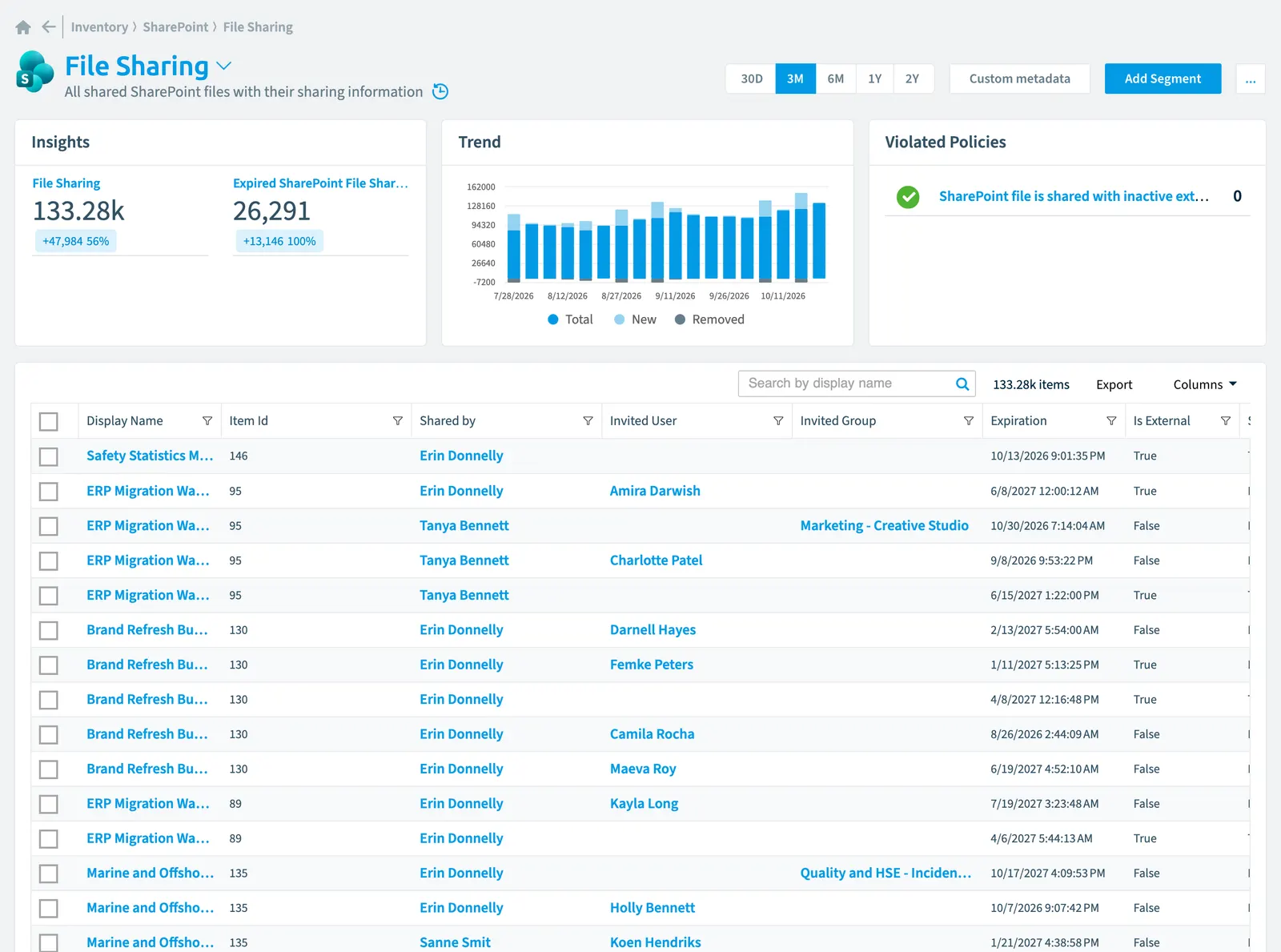
File sharing tracks all shared SharePoint files in Rencore Governance with 46 properties covering sharing details, activity, security, and compliance. You can scan at regular intervals and apply predefined policies that detect files shared with external users or inactive external users.
All shared SharePoint files with their sharing information
Part of the SharePoint inventory.
In Rencore Governance
Scan settings
| Default scanning interval | Allowed scanning intervals | Data removal during incremental scan |
|---|---|---|
| Default | Daily, Weekly, Bi-Weekly, Monthly, Never, Initial | No |
Properties
46 properties in 8 groups. Open a group to see its properties.
Name and identity 6
| Property | Type | Description | Automation placeholder |
|---|---|---|---|
| Display Name | String | {{FileSharing. | |
| Filename | String | Specifies the file name including the extension. | {{FileSharing. |
| Folder Name | String | Specifies the folder name. | {{FileSharing. |
| Item Id | String | {{FileSharing. | |
| List Name | String | Url of the parent list or library. | {{FileSharing. |
| Site Name | String | Name of the site. | {{FileSharing. |
Organization and location 1
| Property | Type | Description | Automation placeholder |
|---|---|---|---|
| Site Url | String | Specifies the URL of the site. | {{FileSharing. |
Activity and usage 2
| Property | Type | Description | Automation placeholder |
|---|---|---|---|
| Is Active | Boolean | Indicates whether the sharing is active. | {{FileSharing. |
| Last scan update | DateTime | Shows when this object was last updated in a scan. If an object is found during a scan but no property has been changed this date will not change. | {{FileSharing. |
Dates and scanning 2
| Property | Type | Description | Automation placeholder |
|---|---|---|---|
| Initially Scanned | DateTime | Shows when this object was initially found in a scan. | {{FileSharing. |
| Expiration | DateTime | A date/time string for which the format conforms to the ISO 8601:2004(E) complete representation for calendar date and time of day and which represents the time and date of expiry for the sharing. | {{FileSharing. |
Sharing and access 27
| Property | Type | Description | Automation placeholder |
|---|---|---|---|
| Shared by | String | SharePoint files shared with the user | {{FileSharing. |
| Shared by Name | String | Specifies the name of the principal. | {{FileSharing. |
| Direct Access | Boolean | Indicates that the file was shared with the user directly, without a link. | {{FileSharing. |
| Shared File Id | String | {{FileSharing. | |
| SharePoint File | File | File SharingSharing linkA sharing link is a link in SharePoint or OneDrive that grants access to a file or folder, sometimes to people outside your organization.Read more | {{FileSharing. |
| SharePoint Folder | Folder | Folder Sharing | {{FileSharing. |
| Is External | Boolean | Indicating whether the link URL is a sharing that has any external guestExternal userAn external user is an account whose home tenant belongs to another organization, invited into your tenant to work with you.Read more invitees (external users explicitly invited by email address). | {{FileSharing. |
| Invitation Expiration | DateTime | A date/time string for which the format conforms to the ISO 8601:2004(E) complete representation for calendar date and time of day and which represents the time and date of expiry for the sharing. A null value indicates no expiry. | {{FileSharing. |
| Invited Group | String | RelationRelationA relation links one inventory object to another, such as a Team to its owners, members and channels.Read more to the group the file has been shared with. | {{FileSharing. |
| Invited Group Name | String | Group name of the user the file has been shared with. | {{FileSharing. |
| Invited User | String | Relation to the user the file has been shared with. | {{FileSharing. |
| Invited User/Group Email | String | Specifies the e-mail address of the user | {{FileSharing. |
| Invited User Name | String | Name of the user the file has been shared with. | {{FileSharing. |
| Invited User Principal Name | String | User Principal Name of the user the file has been shared with. | {{FileSharing. |
| Sharing Changed by | String | Indicates the principal who last modified the sharing. | {{FileSharing. |
| Modified By Name | String | Specifies the display name of the user. | {{FileSharing. |
| Share Url | String | Specifies the URL of the sharing. | {{FileSharing. |
| SharePoint List Id | String | Specifies the identifier of the list in which the file belongs. | {{FileSharing. |
| FileShare Id | String | The unique share identifier of a sharing. | {{FileSharing. |
| Share List Id | String | {{FileSharing. | |
| Shared anonymously | Boolean | True when shared with anonymous link | {{FileSharing. |
| Sharing Creation Date | DateTime | The UTC date/time string with complete representation for calendar date and time of day which represents the time and date of creation of the sharing. | {{FileSharing. |
| Sharing Last Modified Date | DateTime | The UTC date/time string with complete representation for calendar date and time of day which represents the time and date of the last update of the settings for the sharing. | {{FileSharing. |
| SharePoint Site CollectionSite collectionA site collection is the top-level SharePoint container that holds a root site, its subsites, lists, libraries and files.Read more | Site collection | File Sharing in the site | {{FileSharing. |
| SharePoint Site Id | String | Specifies the identifier of the site collection where the file is located. | {{FileSharing. |
| SharePoint Site Collection Name | String | Specifies the full name of the site collection. | {{FileSharing. |
| SharePoint Web Id | String | Specifies the identifier of the site where the file is located. | {{FileSharing. |
Security and compliance 3
| Property | Type | Description | Automation placeholder |
|---|---|---|---|
| Risk Score | Int32 | Stores risk score | {{FileSharing. |
| Risk Score Update | DateTime | Stores risk score update | {{FileSharing. |
| Risk Score Value | String | Stores risk score value like Low_Low | {{FileSharing. |
Settings 2
| Property | Type | Description | Automation placeholder |
|---|---|---|---|
| Is Default | Boolean | Indicates whether a file sharing location is the site collections default sharing location. | {{FileSharing. |
| Is Folder | Boolean | Indicates whether the current selection is a folder. | {{FileSharing. |
Other properties 3
| Property | Type | Description | Automation placeholder |
|---|---|---|---|
| Link Kind | String | Specifies the kind of sharing. Allowed values: Anyone in the tenant with the link can edit, Anyone in the tenant with the link can view, Anyone with the link can edit, Anyone with the link can view, Specific people with the link can edit, Specific people with the link can view, Uninitialized. | {{FileSharing. |
| List | List/library | Relation to the parent list or library. | {{FileSharing. |
| Site | Site | Relation to the parent site. | {{FileSharing. |
Relations
| Relation | Connector | Description |
|---|---|---|
| Group | Microsoft 365Microsoft 365Microsoft 365 is the Microsoft cloud suite of Teams, SharePoint, OneDrive, Exchange and the Office apps.Read more | Group which was invited to use the file |
| Sensitivity label | Microsoft 365 | Sensitivity labelSensitivity labelA sensitivity label is a Microsoft Purview classification, such as Confidential or Internal, that an organization applies to content and to containers such as Teams and SharePoint sites.Read more of the SharePoint Shared File |
| User | Microsoft 365 | User who was invited to use the file (direct or via security groupSecurity groupA security group is a Microsoft Entra group that gives a set of users access to resources.Read more) |
| User | Microsoft 365 | User who modified file sharing |
| User | Microsoft 365 | User who shared the file |
| List/library | SharePoint | All SharePoint lists and libraries |
| File | SharePoint | All SharePoint files stored in a library of a SharePoint site |
| Folder | SharePoint | All SharePoint folders stored in a library of a SharePoint site |
| Site collection | SharePoint | All SharePoint site collections in your tenant |
| Site | SharePoint | All root site and subsites of a SharePoint site collection |
Segments
| Segment | Description |
|---|---|
| Expired SharePoint file sharings | Shows SharePoint File Sharings file sharings which have reached their expiration date |
Actions
- Remove document sharing
Policies that check this object
| Policy | Severity | Description |
|---|---|---|
| SharePoint file is shared with external users | High | Detects SharePoint files that have been shared externally, potentially exposing sensitive data. |
| SharePoint file is shared with inactive external user | Medium | Highlights SharePoint files shared with external users who have been inactive for over six months. |
Frequently asked questions
What is the file sharing object in Rencore Governance?
All shared SharePoint files with their sharing information. File sharing is an object type in the SharePoint inventory of Rencore Governance.
Which properties does Rencore Governance collect for file sharing?
Rencore Governance collects 46 properties for File sharing, such as Shared by, Shared by Name, Initially Scanned and 43 more.
Which policies check file sharing objects?
2 built-in policies check File sharing objects, such as SharePoint file is shared with external users and SharePoint file is shared with inactive external user.
How often is file sharing scanned?
You can change the scan interval of File sharing objects under Configure objects (daily, weekly, bi-weekly, monthly, never or initial (collected once)). The interval is a target, not a guarantee: a scan can run later than planned.
Which actions can I run on file sharing objects?
The built-in actions for File sharing objects are Remove document sharing.
Was this page helpful?
Thanks for the feedback.
Thanks. What was wrong?