
List/library
AI summary
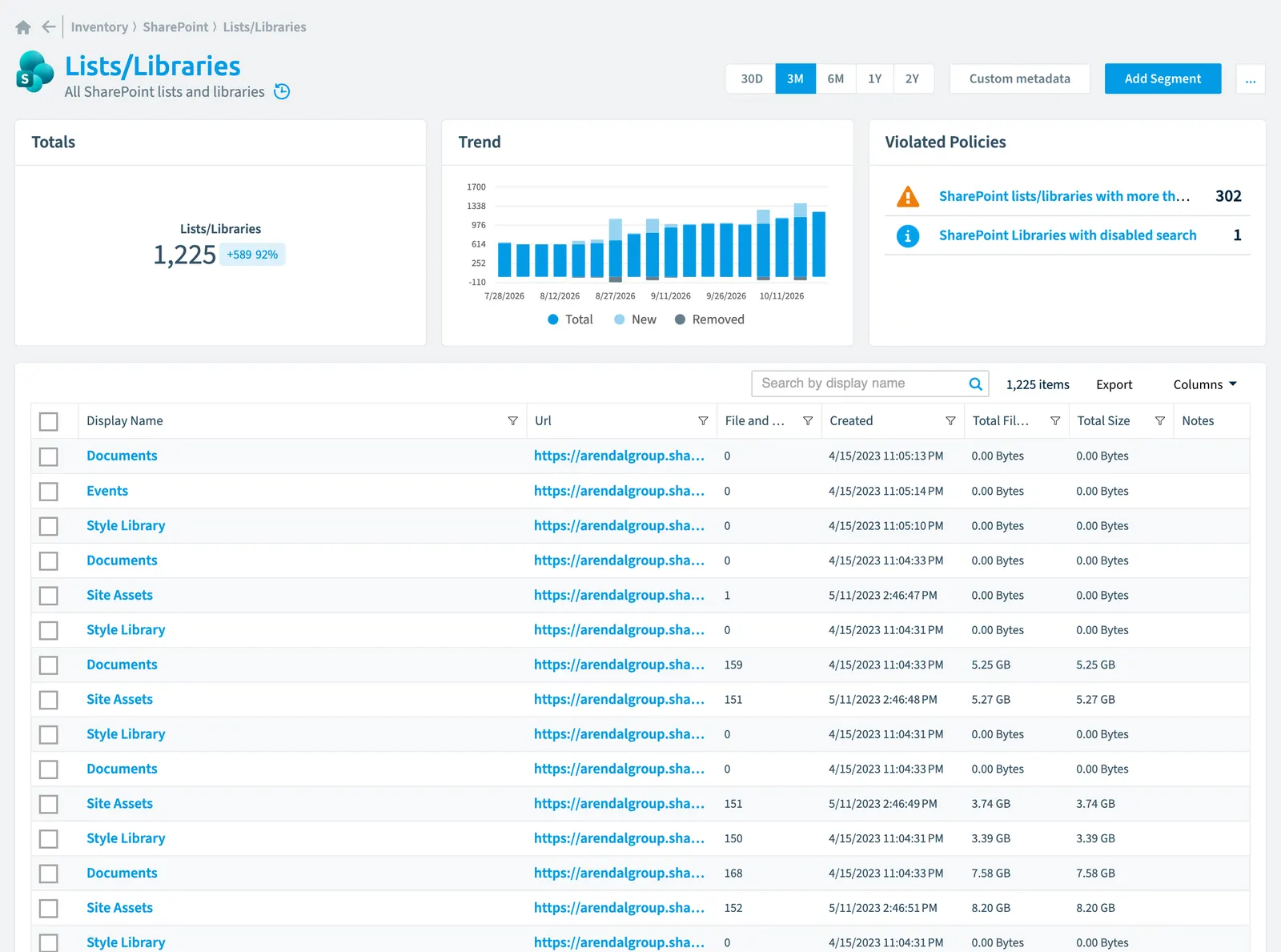
Rencore Governance inventories SharePoint lists and libraries, scanning them daily by default and tracking 40 properties across seven categories covering name, activity, security and compliance, and storage. The collected data includes versioning settings, item counts, risk scores, and sensitivity labels. You can view relationships to groups, users, flows, and files, and set policies to detect issues such as disabled search or libraries exceeding 5000 items.
All SharePoint lists and libraries
Part of the SharePoint inventory.
In Rencore Governance
Scan settings
| Default scanning interval | Allowed scanning intervals | Data removal during incremental scan |
|---|---|---|
| Daily | Daily, Weekly, Bi-Weekly, Monthly, Never, Initial | Yes |
Properties
40 properties in 7 groups. Open a group to see its properties.
Name and identity 10
| Property | Type | Description | Automation placeholder |
|---|---|---|---|
| Base Type | Int32 | The base type for the list.Represents an SP.BaseType value: Generic List = 0; Document Library = 1; Discussion Board = 3; Survey = 4; Issue = 5. | {{ListLibrary. |
| Description | String | Specifies the description of the list. | {{ListLibrary. |
| Display Name | String | {{ListLibrary. | |
| Enable Minor Versions | Boolean | When versioning is enabled for a document library (EnableVersioning=true), specifies whether the minor versions are enabled. | {{ListLibrary. |
| Enable Versioning | Boolean | Specifies whether versioning is enabled for the document library; true if versioning is enabled, otherwise false. | {{ListLibrary. |
| List Id | String | Unique identifier of the list. | {{ListLibrary. |
| Site CollectionSite collectionA site collection is the top-level SharePoint container that holds a root site, its subsites, lists, libraries and files.Read more Name | String | Name of the parent site collection. | {{ListLibrary. |
| Title | String | Display title for the list. | {{ListLibrary. |
| Url | String | Url of the list or library. | {{ListLibrary. |
| Site Name | String | Name of the parent site. | {{ListLibrary. |
Activity and usage 5
| Property | Type | Description | Automation placeholder |
|---|---|---|---|
| File and Folder Count | Int32 | Specifies the number of list items in the list. | {{ListLibrary. |
| Last Item Deleted | DateTime | Specifies the last time a list item was deleted from the list. It must return Created if no list item has been deleted from the list yet. | {{ListLibrary. |
| Last Item Modified | DateTime | The date and time that an item, field, or property of the list was last modified. | {{ListLibrary. |
| Last Item User Modified | DateTime | Specifies when an item of the list was last modified by a non-system update. A non-system update is a change to a list item that is visible to end users. If no item has been created in the list, the list creation time is returned. | {{ListLibrary. |
| Last scan update | DateTime | Shows when this object was last updated in a scan. If an object is found during a scan but no property has been changed this date will not change. | {{ListLibrary. |
Dates and scanning 2
| Property | Type | Description | Automation placeholder |
|---|---|---|---|
| Created | DateTime | Specifies when the list was created. | {{ListLibrary. |
| Initially Scanned | DateTime | Shows when this object was initially found in a scan. | {{ListLibrary. |
Security and compliance 7
| Property | Type | Description | Automation placeholder |
|---|---|---|---|
| Default Sensitivity LabelSensitivity labelA sensitivity label is a Microsoft Purview classification, such as Confidential or Internal, that an organization applies to content and to containers such as Teams and SharePoint sites.Read more | String | Sensitivity label that will be applied automatically when adding a new file to the library. | {{ListLibrary. |
| Disable Commenting | Boolean | Indicates whether comments feature can be used to comment item/documents in the library | {{ListLibrary. |
| Disable Grid Editing | Boolean | Sets whether the datasheet can be used to bulk edit data on this document library. Valid values are true or false. | {{ListLibrary. |
| Has Unique Role Assignments | Boolean | Specifies whether the list has unique security settings or whether it inherits its role assignments from a parent object. | {{ListLibrary. |
| Risk Score | Int32 | Stores risk score | {{ListLibrary. |
| Risk Score Update | DateTime | Stores risk score update | {{ListLibrary. |
| Risk Score Value | String | Stores risk score value like Low_Low | {{ListLibrary. |
Storage, licences and cost 4
| Property | Type | Description | Automation placeholder |
|---|---|---|---|
| Major Version Limit | Int32 | For document library that uses version control with major versions only, specifies the maximum number of major versions allowed for an item. | {{ListLibrary. |
| Major With Minor Versions Limit | Int32 | For a document library that uses version control with both major and minor versions, specifies the number of major versions allowed for an item. | {{ListLibrary. |
| Total File Size | Int64 | Aggregate stream size in bytes for all files under the corresponding folder and its sub-folders. Excludes version, metadata, list item attachment, and non-customized document sizes. | {{ListLibrary. |
| Total Size | Int64 | Aggregate of total sizes in bytes for all items under the corresponding folder and its sub-folders. Total size for a file/folder includes stream, version, and metadata sizes. | {{ListLibrary. |
Settings 4
| Property | Type | Description | Automation placeholder |
|---|---|---|---|
| Allow Content Types | Boolean | Specifies whether the list supports content types. | {{ListLibrary. |
| Base Template | Int32 | The list definition type on which the list is based. Represents a ListTemplateType value. | {{ListLibrary. |
| Enable Moderation | Boolean | Specifies whether the Content Approval feature is enabled for the list; true if approval feature is enabled, otherwise false. | {{ListLibrary. |
| List Experience Options | Int32 | Specifies the list to new experience, classic experience or default experience set by my administrator. | {{ListLibrary. |
Other properties 8
| Property | Type | Description | Automation placeholder |
|---|---|---|---|
| Enable Attachments | Boolean | Specifies whether attachments can be added to items in the list; true if attachments can be added, otherwise false. | {{ListLibrary. |
| Enable Folder Creation | Boolean | Specifies whether folders can be created in the list; true if folders can be created, otherwise false. | {{ListLibrary. |
| Exclude from Offline Client | Boolean | This property controls if a OneDrive Sync can be used for a site/list | {{ListLibrary. |
| Force Checkout | Boolean | Specifies whether Forced Checkout is enabled for the document library; true if forced checkout is enabled, otherwise false. | {{ListLibrary. |
| No Crawl | Boolean | True to specify that the list not be visible in search results; otherwise, false. | {{ListLibrary. |
| Site Collection | Site collection | RelationRelationA relation links one inventory object to another, such as a Team to its owners, members and channels.Read more to the parent site collection. | {{ListLibrary. |
| Site | Site | Relation to the parent site. | {{ListLibrary. |
Relations
| Relation | Connector | Description |
|---|---|---|
| Group | Microsoft 365Microsoft 365Microsoft 365 is the Microsoft cloud suite of Teams, SharePoint, OneDrive, Exchange and the Office apps.Read more | Group with an access to a list |
| User | Microsoft 365 | User with an access to a list (direct or via security groupSecurity groupA security group is a Microsoft Entra group that gives a set of users access to resources.Read more) |
| Flow | Power AutomatePower AutomatePower Automate, formerly Microsoft Flow, is the Microsoft low-code tool for automated workflows called flows.Read more | FlowsFlowA flow is a Power Automate workflow, made of a trigger and actions, that runs a task automatically across apps and services.Read more owned by the SharePoint list |
| Flow | Power Automate | Flows used by the SharePoint list |
| SharePoint group | SharePoint | SharePoint Group with an access to a list |
| SharePoint agent | SharePoint | SharePoint agents inside a list |
| SharePoint agent | SharePoint | SharePoint agents that use this list as source. |
| File sharing | SharePoint | All shared SharePoint files with their sharing information |
| File | SharePoint | |
| File | SharePoint | All SharePoint files stored in a library of a SharePoint site |
| Folder | SharePoint | |
| Folder | SharePoint | All SharePoint folders stored in a library of a SharePoint site |
| Site collection | SharePoint | All SharePoint site collections in your tenant |
| Site | SharePoint | All root site and subsites of a SharePoint site collection |
Segments
This object does currently not have any segments.
Actions
- Restore broken inheritancePermission inheritanceSharePoint sites, lists, folders and files inherit their permissions from their parent by default.Read more for SharePoint List
Policies that check this object
| Policy | Severity | Description |
|---|---|---|
| SharePoint libraries with disabled search | Information | Shows SharePoint Libraries where search has been disabled |
| SharePoint lists/libraries with more than 5000 items/documents | Medium | Shows SharePoint lists or libraries with more than 5000 items or documents |
Frequently asked questions
What is the list/library object in Rencore Governance?
All SharePoint lists and libraries. List/library is an object type in the SharePoint inventory of Rencore Governance.
Which properties does Rencore Governance collect for list/library?
Rencore Governance collects 40 properties for List/library, such as Allow Content Types, Base Template, Base Type and 37 more.
Which policies check list/library objects?
2 built-in policies check List/library objects, such as SharePoint libraries with disabled search and SharePoint lists/libraries with more than 5000 items/documents.
How often is list/library scanned?
By default daily. You can change the scan interval of List/library objects under Configure objects (daily, weekly, bi-weekly, monthly, never or initial (collected once)). The interval is a target, not a guarantee: a scan can run later than planned.
Which actions can I run on list/library objects?
The built-in actions for List/library objects are Restore broken inheritance for SharePoint List.
Was this page helpful?
Thanks for the feedback.
Thanks. What was wrong?