
Site
AI summary
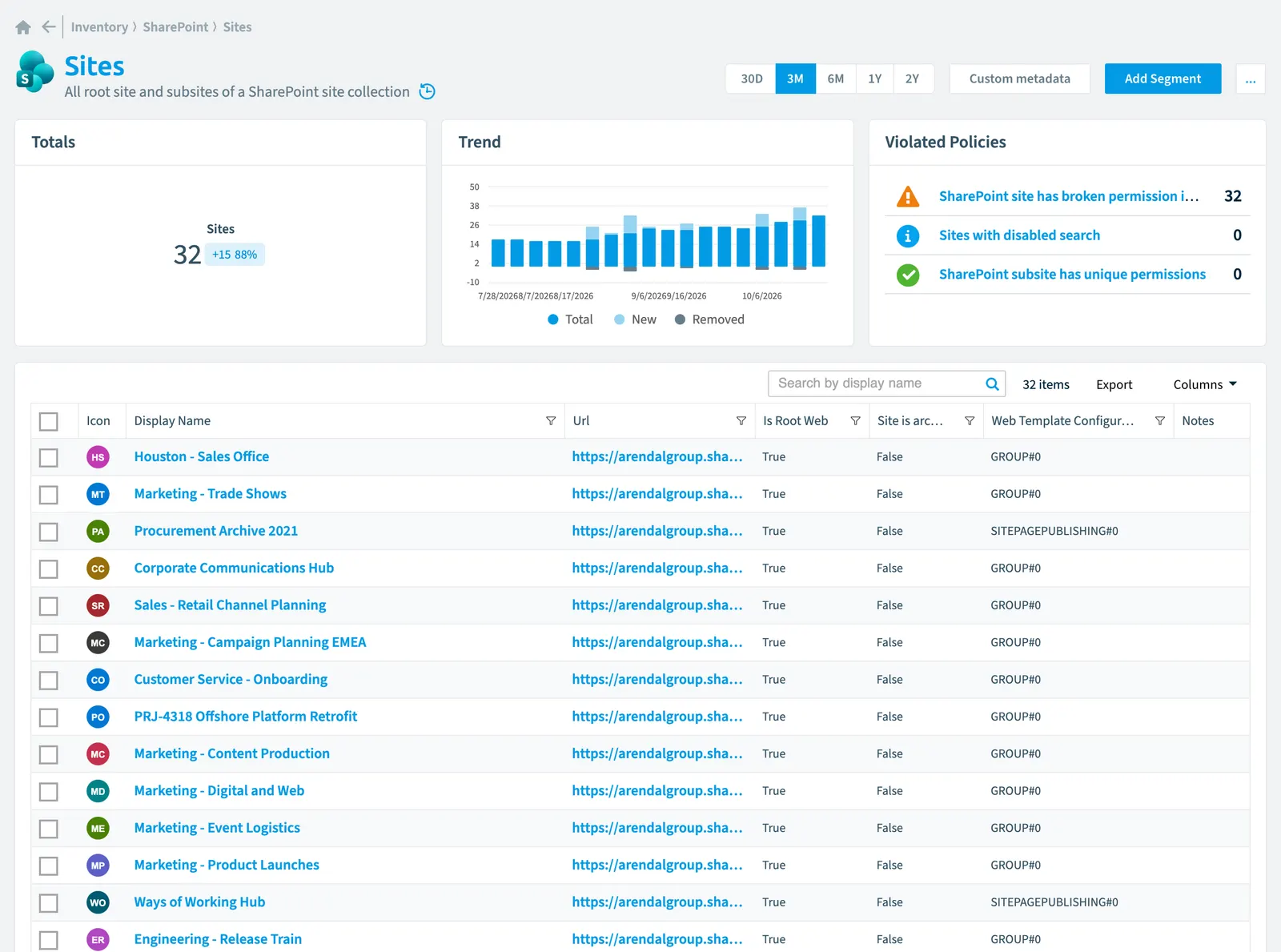
The Site object in Rencore Governance represents all SharePoint sites and subsites in your site collections. It tracks 29 properties related to security, compliance, activity, sharing, and settings through regular scans. You can use policies to detect governance risks such as disabled search, broken permission inheritance, and sites with unique permissions.
All root site and subsites of a SharePoint site collectionSite collectionA site collection is the top-level SharePoint container that holds a root site, its subsites, lists, libraries and files.Read more
Part of the SharePoint inventory.
In Rencore Governance
Scan settings
| Default scanning interval | Allowed scanning intervals | Data removal during incremental scan |
|---|---|---|
| Daily | Daily, Weekly, Bi-Weekly, Monthly, Never, Initial | Yes |
Properties
29 properties in 8 groups. Open a group to see its properties.
Name and identity 7
| Property | Type | Description | Automation placeholder |
|---|---|---|---|
| Description | String | Specifies the descriptive text for the site | {{Site. |
| Icon | String | Default scanning intervalScan intervalA scan interval is how often Rencore Governance aims to scan one object type, such as daily or weekly.Read more: Initial. | {{Site. |
| Display Name | String | {{Site. | |
| Id | String | Id of the site. | {{Site. |
| Master Url | String | Specifies the URL of the master page that is used for the website. | {{Site. |
| Site Logo Url | String | Specifies the absolute URL of the website logo. | {{Site. |
| Url | String | Specifies the URL of the site. | {{Site. |
Organization and location 1
| Property | Type | Description | Automation placeholder |
|---|---|---|---|
| Site Url | String | Name of the site collection. | {{Site. |
Activity and usage 2
| Property | Type | Description | Automation placeholder |
|---|---|---|---|
| Last scan update | DateTime | Shows when this object was last updated in a scan. If an object is found during a scan but no property has been changed this date will not change. | {{Site. |
| Last modified | DateTime | Specifies the date and time that an item was last modified in the site by a non-system update. A non-system update is a change to a list item that is visible to end users. | {{Site. |
Dates and scanning 2
| Property | Type | Description | Automation placeholder |
|---|---|---|---|
| Initially Scanned | DateTime | Shows when this object was initially found in a scan. | {{Site. |
| Created Date | DateTime | Specifies when the site was created. | {{Site. |
Sharing and access 2
| Property | Type | Description | Automation placeholder |
|---|---|---|---|
| Members Can Share | Boolean | Specifies whether to enable site members to invite external usersExternal userAn external user is an account whose home tenant belongs to another organization, invited into your tenant to work with you.Read more. | {{Site. |
| SharePoint Site Collection | Site collection | Sites in the SharePoint Site Collection | {{Site. |
Security and compliance 9
| Property | Type | Description | Automation placeholder |
|---|---|---|---|
| Comments On Site Pages Disable | Boolean | Indicates whether comments on site pages are disabled or not. | {{Site. |
| Disable App Views | Boolean | Indicates if UI elements to access Power PlatformPower PlatformPower Platform is the Microsoft low-code platform where users build their own apps, flows, reports, agents and websites.Read more Power app features have been enabled or disabled for the site collection. | {{Site. |
| Disable FlowsFlowA flow is a Power Automate workflow, made of a trigger and actions, that runs a task automatically across apps and services.Read more | Boolean | Indicates whether UI elements to access Power Platform flow features have been enabled or disabled for the site collection. | {{Site. |
| Has Unique Role Assignments | Boolean | Specifies whether the site has unique security settings or whether it inherits its role assignments from a parent object. | {{Site. |
| Mega Menu Enabled | Boolean | Indicates whether SharePoint navigation mega menu can be used for the site collection. | {{Site. |
| Quick Launch Enabled | Boolean | Specifies whether the Quick Launch area is enabled on the site. | {{Site. |
| Risk Score | Int32 | Stores risk score | {{Site. |
| Risk Score Update | DateTime | Stores risk score update | {{Site. |
| Risk Score Value | String | Stores risk score value like Low_Low | {{Site. |
Settings 3
| Property | Type | Description | Automation placeholder |
|---|---|---|---|
| Site is archived | Boolean | Shows this site archive state. | {{Site. |
| Is Root Web | Boolean | Indicates whether the site is the top-level website of the site collection. | {{Site. |
| Web Template Configuration | String | Indicates the site template of the site collection. A Site template is a container of pre-populated pages, page templates, news post templates, and web parts that can be customized to fit the needs of your organization.A site template can be only be set before creating a SharePoint Site/Site Collection. | {{Site. |
Other properties 3
| Property | Type | Description | Automation placeholder |
|---|---|---|---|
| Exclude from Offline Client | Boolean | This property controls if a OneDrive Sync can be used for a site/list | {{Site. |
| No Crawl | Boolean | Specifies whether searching is enabled for the Web site. | {{Site. |
| Welcome Page | String | Specifies the URL of the Welcome page for the site. | {{Site. |
Relations
| Relation | Connector | Description |
|---|---|---|
| Deleted group | Microsoft 365Microsoft 365Microsoft 365 is the Microsoft cloud suite of Teams, SharePoint, OneDrive, Exchange and the Office apps.Read more | All groups that have been deleted from your tenant |
| Group | Microsoft 365 | All Entra IDMicrosoft Entra IDMicrosoft Entra ID, formerly Azure Active Directory, is the Microsoft identity service behind every Microsoft 365 tenant.Read more groups in your Tenant (Security groupsSecurity groupA security group is a Microsoft Entra group that gives a set of users access to resources.Read more, Microsoft 365 groupsMicrosoft 365 groupA Microsoft 365 Group is the membership object behind many Microsoft 365 workspaces.Read more) |
| Group | Microsoft 365 | Administrator security groups of a site |
| Group | Microsoft 365 | Member security groups of a site |
| Group | Microsoft 365 | Owner security groups of a site |
| Group | Microsoft 365 | Visitor security groups of a site |
| Group | Microsoft 365 | Group with an access to a Web |
| User | Microsoft 365 | Admins of a site (direct or via security group) |
| User | Microsoft 365 | Members of a site (direct or via security group) |
| User | Microsoft 365 | Owners of a site (direct or via security group) |
| User | Microsoft 365 | Visitors of a site (direct or via security group) |
| User | Microsoft 365 | User with an access to a Web |
| SharePoint group | SharePoint | SharePoint Group with an access to a Web |
| SharePoint agent | SharePoint | SharePoint agents that use this site as source. |
| File sharing | SharePoint | All shared SharePoint files with their sharing information |
| List/library | SharePoint | All SharePoint lists and libraries |
| File | SharePoint | All SharePoint files stored in a library of a SharePoint site |
| Folder | SharePoint | All SharePoint folders stored in a library of a SharePoint site |
| Site collection | SharePoint | All SharePoint site collections in your tenant |
| SharePoint special group | SharePoint | Special group members of a site (direct or via security group) |
| SharePoint special group | SharePoint | Special group owners of a site (direct or via security group) |
| SharePoint special group | SharePoint | Special group visitors of a site (direct or via security group) |
| Team | TeamsMicrosoft TeamsMicrosoft Teams is the Microsoft 365 app for chat, meetings and team collaboration.Read more | All teams in your tenant |
Segments
This object does currently not have any segments.
Actions
- Restore broken inheritancePermission inheritanceSharePoint sites, lists, folders and files inherit their permissions from their parent by default.Read more for SharePoint Site
Policies that check this object
| Policy | Severity | Description |
|---|---|---|
| Sites with disabled search | Information | Shows SharePoint Sites where search has been disabled |
| SharePoint site has broken permission inheritance | Medium | Detects SharePoint sites where permission inheritance is broken, increasing security risks. |
| SharePoint subsite has unique permissions | Medium | Detects SharePoint subsitesSubsiteA subsite is a site created under another SharePoint site in the same site collection.Read more that have unique permissions, making security management complex. |
Frequently asked questions
What is the site object in Rencore Governance?
All root site and subsites of a SharePoint site collection. Site is an object type in the SharePoint inventory of Rencore Governance.
Which properties does Rencore Governance collect for site?
Rencore Governance collects 29 properties for Site, such as Comments On Site Pages Disable, Initially Scanned, Description and 26 more.
Which policies check site objects?
3 built-in policies check Site objects, such as Sites with disabled search, SharePoint site has broken permission inheritance and SharePoint subsite has unique permissions.
How often is site scanned?
By default daily. You can change the scan interval of Site objects under Configure objects (daily, weekly, bi-weekly, monthly, never or initial (collected once)). The interval is a target, not a guarantee: a scan can run later than planned.
Which actions can I run on site objects?
The built-in actions for Site objects are Restore broken inheritance for SharePoint Site.
Was this page helpful?
Thanks for the feedback.
Thanks. What was wrong?