
SharePoint agent
AI summary
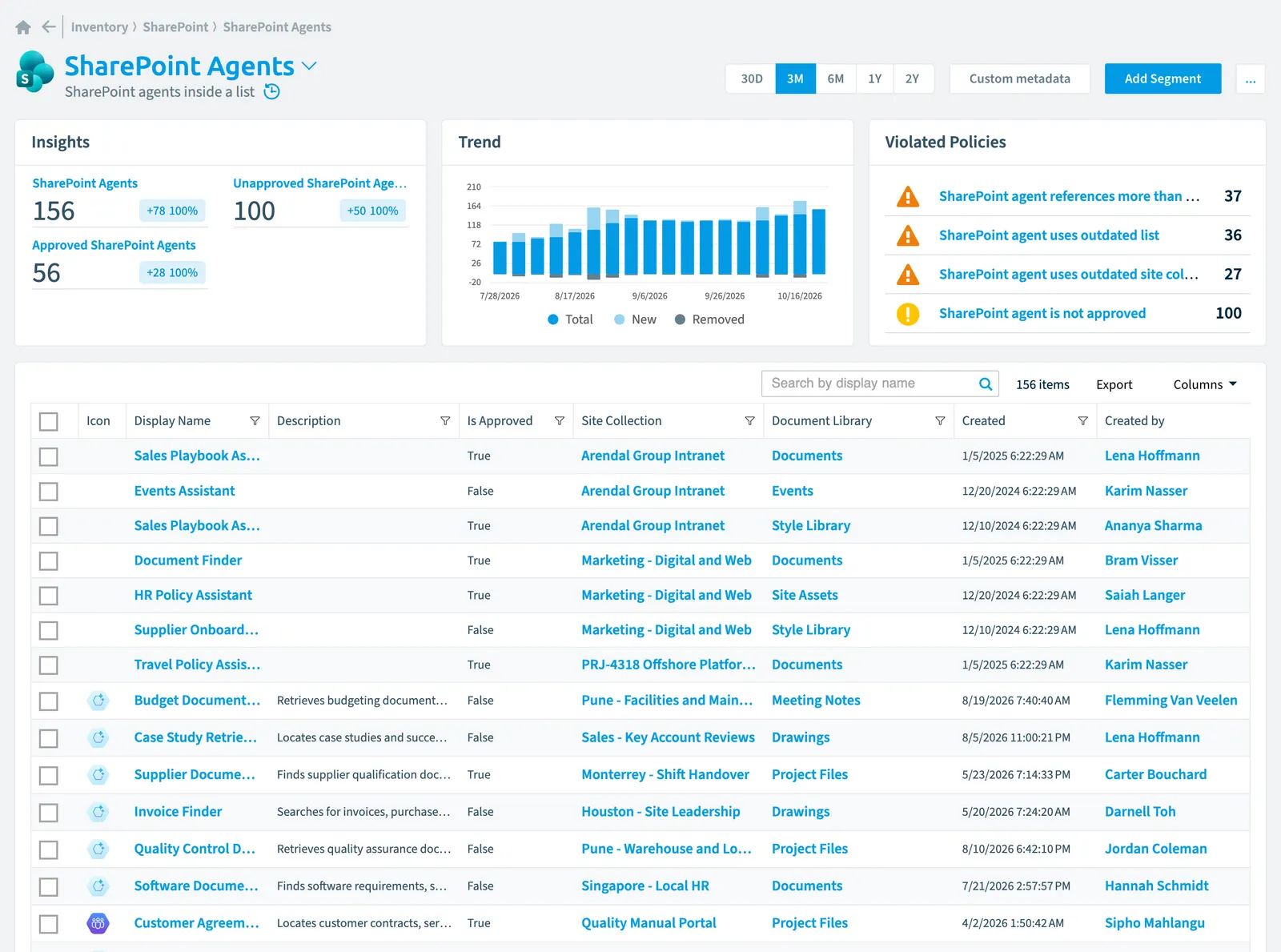
SharePoint agents are tracked inventory objects that reference SharePoint resources and are checked for governance compliance. The agent data model includes properties, relationships to other SharePoint objects, approval status segments, and policies that identify risks such as agents accessing outdated resources or confidential sites without proper approval. Understanding how agents are tracked and which compliance rules apply helps you monitor governance across your SharePoint environment.
SharePoint agents inside a list
Part of the SharePoint inventory.
In Rencore Governance
Scan settings
| Default scanning interval | Allowed scanning intervals | Data removal during incremental scan |
|---|---|---|
| Daily | Daily, Weekly, Bi-Weekly, Monthly, Never, Initial | No |
Properties
| Property | Type | Description | Automation placeholder |
|---|---|---|---|
| Created | DateTime | Creation date of the agent | {{SharePointAgent. |
| Created by | User | File Creator | {{SharePointAgent. |
| Created by | String | File Creator | {{SharePointAgent. |
| Initially Scanned | DateTime | Shows when this object was initially found in a scan. | {{SharePointAgent. |
| Description | String | Description of the agent. | {{SharePointAgent. |
| Icon | String | {{SharePointAgent. | |
| Display Name | String | {{SharePointAgent. | |
| Instructions | String | Instructions of the agent. | {{SharePointAgent. |
| Is Approved | Boolean | True if agent is approved. | {{SharePointAgent. |
| Last scan update | DateTime | Shows when this object was last updated in a scan. If an object is found during a scan but no property has been changed this date will not change. | {{SharePointAgent. |
| Document Library | List/library | RelationRelationA relation links one inventory object to another, such as a Team to its owners, members and channels.Read more to the parent document library. | {{SharePointAgent. |
| Document Library Name | String | Name of the parent document library. | {{SharePointAgent. |
| Modified | DateTime | The date the agent was last changed. | {{SharePointAgent. |
| Modified by | User | Agent last modified by the user | {{SharePointAgent. |
| Modified by | String | Name of the user who last modified the agent | {{SharePointAgent. |
| Risk Score | Int32 | Stores risk score | {{SharePointAgent. |
| Risk Score Update | DateTime | Stores risk score update | {{SharePointAgent. |
| Risk Score Value | String | Stores risk score value like Low_Low | {{SharePointAgent. |
| Url | String | Url of the agent. | {{SharePointAgent. |
| Site CollectionSite collectionA site collection is the top-level SharePoint container that holds a root site, its subsites, lists, libraries and files.Read more | Site collection | Relation to the parent site collection. | {{SharePointAgent. |
| Site Collection Url | String | Name of the parent site collection. | {{SharePointAgent. |
Relations
| Relation | Connector | Description |
|---|---|---|
| User | Microsoft 365Microsoft 365Microsoft 365 is the Microsoft cloud suite of Teams, SharePoint, OneDrive, Exchange and the Office apps.Read more | All users registered in your tenant (internal, external) |
| User | Microsoft 365 | All users registered in your tenant (internal, external) |
| List/library | SharePoint | All SharePoint lists and libraries |
| List/library | SharePoint | SharePoint lists which are used by the SharePoint agent. |
| File | SharePoint | SharePoint files which are used by the SharePoint agent. |
| Folder | SharePoint | SharePoint folders which are used by the SharePoint agent. |
| Site collection | SharePoint | All SharePoint site collections in your tenant |
| Site collection | SharePoint | Site collections which are used by the SharePoint agent |
| Site | SharePoint | Sites which are used by the SharePoint agent |
Segments
| Segment | Description |
|---|---|
| Approved SharePoint Agents | Identifies SharePoint agents which have been approved |
| Unapproved SharePoint Agents | Identifies SharePoint agents which have not been approved |
Actions
This object does currently not have any actions.
Policies that check this object
| Policy | Severity | Description |
|---|---|---|
| SharePoint agent references more than two site collections | Medium | Identifies SharePoint agents accessing data from more than two site collections, potentially leading to governance and accuracy issues. |
| SharePoint agent uses outdated site collection | Medium | Identifies SharePoint agents linked to site collections that have not been modified in over a year, increasing response inaccuracy risks. |
| SharePoint agent uses outdated list | Medium | Detects SharePoint agents relying on lists that have not been updated in over a year, affecting AI accuracy. |
| SharePoint agent references confidential site without approval | High | Identifies SharePoint agents connected to confidential sites without approval, increasing the risk of unauthorized AI-generated responses. |
| SharePoint agent is not approved | Low | Identifies SharePoint agents that have not been reviewed or approved before use, posing security risks. |
Frequently asked questions
What is the SharePoint agent object in Rencore Governance?
What is the SharePoint agent object in Rencore Governance?SharePoint agents inside a list. SharePoint agent is an object type in the SharePoint inventory of Rencore Governance.
Which properties does Rencore Governance collect for SharePoint agent?
Which properties does Rencore Governance collect for SharePoint agent?Rencore Governance collects 21 properties for SharePoint agent, such as Created, Created by, Initially Scanned and 16 more.
Which policies check SharePoint agent objects?
Which policies check SharePoint agent objects?5 built-in policies check SharePoint agent objects, such as SharePoint agent references more than two site collections, SharePoint agent uses outdated site collection and 3 more.
How often is SharePoint agent scanned?
How often is SharePoint agent scanned?By default daily. You can change the scan interval of SharePoint agent objects under Configure objects (daily, weekly, bi-weekly, monthly, never or initial (collected once)). The interval is a target, not a guarantee: a scan can run later than planned.
Which module includes the SharePoint connector?
Which module includes the SharePoint connector?The SharePoint connector is part of the Digital Workplace module of Rencore Governance, which every Plan includes. The connector is generally available.
Was this page helpful?
Thanks for the feedback.
Thanks. What was wrong?