
Deleted site collection
AI summary
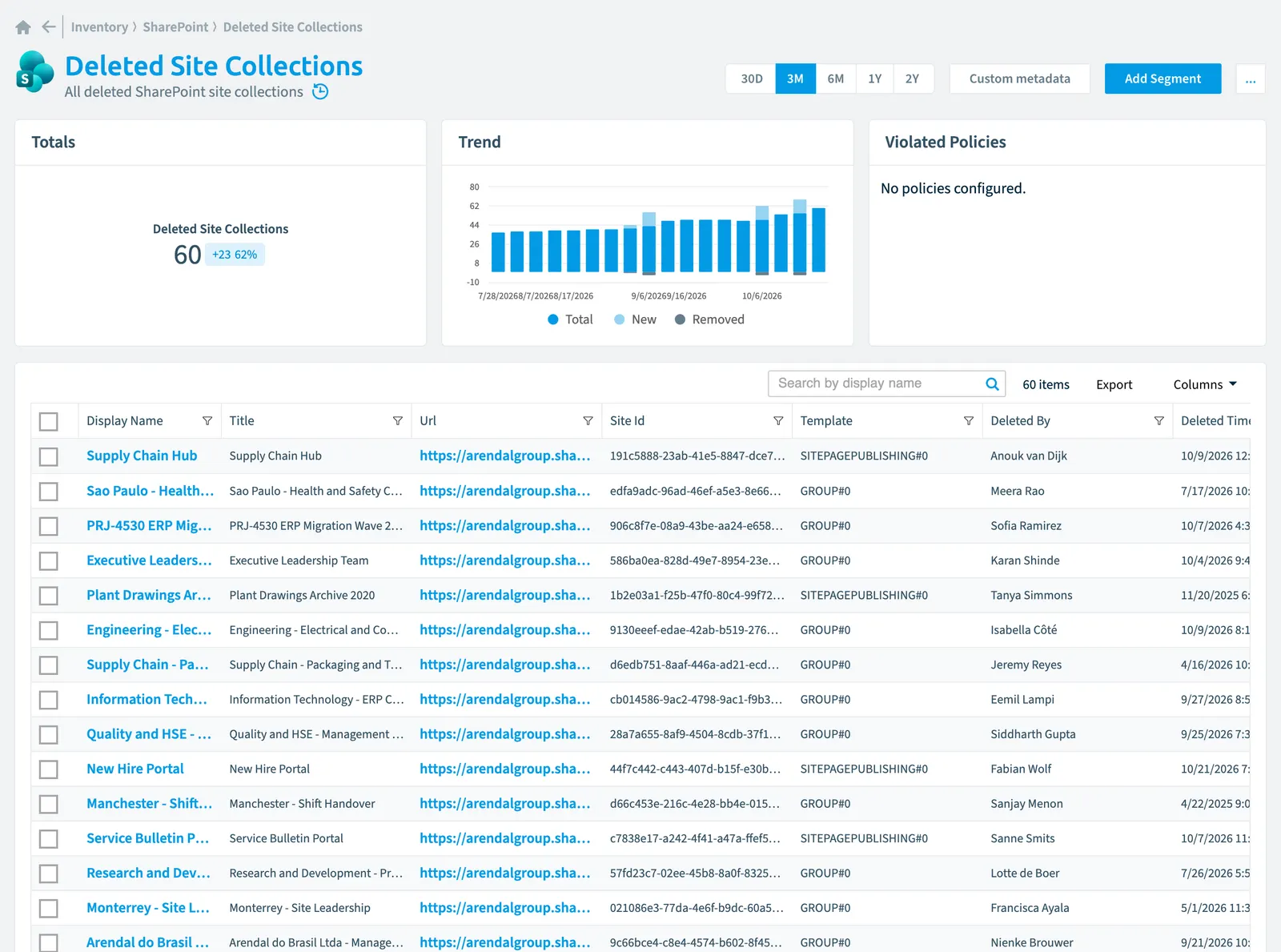
Rencore's inventory tracks deleted SharePoint site collections with 29 properties across 8 categories: identity, organization, activity, dates, sharing, security, storage, and settings. You can see details such as when a site was deleted and by whom, last activity dates, risk scores, and sharing permissions. The inventory also provides an action to restore deleted site collections from the recycle bin.
All deleted SharePoint site collectionsSite collectionA site collection is the top-level SharePoint container that holds a root site, its subsites, lists, libraries and files.Read more
Part of the SharePoint inventory.
In Rencore Governance
Scan settings
| Default scanning interval | Allowed scanning intervals | Data removal during incremental scan |
|---|---|---|
| Daily | Daily, Weekly, Bi-Weekly, Monthly, Never, Initial | Yes |
Properties
29 properties in 8 groups. Open a group to see its properties.
Name and identity 5
| Property | Type | Description | Automation placeholder |
|---|---|---|---|
| Display Name | String | {{DeletedSiteCollection. | |
| Group Id | String | ID of the M365 groupMicrosoft 365 groupA Microsoft 365 Group is the membership object behind many Microsoft 365 workspaces.Read more connected to the site collection. | {{DeletedSiteCollection. |
| Site Id | String | GUID that identifies the site collection. | {{DeletedSiteCollection. |
| Title | String | Specifies the title of the site collection. | {{DeletedSiteCollection. |
| Url | String | Full URL to the root Web site of the site collection. | {{DeletedSiteCollection. |
Organization and location 1
| Property | Type | Description | Automation placeholder |
|---|---|---|---|
| Hub Site Id | String | ID of the parent hub site collection. | {{DeletedSiteCollection. |
Activity and usage 6
| Property | Type | Description | Automation placeholder |
|---|---|---|---|
| Last scan update | DateTime | Shows when this object was last updated in a scan. If an object is found during a scan but no property has been changed this date will not change. | {{DeletedSiteCollection. |
| Last Used | DateTime | The date of the last time file activity was detected or a page was viewed on the site collection. This is the same value as in SharePoint admin centerAdmin centerAn admin center is the web portal where administrators manage one Microsoft service, such as the Microsoft 365 admin center, the Teams admin center or the Microsoft Entra admin center.Read more and is not being updated every 24 hours (same as in admin center). | {{DeletedSiteCollection. |
| Last Used Days Ago | Int32 | The number of days the last time file activity was detected or a page was viewed on the site collection. This is the same value as in SharePoint admin center and is not being updated every 24 hours (same as in admin center). | {{DeletedSiteCollection. |
| Page views in the last 30 days | Int32 | The number of times pages were viewed on the site collection in last 7 days. | {{DeletedSiteCollection. |
| Page visits in the last 30 days | Int32 | The number of unique pages that were visited on the site collection in last 7 days. | {{DeletedSiteCollection. |
| Last modified | DateTime | Last modified date of the site collection properties. This will update only when editing site collection properties (excluding permission changes) and will not update when editing any content (e.g. List Items and Files). | {{DeletedSiteCollection. |
Dates and scanning 4
| Property | Type | Description | Automation placeholder |
|---|---|---|---|
| Initially Scanned | DateTime | Shows when this object was initially found in a scan. | {{DeletedSiteCollection. |
| Deleted By | String | The name of the user who deleted this item. | {{DeletedSiteCollection. |
| Deleted Time | DateTime | When this item was deleted. | {{DeletedSiteCollection. |
| Created Date | DateTime | Creation date of the site collection. | {{DeletedSiteCollection. |
Sharing and access 2
| Property | Type | Description | Automation placeholder |
|---|---|---|---|
| Allow Guest UserExternal userAn external user is an account whose home tenant belongs to another organization, invited into your tenant to work with you.Read more SignIn | Boolean | External users are allowed to access the site collection. | {{DeletedSiteCollection. |
| External SharingSharing linkA sharing link is a link in SharePoint or OneDrive that grants access to a file or folder, sometimes to people outside your organization.Read more | String | Shows the external content can be shared with external users. | {{DeletedSiteCollection. |
Security and compliance 6
| Property | Type | Description | Automation placeholder |
|---|---|---|---|
| Risk Score | Int32 | Stores risk score | {{DeletedSiteCollection. |
| Risk Score Update | DateTime | Stores risk score update | {{DeletedSiteCollection. |
| Risk Score Value | String | Stores risk score value like Low_Low | {{DeletedSiteCollection. |
| Sensitivity LabelSensitivity labelA sensitivity label is a Microsoft Purview classification, such as Confidential or Internal, that an organization applies to content and to containers such as Teams and SharePoint sites.Read more | String | The display name of the sensitivity label applied to the site collection. | {{DeletedSiteCollection. |
| Share By Email Enabled | Boolean | When true, users will be able to grant permissions to guests for resources within the site collection. | {{DeletedSiteCollection. |
| Share By Link Enabled | Boolean | Specifies whether the user will be able to share links to the documents that can be accessed without signing in. | {{DeletedSiteCollection. |
Storage, licences and cost 3
| Property | Type | Description | Automation placeholder |
|---|---|---|---|
| Storage QuotaStorage limitA storage limit, or quota, caps how much space a SharePoint site or a OneDrive can use from the storage of your tenant.Read more | Double | Specifies the storage quota for this site collection in megabytes. | {{DeletedSiteCollection. |
| Storage used | Double | The amount of storage currently being used on the site collection. | {{DeletedSiteCollection. |
| Percent of storage used | Double | The percentage of storage currently being used on the site collection based on the maximum usable storage quota. | {{DeletedSiteCollection. |
Settings 2
| Property | Type | Description | Automation placeholder |
|---|---|---|---|
| Is Group Connected | Boolean | Indicates of a site collection has been connected to an M365 group. | {{DeletedSiteCollection. |
| Template | String | Indicates the site template of the site collection. A Site template is a container of pre - populated pages, page templates, news post templates, and web parts that can be customized to fit the needs of your organization. A site template can be only be set before creating a SharePoint Site/Site Collection. | {{DeletedSiteCollection. |
Relations
This object does currently not have any relations.
Segments
This object does currently not have any segments.
Actions
- Restore Site Collection from recycle bin
Frequently asked questions
What is the deleted site collection object in Rencore Governance?
All deleted SharePoint site collections. Deleted site collection is an object type in the SharePoint inventory of Rencore Governance.
Which properties does Rencore Governance collect for deleted site collection?
Rencore Governance collects 29 properties for Deleted site collection, such as Allow Guest User SignIn, Initially Scanned, Deleted By and 26 more.
How often is deleted site collection scanned?
By default daily. You can change the scan interval of Deleted site collection objects under Configure objects (daily, weekly, bi-weekly, monthly, never or initial (collected once)). The interval is a target, not a guarantee: a scan can run later than planned.
Which actions can I run on deleted site collection objects?
The built-in actions for Deleted site collection objects are Restore Site Collection from recycle bin.
Which module includes the SharePoint connector?
Which module includes the SharePoint connector?The SharePoint connector is part of the Digital Workplace module of Rencore Governance, which every Plan includes. The connector is generally available.
Was this page helpful?
Thanks for the feedback.
Thanks. What was wrong?