
Flow
AI summary
Rencore Governance scans all Power Automate Flows in your tenant and tracks properties like creator, connections, actions, and state. You can use predefined policies to identify flows that need attention, such as stopped flows, flows with many runs, or flows requiring premium licenses. The system maintains flow metadata and relationships to users, groups, environments, and other objects.
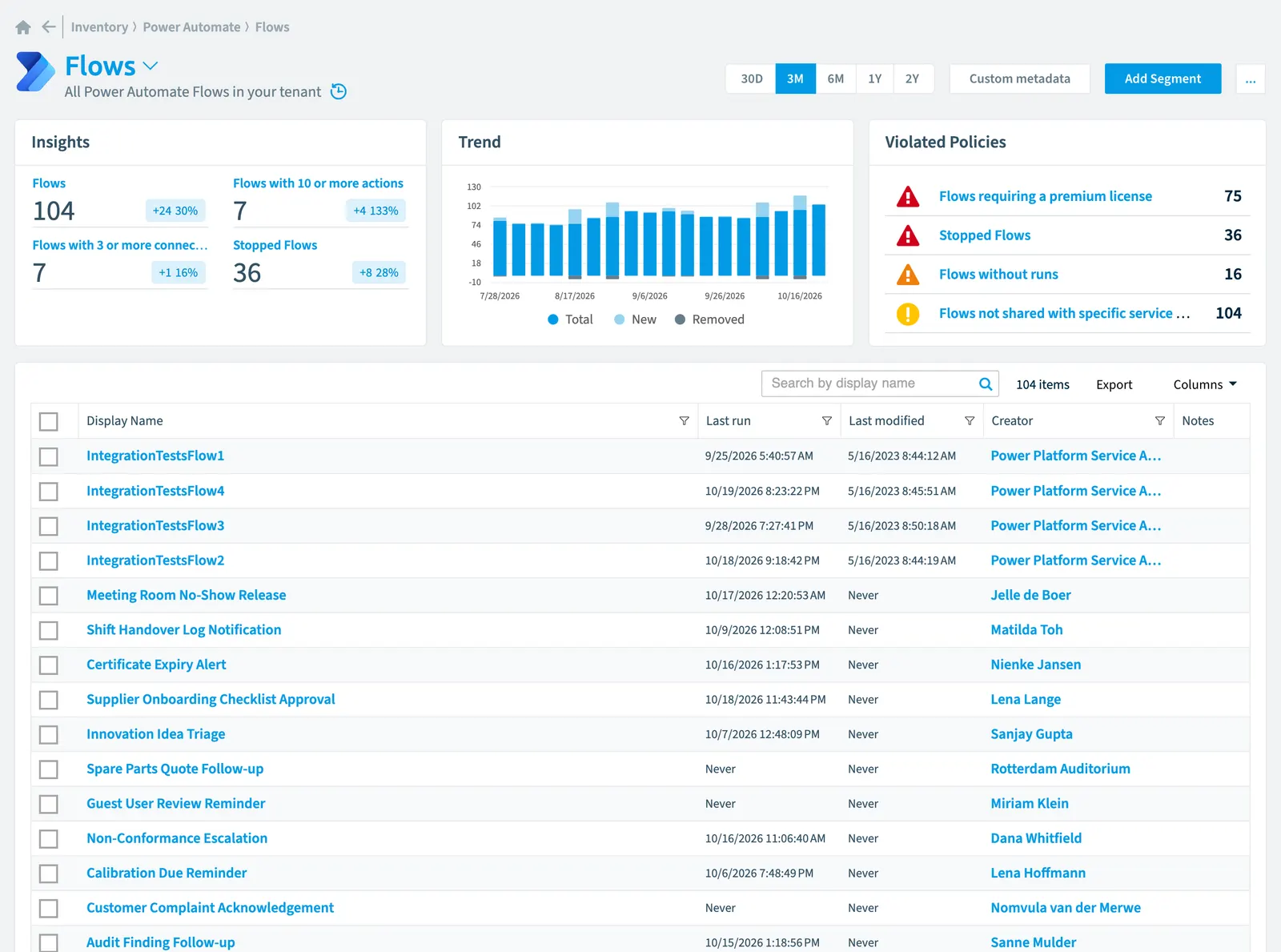
All Power Automate FlowsFlowA flow is a Power Automate workflow, made of a trigger and actions, that runs a task automatically across apps and services.Read more in your tenant
Part of the Power Automate inventory.
In Rencore Governance
Scan settings
| Default scanning interval | Allowed scanning intervals | Data removal during incremental scan |
|---|---|---|
| Daily | Daily, Weekly, Bi-Weekly, Monthly, Never, Initial | Yes |
Properties
| Property | Type | Description | Automation placeholder |
|---|---|---|---|
| Actions Count | Int32 | Number of actions used in the flow | {{Flow. |
| ApiId | String | API path of the flow | {{Flow. |
| Connections Count | Int32 | Number of connections used in the flow | {{Flow. |
| Initially Scanned | DateTime | Shows when this object was initially found in a scan. | {{Flow. |
| Creator | User | Flows created by the user. Default scanning intervalScan intervalA scan interval is how often Rencore Governance aims to scan one object type, such as daily or weekly.Read more: Initial Default scanning interval: Initial. | {{Flow. |
| Creator name | String | Name of the flow creator. | {{Flow. |
| Creator Tenant IdTenant IDThe tenant ID is the GUID that identifies your Microsoft Entra tenant.Read more | String | Tenant ID of the user who created the flow | {{Flow. |
| Creator User Id | String | User Id of the user who created the flow | {{Flow. |
| Creator User Type | String | User Type of the user who created the flow | {{Flow. |
| Display Name | String | Display name of the flow | {{Flow. |
| Flow EnvironmentEnvironmentAn Environment is the connected Microsoft 365 tenant inside a Workspace.Read more | Environment | Flows in this environment. Default scanning interval: Initial Default scanning interval: Initial. | {{Flow. |
| Environment Name | String | Flow Environment Name of the environment where the flow is saved in | {{Flow. |
| Environment Url | String | Flow Environment Url of the environment where the flow is saved in | {{Flow. |
| Created Date | DateTime | Creation Date of the flow | {{Flow. |
| Last modified | DateTime | Date when the flow was last modified by a user | {{Flow. |
| Last scan update | DateTime | Shows when this object was last updated in a scan. If an object is found during a scan but no property has been changed this date will not change. | {{Flow. |
| Last run | DateTime | Date when the flow last ran | {{Flow. |
| ObjectId | String | Object Id of the flow | {{Flow. |
| Provisioning Method | String | Provisioning method of the flow | {{Flow. |
| Risk Score | Int32 | Stores risk score | {{Flow. |
| Risk Score Update | DateTime | Stores risk score update | {{Flow. |
| Risk Score Value | String | Stores risk score value like Low_Low | {{Flow. |
| State | String | State of the flow. Possible values: Started, Stopped, Suspended Allowed values: Started, Stopped, Suspended. | {{Flow. |
Relations
| Relation | Connector | Description |
|---|---|---|
| Group | Microsoft 365Microsoft 365Microsoft 365 is the Microsoft cloud suite of Teams, SharePoint, OneDrive, Exchange and the Office apps.Read more | Groups that own the Flow |
| Group | Microsoft 365 | Groups that can use the Flow |
| User | Microsoft 365 | Users that own the Flow (direct or via security groupSecurity groupA security group is a Microsoft Entra group that gives a set of users access to resources.Read more) |
| User | Microsoft 365 | Users that own the Flow (direct or via security group) |
| User | Microsoft 365 | Users that can use the Flow (direct) |
| User | Microsoft 365 | Users that can use the Flow (direct or via security group) |
| User | Microsoft 365 | All users registered in your tenant (internal, external) |
| Action | Power AutomatePower AutomatePower Automate, formerly Microsoft Flow, is the Microsoft low-code tool for automated workflows called flows.Read more | Actions used in the Flow |
| Connection | Power Automate | ConnectionsConnectionA connection is the stored, signed-in link that a Power App or a flow uses to reach a data source through a connector.Read more used in the Flow |
| Environment | Power Automate | All Power Automate environmentsPower Platform environmentA Power Platform environment is a container in Microsoft Power Platform that holds apps, flows, agents and their data, often with its own Dataverse database.Read more in your tenant |
| Run | Power Automate | All Flow Runs of your Flows |
| Trigger | Power Automate | Triggers used in the Flow |
| List/library | SharePoint | SharePoint lists that own the Flow |
| List/library | SharePoint | SharePoint lists that use the Flow |
Segments
| Segment | Description |
|---|---|
| Flows with 10 or more actions | All complex flows |
| Flows with 3 or more connections | All Flows that user combine many services |
| Stopped flows | All stopped Flows |
Actions
This object does currently not have any actions.
Policies that check this object
| Policy | Severity | Description |
|---|---|---|
| Flows with many runs in last 30 days | Information | Shows flows with run count exceeds defined value (default 100 runs) |
| Flows requiring a premium license | High | Shows Flows with premium connectors, premium actions or premium triggers (e.g. common data service) |
| Complex flows | Information | Flows with many actions (default 20+), that might require additional documentation |
| Long running flows | High | Shows Flows that ran for a longer period (default 3 hours) |
| Flows with errors | Low | Shows Flows that have failed runs and might not function as intended |
| Flows not shared with specific service account | Low | Shows all Flows that are not shared with a specified service account (adjust account in Policy) |
| Stopped flows | High | Shows Flows that have stopped |
| Flows without runs | Medium | Shows Flows that have never been used. Warning: Flows with runs that happened before the first flow scan of Rencore Governance occurred will not be found. |
| New flows | Information | Shows Flows created in the last defined number of days (default 30 days) |
| Flows that use a specific connector | Low | Shows Flows that use a specific connector (default Twitter) |
| Unused flows | Information | Shows Flows created more than 30 days ago that haven't run in more than 180 days |
| Flows without owners | Information | Shows Flows that have no Flow Owners |
| Stopped flows last week with errors | High | Shows Flows that have stopped |
Frequently asked questions
What is the flow object in Rencore Governance?
All Power Automate Flows in your tenant. Flow is an object type in the Power Automate inventory of Rencore Governance.
Which properties does Rencore Governance collect for flow?
Rencore Governance collects 23 properties for Flow, such as Actions Count, ApiId, Connections Count and 20 more.
Which policies check flow objects?
13 built-in policies check Flow objects, such as Flows with many runs in last 30 days, Flows requiring a premium license and 11 more.
How often is flow scanned?
By default daily. You can change the scan interval of Flow objects under Configure objects (daily, weekly, bi-weekly, monthly, never or initial (collected once)). The interval is a target, not a guarantee: a scan can run later than planned.
Which module includes the Power Automate connector?
Which module includes the Power Automate connector?The Power Automate connector is part of the Apps, Automation & BI module of Rencore Governance, an add-on module on the Premium and Enterprise Plans. The connector is generally available.
Was this page helpful?
Thanks for the feedback.
Thanks. What was wrong?