
Deleted user
AI summary
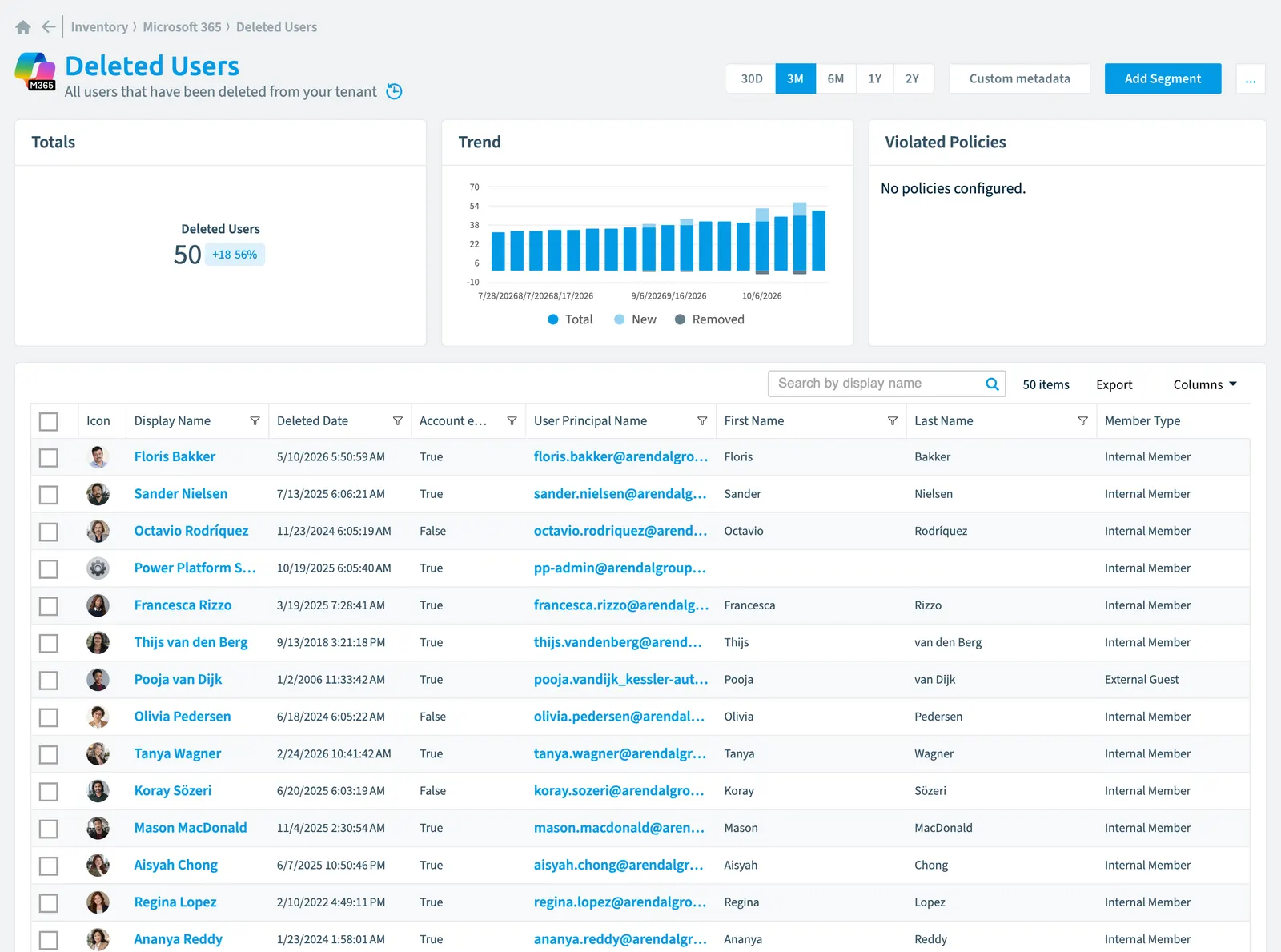
Review user accounts deleted from your tenant in the Microsoft 365 inventory. Rencore Governance tracks 56 properties for each deleted user across seven categories including identity information, location, activity, sign-in history, security status, and custom attributes. You can adjust scanning intervals and choose whether data is removed during incremental scans.
All users that have been deleted from your tenant
Part of the Microsoft 365 inventory.
In Rencore Governance
Scan settings
| Default scanning interval | Allowed scanning intervals | Data removal during incremental scan |
|---|---|---|
| Daily | Daily, Weekly, Bi-Weekly, Monthly, Never, Initial | Yes |
Properties
56 properties in 7 groups. Open a group to see its properties.
Name and identity 13
| Property | Type | Description | Automation placeholder |
|---|---|---|---|
| Creation Type | String | Indicates whether the user account was created as a regular school or work account (null), an external account (Invitation), a local account for an Microsoft Entra IDMicrosoft Entra IDMicrosoft Entra ID, formerly Azure Active Directory, is the Microsoft identity service behind every Microsoft 365 tenant.Read more B2C tenant (LocalAccount) or self-service sign-up using email verification (EmailVerified). | {{DeletedUser. |
| Icon | String | Default scanning intervalScan intervalA scan interval is how often Rencore Governance aims to scan one object type, such as daily or weekly.Read more: Initial. | {{DeletedUser. |
| Display Name | String | {{DeletedUser. | |
| First Name | String | The given name (first name) of the user | {{DeletedUser. |
| Last Name | String | The user's surname | {{DeletedUser. |
| On-premises Distinguished Name | String | Contains the on-premises Active Directory distinguished name or DN. The property is only populated for customers who are synchronizing their on-premises directory to Microsoft Entra ID via Entra ID Connect. | {{DeletedUser. |
| On-premises sAMAccountName | String | Contains the on-premises sAMAccountName synchronized from the on-premises directory. The property is only populated for customers who are synchronizing their on-premises directory to Microsoft Entra ID via Entra ID Connect | {{DeletedUser. |
| Type | String | A custom security attribute that is assigned to a directory object | {{DeletedUser. |
| User Email | String | The SMTP address for the user | {{DeletedUser. |
| User Email Domain | String | Email domain of the user. This will only be set if User Email is not empty. | {{DeletedUser. |
| User Id | String | The unique identifier for the user | {{DeletedUser. |
| User Principal Name | String | The user principal name (UPN) of the user. The UPN is an Internet-style login name for the user based on the Internet standard RFC 822 | {{DeletedUser. |
| User Type | String | A String value that can be used to classify user types in your directory | {{DeletedUser. |
Organization and location 9
| Property | Type | Description | Automation placeholder |
|---|---|---|---|
| City | String | The city in which the user is located | {{DeletedUser. |
| Company | String | The company name which the user is associated | {{DeletedUser. |
| Country or region | String | The country/region in which the user is located | {{DeletedUser. |
| Department | String | The name for the department in which the user works | {{DeletedUser. |
| Title | String | The user's job title | {{DeletedUser. |
| Office | String | The office location in the user's place of business | {{DeletedUser. |
| Preferred data locationData centerThe data center is the Microsoft Azure region where Rencore Governance stores all data of a Workspace.Read more | String | The preferred data location for the user | {{DeletedUser. |
| State or province | String | The state or province in the user's address | {{DeletedUser. |
| Usage location | String | A two letter country code (ISO standard 3166) | {{DeletedUser. |
Activity and usage 5
| Property | Type | Description | Automation placeholder |
|---|---|---|---|
| Last scan update | DateTime | Shows when this object was last updated in a scan. If an object is found during a scan but no property has been changed this date will not change. | {{DeletedUser. |
| Last Sign-In | DateTime | The last date a user has signed in to M365Microsoft 365Microsoft 365 is the Microsoft cloud suite of Teams, SharePoint, OneDrive, Exchange and the Office apps.Read more. This date can either be the last date a user actively signed in to M365 or when he last had a so called non-interactive sign-in (depending on what is more recent). Interactive sign-in happens by opening the browser and opening the url of an M365 resource (e.g. SharePoint Online). Non-interactive sign-in will happen when users use clients (e.g. Outlook Client) to access tenant resources rather than signing into your tenant directly. The timestamp represents date and time information using ISO 8601 format and is always in UTC time. Default scanning interval: Weekly. | {{DeletedUser. |
| Last Sign-In (Interactive) | DateTime | The last date a user has signed in to M365 interactively. Interactive sign-in happens by opening the browser and opening the url of an M365 resource (e.g. SharePoint Online). The timestamp represents date and time information using ISO 8601 format and is always in UTC time. Default scanning interval: Weekly. | {{DeletedUser. |
| Last Sign-In (non-interactive) | DateTime | The last date a user has signed in to M365 non-interactively. Non-interactive sign-in will happen when users use clients (e.g. Outlook Client) to access tenant resources rather than signing into your tenant directly. The timestamp represents date and time information using ISO 8601 format and is always in UTC time. Default scanning interval: Weekly. | {{DeletedUser. |
| Last Successful Sign-In | DateTime | The date and time of the users most recent successful sign-in activity. The timestamp type represents date and time information using ISO 8601 format and is always in UTC. Default scanning interval: Weekly. | {{DeletedUser. |
Dates and scanning 3
| Property | Type | Description | Automation placeholder |
|---|---|---|---|
| Created | DateTime | The date and time the user was created | {{DeletedUser. |
| Initially Scanned | DateTime | Shows when this object was initially found in a scan. | {{DeletedUser. |
| Deleted Date | DateTime | The date and time the user was deleted | {{DeletedUser. |
Sharing and access 3
| Property | Type | Description | Automation placeholder |
|---|---|---|---|
| External UserExternal userAn external user is an account whose home tenant belongs to another organization, invited into your tenant to work with you.Read more State | String | For invited users, the state can be PendingAcceptance or Accepted, or null for all other users. | {{DeletedUser. |
| Is External | Boolean | Is user sign-in as guest | {{DeletedUser. |
| Member Type | String | A String value that can be used to classify user membership types in your directory Allowed values: External Guest, External Member, Internal Guest, Internal Member. | {{DeletedUser. |
Security and compliance 8
| Property | Type | Description | Automation placeholder |
|---|---|---|---|
| Account enabled | Boolean | True if the account is enabled; otherwise, false. This property is required when a user is created | {{DeletedUser. |
| Disable Password Expiration | Boolean | If true password never expires | {{DeletedUser. |
| Disable Strong Password | Boolean | If true it allows weaker passwords than the default policy to be specified | {{DeletedUser. |
| onPremises Sync Enabled | Boolean | true if this user object is currently being synced from an on-premises Active Directory (AD); otherwise the user isn't being synced and can be managed in Microsoft Entra ID. | {{DeletedUser. |
| Last password change date | DateTime | The time when this Entra ID user last changed their password or when their password was created, whichever date the latest action was performed | {{DeletedUser. |
| Risk Score | Int32 | Stores risk score | {{DeletedUser. |
| Risk Score Update | DateTime | Stores risk score update | {{DeletedUser. |
| Risk Score Value | String | Stores risk score value like Low_Low | {{DeletedUser. |
Custom attributes 15
| Property | Type | Description | Automation placeholder |
|---|---|---|---|
| Extension Attribute 1 | String | This extension attribute is also known as ExchangeExchange OnlineExchange Online is the Microsoft 365 mail and calendar service. Rencore Governance covers it with the Exchange connector, part of the Digital Workplace module.Read more custom attribute 1. For an onPremisesSyncEnabled user, the source of authority for this set of properties is the on-premises and is read-only. For a cloud-only user (where onPremisesSyncEnabled is false), these properties can be set during creation or update of a user object. For a cloud-only user previously synced from on-premises Active Directory, these properties are read-only in Microsoft GraphMicrosoft GraphMicrosoft Graph is the Microsoft API that gives access to the data of the Microsoft 365 services.Read more but can be fully managed through the Exchange Admin CenterAdmin centerAn admin center is the web portal where administrators manage one Microsoft service, such as the Microsoft 365 admin center, the Teams admin center or the Microsoft Entra admin center.Read more or the Exchange Online V2 module in PowerShell. Default scanning interval: Weekly. | {{DeletedUser. |
| Extension Attribute 10 | String | This extension attribute is also known as Exchange custom attribute 10. For an onPremisesSyncEnabled user, the source of authority for this set of properties is the on-premises and is read-only. For a cloud-only user (where onPremisesSyncEnabled is false), these properties can be set during creation or update of a user object. For a cloud-only user previously synced from on-premises Active Directory, these properties are read-only in Microsoft Graph but can be fully managed through the Exchange Admin Center or the Exchange Online V2 module in PowerShell. | {{DeletedUser. |
| Extension Attribute 11 | String | This extension attribute is also known as Exchange custom attribute 11. For an onPremisesSyncEnabled user, the source of authority for this set of properties is the on-premises and is read-only. For a cloud-only user (where onPremisesSyncEnabled is false), these properties can be set during creation or update of a user object. For a cloud-only user previously synced from on-premises Active Directory, these properties are read-only in Microsoft Graph but can be fully managed through the Exchange Admin Center or the Exchange Online V2 module in PowerShell. | {{DeletedUser. |
| Extension Attribute 12 | String | This extension attribute is also known as Exchange custom attribute 12. For an onPremisesSyncEnabled user, the source of authority for this set of properties is the on-premises and is read-only. For a cloud-only user (where onPremisesSyncEnabled is false), these properties can be set during creation or update of a user object. For a cloud-only user previously synced from on-premises Active Directory, these properties are read-only in Microsoft Graph but can be fully managed through the Exchange Admin Center or the Exchange Online V2 module in PowerShell. | {{DeletedUser. |
| Extension Attribute 13 | String | This extension attribute is also known as Exchange custom attribute 13. For an onPremisesSyncEnabled user, the source of authority for this set of properties is the on-premises and is read-only. For a cloud-only user (where onPremisesSyncEnabled is false), these properties can be set during creation or update of a user object. For a cloud-only user previously synced from on-premises Active Directory, these properties are read-only in Microsoft Graph but can be fully managed through the Exchange Admin Center or the Exchange Online V2 module in PowerShell. | {{DeletedUser. |
| Extension Attribute 14 | String | This extension attribute is also known as Exchange custom attribute 14. For an onPremisesSyncEnabled user, the source of authority for this set of properties is the on-premises and is read-only. For a cloud-only user (where onPremisesSyncEnabled is false), these properties can be set during creation or update of a user object. For a cloud-only user previously synced from on-premises Active Directory, these properties are read-only in Microsoft Graph but can be fully managed through the Exchange Admin Center or the Exchange Online V2 module in PowerShell. | {{DeletedUser. |
| Extension Attribute 15 | String | This extension attribute is also known as Exchange custom attribute 15. For an onPremisesSyncEnabled user, the source of authority for this set of properties is the on-premises and is read-only. For a cloud-only user (where onPremisesSyncEnabled is false), these properties can be set during creation or update of a user object. For a cloud-only user previously synced from on-premises Active Directory, these properties are read-only in Microsoft Graph but can be fully managed through the Exchange Admin Center or the Exchange Online V2 module in PowerShell. | {{DeletedUser. |
| Extension Attribute 2 | String | This extension attribute is also known as Exchange custom attribute 2. For an onPremisesSyncEnabled user, the source of authority for this set of properties is the on-premises and is read-only. For a cloud-only user (where onPremisesSyncEnabled is false), these properties can be set during creation or update of a user object. For a cloud-only user previously synced from on-premises Active Directory, these properties are read-only in Microsoft Graph but can be fully managed through the Exchange Admin Center or the Exchange Online V2 module in PowerShell. | {{DeletedUser. |
| Extension Attribute 3 | String | This extension attribute is also known as Exchange custom attribute 3. For an onPremisesSyncEnabled user, the source of authority for this set of properties is the on-premises and is read-only. For a cloud-only user (where onPremisesSyncEnabled is false), these properties can be set during creation or update of a user object. For a cloud-only user previously synced from on-premises Active Directory, these properties are read-only in Microsoft Graph but can be fully managed through the Exchange Admin Center or the Exchange Online V2 module in PowerShell. | {{DeletedUser. |
| Extension Attribute 4 | String | This extension attribute is also known as Exchange custom attribute 4. For an onPremisesSyncEnabled user, the source of authority for this set of properties is the on-premises and is read-only. For a cloud-only user (where onPremisesSyncEnabled is false), these properties can be set during creation or update of a user object. For a cloud-only user previously synced from on-premises Active Directory, these properties are read-only in Microsoft Graph but can be fully managed through the Exchange Admin Center or the Exchange Online V2 module in PowerShell. | {{DeletedUser. |
| Extension Attribute 5 | String | This extension attribute is also known as Exchange custom attribute 5. For an onPremisesSyncEnabled user, the source of authority for this set of properties is the on-premises and is read-only. For a cloud-only user (where onPremisesSyncEnabled is false), these properties can be set during creation or update of a user object. For a cloud-only user previously synced from on-premises Active Directory, these properties are read-only in Microsoft Graph but can be fully managed through the Exchange Admin Center or the Exchange Online V2 module in PowerShell. | {{DeletedUser. |
| Extension Attribute 6 | String | This extension attribute is also known as Exchange custom attribute 6. For an onPremisesSyncEnabled user, the source of authority for this set of properties is the on-premises and is read-only. For a cloud-only user (where onPremisesSyncEnabled is false), these properties can be set during creation or update of a user object. For a cloud-only user previously synced from on-premises Active Directory, these properties are read-only in Microsoft Graph but can be fully managed through the Exchange Admin Center or the Exchange Online V2 module in PowerShell. | {{DeletedUser. |
| Extension Attribute 7 | String | This extension attribute is also known as Exchange custom attribute 7. For an onPremisesSyncEnabled user, the source of authority for this set of properties is the on-premises and is read-only. For a cloud-only user (where onPremisesSyncEnabled is false), these properties can be set during creation or update of a user object. For a cloud-only user previously synced from on-premises Active Directory, these properties are read-only in Microsoft Graph but can be fully managed through the Exchange Admin Center or the Exchange Online V2 module in PowerShell. | {{DeletedUser. |
| Extension Attribute 8 | String | This extension attribute is also known as Exchange custom attribute 8. For an onPremisesSyncEnabled user, the source of authority for this set of properties is the on-premises and is read-only. For a cloud-only user (where onPremisesSyncEnabled is false), these properties can be set during creation or update of a user object. For a cloud-only user previously synced from on-premises Active Directory, these properties are read-only in Microsoft Graph but can be fully managed through the Exchange Admin Center or the Exchange Online V2 module in PowerShell. | {{DeletedUser. |
| Extension Attribute 9 | String | This extension attribute is also known as Exchange custom attribute 9. For an onPremisesSyncEnabled user, the source of authority for this set of properties is the on-premises and is read-only. For a cloud-only user (where onPremisesSyncEnabled is false), these properties can be set during creation or update of a user object. For a cloud-only user previously synced from on-premises Active Directory, these properties are read-only in Microsoft Graph but can be fully managed through the Exchange Admin Center or the Exchange Online V2 module in PowerShell. | {{DeletedUser. |
Relations
| Relation | Connector | Description |
|---|---|---|
| Mailbox | Exchange | All Exchange mailboxes of your users, rooms & equipment |
| User activity | TeamsMicrosoft TeamsMicrosoft Teams is the Microsoft 365 app for chat, meetings and team collaboration.Read more | Details about the activity of the user in Teams |
| Device usage | Teams | Details which devices the user uses to access Teams |
Segments
This object does currently not have any segments.
Actions
- Restore User Account
Frequently asked questions
What is the deleted user object in Rencore Governance?
All users that have been deleted from your tenant. Deleted user is an object type in the Microsoft 365 inventory of Rencore Governance.
Which properties does Rencore Governance collect for deleted user?
Rencore Governance collects 56 properties for Deleted user, such as Account enabled, City, Company and 53 more.
How often is deleted user scanned?
By default daily. You can change the scan interval of Deleted user objects under Configure objects (daily, weekly, bi-weekly, monthly, never or initial (collected once)). The interval is a target, not a guarantee: a scan can run later than planned.
Which actions can I run on deleted user objects?
The built-in actions for Deleted user objects are Restore User Account.
 Which module includes the Microsoft 365 connector?
Which module includes the Microsoft 365 connector?The Microsoft 365 connector is part of the Digital Workplace module of Rencore Governance, which every Plan includes. The connector is generally available.
Was this page helpful?
Thanks for the feedback.
Thanks. What was wrong?