
Mailbox
AI summary
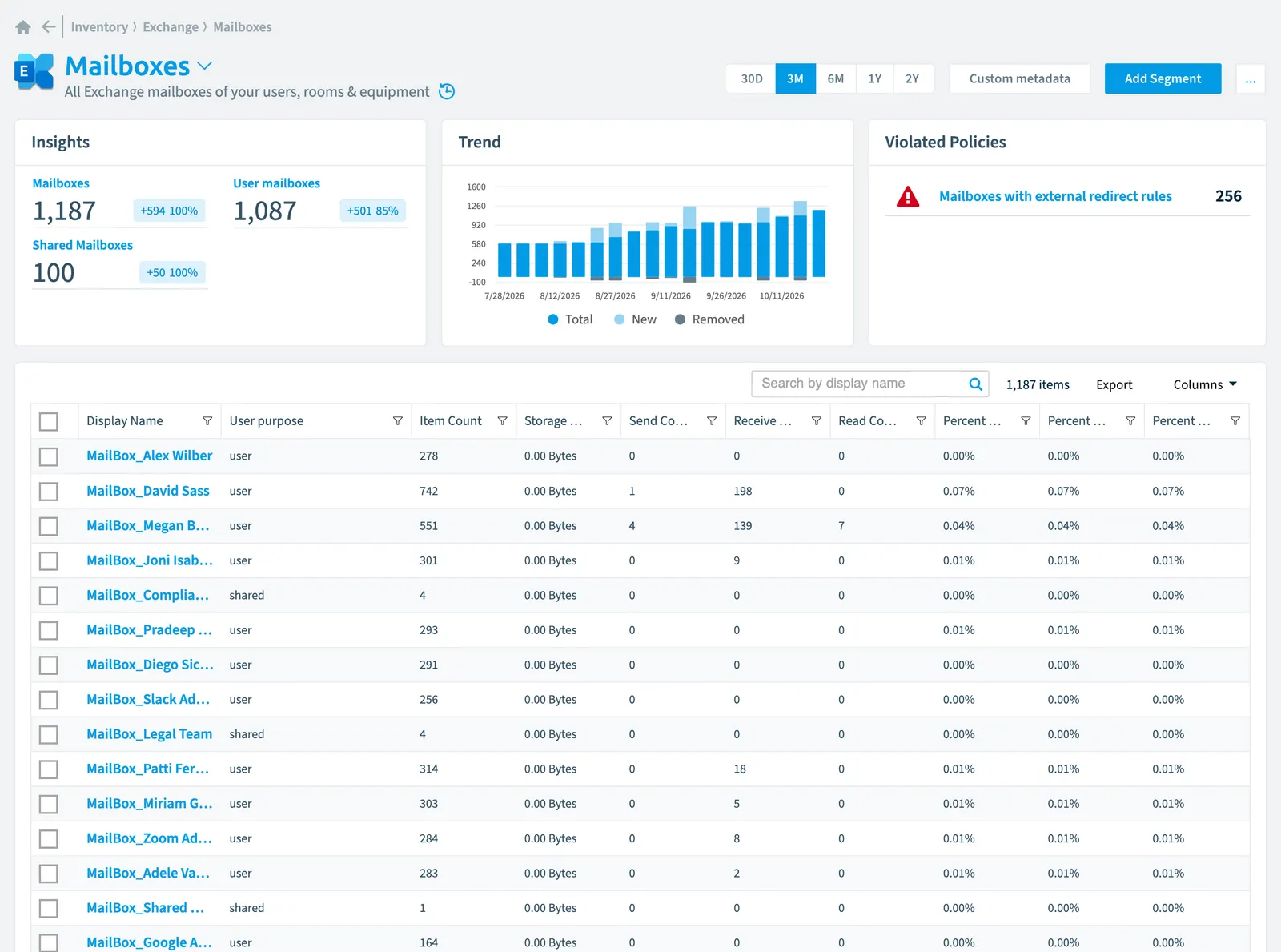
Rencore Governance tracks all your Exchange mailboxes, including user, room, and equipment types, as part of the Exchange inventory. The system monitors 29 properties in seven categories: mailbox activity and usage, storage and quota information, security and compliance data, and configuration settings. You can configure scanning schedules and segment mailboxes by type, such as shared or user-owned.
All ExchangeExchange OnlineExchange Online is the Microsoft 365 mail and calendar service. Rencore Governance covers it with the Exchange connector, part of the Digital Workplace module.Read more mailboxes of your users, rooms & equipment
Part of the Exchange inventory.
In Rencore Governance
Scan settings
| Default scanning interval | Allowed scanning intervals | Data removal during incremental scan |
|---|---|---|
| Monthly | Daily, Weekly, Bi-Weekly, Monthly, Never, Initial | Yes |
Properties
29 properties in 7 groups. Open a group to see its properties.
Name and identity 5
| Property | Type | Description | Automation placeholder |
|---|---|---|---|
| Deleted userDeleted objectWhen you delete a user or a Microsoft 365 group, Microsoft Entra ID keeps it soft-deleted for 30 days.Read more name | String | {{Mailbox. | |
| Display Name | String | The full name of the user. | {{Mailbox. |
| String | Email is the email address of the user | {{Mailbox. | |
| Id | String | {{Mailbox. | |
| User name | String | Email address of the user. | {{Mailbox. |
Activity and usage 7
| Property | Type | Description | Automation placeholder |
|---|---|---|---|
| Deleted Item Count | Int32 | Total number of deleted items in the mailbox | {{Mailbox. |
| Item Count | Int32 | The total number of items in the mailbox. | {{Mailbox. |
| Last Activity Date | DateTime | Date the mailbox had an email send or read activity. | {{Mailbox. |
| Last scan update | DateTime | Shows when this object was last updated in a scan. If an object is found during a scan but no property has been changed this date will not change. | {{Mailbox. |
| Read Count | Int32 | Mails read in report period. | {{Mailbox. |
| Receive Count | Int32 | Mails received in report period. | {{Mailbox. |
| Send Count | Int32 | Mails send in report period. | {{Mailbox. |
Dates and scanning 2
| Property | Type | Description | Automation placeholder |
|---|---|---|---|
| Initially Scanned | DateTime | Shows when this object was initially found in a scan. | {{Mailbox. |
| Deleted User | Deleted user | Deleted user connected to the mailbox | {{Mailbox. |
Security and compliance 3
| Property | Type | Description | Automation placeholder |
|---|---|---|---|
| Risk Score | Int32 | Stores risk score | {{Mailbox. |
| Risk Score Update | DateTime | Stores risk score update | {{Mailbox. |
| Risk Score Value | String | Stores risk score value like Low_Low | {{Mailbox. |
Storage, licences and cost 9
| Property | Type | Description | Automation placeholder |
|---|---|---|---|
| Deleted Item Quota | Int64 | Maximum storage size for deleted items in the mailbox | {{Mailbox. |
| Deleted Item Size | Int64 | The total size of all deleted items in the mailbox | {{Mailbox. |
| Issue Warning Quota | Int64 | This value sets the maximum storage limitStorage limitA storage limit, or quota, caps how much space a SharePoint site or a OneDrive can use from the storage of your tenant.Read more before a warning is issued to the user. If the mailbox size reaches or exceeds the value specified, Exchange sends a warning message to the user. | {{Mailbox. |
| Percent of prohibit Send Quota | Double | Percentage reached for maximum storage until mailbox can not send any mails anymore because of reaching storage quota limit. | {{Mailbox. |
| Percent of prohibit Send/Receive Quota | Double | Percentage reached for maximum storage until mailbox can not send or receive any mails anymore because of reaching storage quota limit. | {{Mailbox. |
| Percent of prohibit Issue Warning Quota | Double | Percentage reached for maximum storage until warning will be shown that mailbox is reaching storage quota limit. | {{Mailbox. |
| Prohibit Send Quota | Int64 | If the mailbox size reaches or exceeds the specified limit, Exchange prevents the user from sending new messages and displays a descriptive error message. | {{Mailbox. |
| Prohibit Send/Receive Quota | Int64 | If the mailbox size reaches or exceeds the specified limit, Exchange prevents the mailbox user from sending new messages and won't deliver any new messages to the mailbox. Any messages sent to the mailbox are returned to the sender with a descriptive error message. | {{Mailbox. |
| Storage Used | Int64 | Total storage used. | {{Mailbox. |
Settings 1
| Property | Type | Description | Automation placeholder |
|---|---|---|---|
| Has Archive | Boolean | Shows if the mailbox has an online archive enabled | {{Mailbox. |
Other properties 2
| Property | Type | Description | Automation placeholder |
|---|---|---|---|
| User | User | Exchange mailbox of the user | {{Mailbox. |
| User purpose | String | States if the mailbox belongs to a user or is a shared mailboxMailboxA mailbox is an Exchange Online recipient that stores email, calendar items and contacts.Read more. Default scanning intervalScan intervalA scan interval is how often Rencore Governance aims to scan one object type, such as daily or weekly.Read more: Initial. | {{Mailbox. |
Relations
| Relation | Connector | Description |
|---|---|---|
| Redirect rule | Exchange | All registered Exchange mailbox redirect rulesRedirect ruleA redirect rule forwards or redirects the incoming email of a mailbox to another recipient.Read more |
| Deleted user | Microsoft 365Microsoft 365Microsoft 365 is the Microsoft cloud suite of Teams, SharePoint, OneDrive, Exchange and the Office apps.Read more | All users that have been deleted from your tenant |
| User | Microsoft 365 | All users registered in your tenant (internal, external) |
Segments
| Segment | Description |
|---|---|
| Shared mailboxes | Shows mailboxes shared by multiple users |
| User mailboxes | Shows mailboxes owned by single users |
Actions
This object does currently not have any actions.
Policies that check this object
| Policy | Severity | Description |
|---|---|---|
| Mailboxes with external redirect rules | High | Shows mailboxes which have redirect rules that redirect to external domains |
Frequently asked questions
What is the mailbox object in Rencore Governance?
All Exchange mailboxes of your users, rooms & equipment. Mailbox is an object type in the Exchange inventory of Rencore Governance.
Which properties does Rencore Governance collect for mailbox?
Rencore Governance collects 29 properties for Mailbox, such as Initially Scanned, Deleted Item Count, Deleted Item Quota and 26 more.
Which policies check mailbox objects?
1 built-in policy checks Mailbox objects, such as Mailboxes with external redirect rules.
How often is mailbox scanned?
By default monthly. You can change the scan interval of Mailbox objects under Configure objects (daily, weekly, bi-weekly, monthly, never or initial (collected once)). The interval is a target, not a guarantee: a scan can run later than planned.
Which module includes the Exchange connector?
Which module includes the Exchange connector?The Exchange connector is part of the Digital Workplace module of Rencore Governance, which every Plan includes. The connector is generally available.
Was this page helpful?
Thanks for the feedback.
Thanks. What was wrong?