
Power app (canvas app)
AI summary
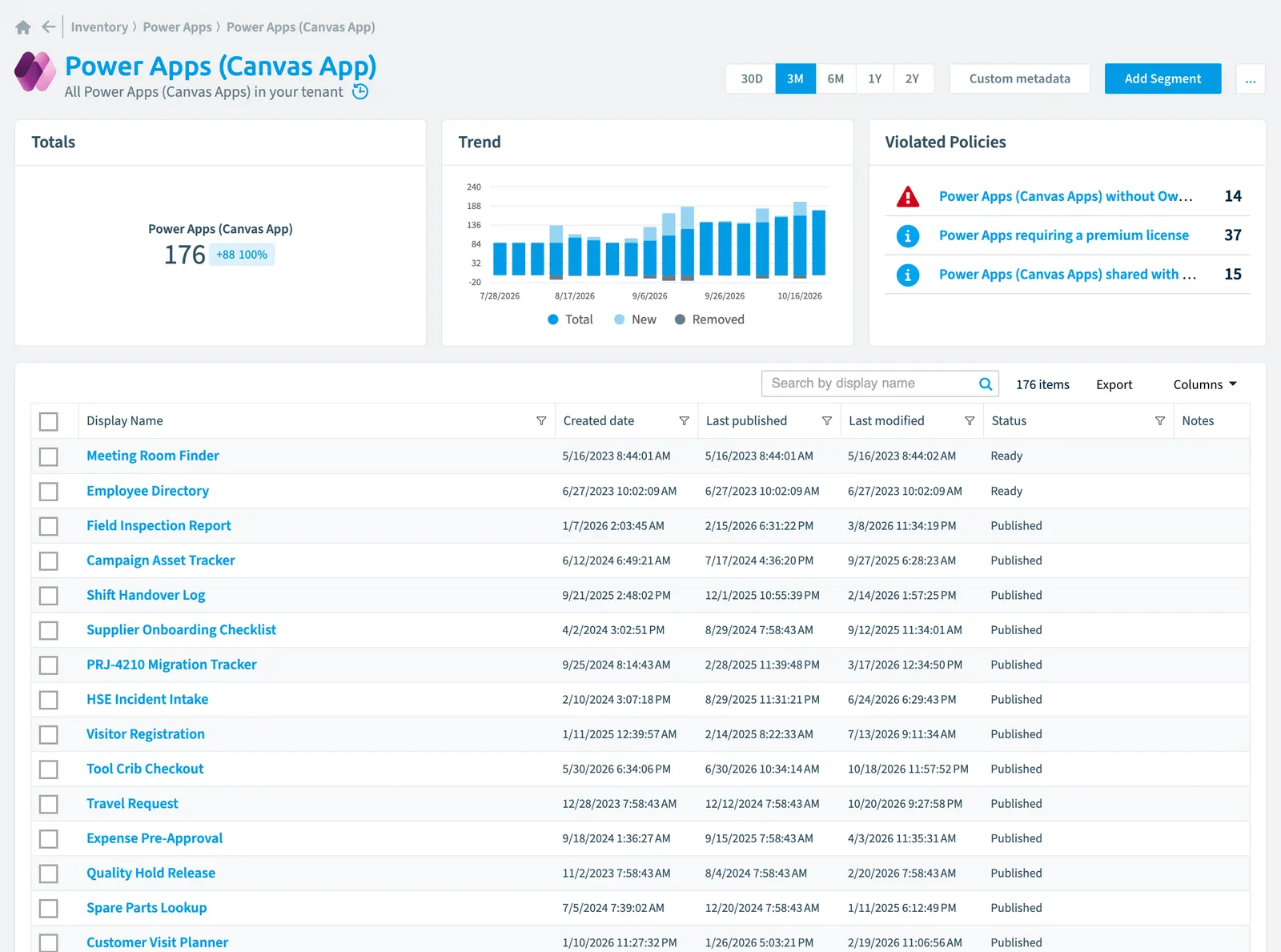
Rencore Governance tracks 38 properties for each canvas app in your Power Apps inventory, spanning identity, ownership, usage, sharing, security, and compliance details. You configure scanning to run daily, weekly, bi-weekly, or monthly, with optional data removal during incremental scans. Three built-in policies help you identify canvas apps with premium licensing requirements, missing owners, and those shared with all tenant users.
All Power AppsPower AppsPower Apps is the Microsoft low-code tool for building business apps. Rencore Governance covers it with the Power Apps connector, part of the Apps, Automation & BI module.Read more (Canvas AppsCanvas appA canvas app is a Power App whose screens you design freely, by dragging controls onto a canvas and connecting them to data.Read more) in your tenant
Part of the Power Apps inventory.
In Rencore Governance
Scan settings
| Default scanning interval | Allowed scanning intervals | Data removal during incremental scan |
|---|---|---|
| Daily | Daily, Weekly, Bi-Weekly, Monthly, Never, Initial | Yes |
Properties
38 properties in 8 groups. Open a group to see its properties.
Name and identity 8
| Property | Type | Description | Automation placeholder |
|---|---|---|---|
| AppId Id | String | {{PowerAppCanvasApp. | |
| App Open Uri | String | {{PowerAppCanvasApp. | |
| App Type | String | Allowed values: Canvas, SharePoint Form, System. | {{PowerAppCanvasApp. |
| App Version | DateTime | {{PowerAppCanvasApp. | |
| Description | String | {{PowerAppCanvasApp. | |
| Display Name | String | {{PowerAppCanvasApp. | |
| Last published by User | String | {{PowerAppCanvasApp. | |
| Min Client Version | String | {{PowerAppCanvasApp. |
Organization and location 3
| Property | Type | Description | Automation placeholder |
|---|---|---|---|
| EnvironmentEnvironmentAn Environment is the connected Microsoft 365 tenant inside a Workspace.Read more | Environment | PowerApps in the environment Default scanning intervalScan intervalA scan interval is how often Rencore Governance aims to scan one object type, such as daily or weekly.Read more: Initial. | {{PowerAppCanvasApp. |
| Power App Environment | String | {{PowerAppCanvasApp. | |
| Shared with everyone in tenant | Boolean | Shows if this Power App can be viewed and used by all users of current tenant (Permission: Everyone in {TenantName}) | {{PowerAppCanvasApp. |
Activity and usage 5
| Property | Type | Description | Automation placeholder |
|---|---|---|---|
| Last scan update | DateTime | Shows when this object was last updated in a scan. If an object is found during a scan but no property has been changed this date will not change. | {{PowerAppCanvasApp. |
| Last published | DateTime | {{PowerAppCanvasApp. | |
| Last published by | String | Published PowerApps by user | {{PowerAppCanvasApp. |
| Last modified | DateTime | {{PowerAppCanvasApp. | |
| Status | String | {{PowerAppCanvasApp. |
Dates and scanning 2
| Property | Type | Description | Automation placeholder |
|---|---|---|---|
| Initially Scanned | DateTime | Shows when this object was initially found in a scan. | {{PowerAppCanvasApp. |
| Created date | DateTime | {{PowerAppCanvasApp. |
Sharing and access 8
| Property | Type | Description | Automation placeholder |
|---|---|---|---|
| Created By | String | PowerApps created by the user | {{PowerAppCanvasApp. |
| Created By User | String | {{PowerAppCanvasApp. | |
| Modified by | String | Modified PowerApps by the user | {{PowerAppCanvasApp. |
| Modified by User | String | {{PowerAppCanvasApp. | |
| Owner | String | PowerApps owned by the user | {{PowerAppCanvasApp. |
| Owner User | String | {{PowerAppCanvasApp. | |
| Shared Groups Count | Int32 | {{PowerAppCanvasApp. | |
| Shared Users Count | Int32 | {{PowerAppCanvasApp. |
Security and compliance 5
| Property | Type | Description | Automation placeholder |
|---|---|---|---|
| Plan Classification | String | {{PowerAppCanvasApp. | |
| Bypass Consent | Boolean | {{PowerAppCanvasApp. | |
| Risk Score | Int32 | Stores risk score | {{PowerAppCanvasApp. |
| Risk Score Update | DateTime | Stores risk score update | {{PowerAppCanvasApp. |
| Risk Score Value | String | Stores risk score value like Low_Low | {{PowerAppCanvasApp. |
Settings 3
| Property | Type | Description | Automation placeholder |
|---|---|---|---|
| Alm Mode | String | {{PowerAppCanvasApp. | |
| Is Featured App | Boolean | {{PowerAppCanvasApp. | |
| Is Hero App | Boolean | {{PowerAppCanvasApp. |
Other properties 4
| Property | Type | Description | Automation placeholder |
|---|---|---|---|
| Uses Custom Api | Boolean | {{PowerAppCanvasApp. | |
| Uses OnPremise Gateway | Boolean | {{PowerAppCanvasApp. | |
| Uses Only Grandfathered Premium Apis | Boolean | {{PowerAppCanvasApp. | |
| Uses Premium Api | Boolean | {{PowerAppCanvasApp. |
Relations
| Relation | Connector | Description |
|---|---|---|
| Group | Microsoft 365Microsoft 365Microsoft 365 is the Microsoft cloud suite of Teams, SharePoint, OneDrive, Exchange and the Office apps.Read more | Groups which are co-owners of the PowerApp |
| Group | Microsoft 365 | Groups which can use the PowerApp |
| User | Microsoft 365 | Users co-owning the PowerApp |
| User | Microsoft 365 | User who created the app |
| User | Microsoft 365 | Users co-owning the PowerApp |
| User | Microsoft 365 | Users who can use the power app (direct or via security groupSecurity groupA security group is a Microsoft Entra group that gives a set of users access to resources.Read more) |
| User | Microsoft 365 | User who modified the app |
| User | Microsoft 365 | User who published the app |
| User | Microsoft 365 | Users owning the PowerApp |
| User | Microsoft 365 | Users who can use the power app (direct or via security group) |
| Connection | Power Apps | ConnectionsConnectionA connection is the stored, signed-in link that a Power App or a flow uses to reach a data source through a connector.Read more used in the Power App |
| Environment | Power Apps | All Power App environments in your tenant |
| Version | Power Apps | All versions of your Power Apps |
Segments
This object does currently not have any segments.
Actions
This object does currently not have any actions.
Policies that check this object
| Policy | Severity | Description |
|---|---|---|
| Power Apps requiring a premium license | Information | Shows Power Apps with premium connectors, custom connectors, common data service etc. |
| Power Apps (canvas apps) without owners | High | Shows PowerApps with no Owners |
| Power Apps (canvas apps) shared with everyone | Information | Shows Power Apps that all users of current tenant can viewed and used. |
Frequently asked questions
What is the power app (canvas app) object in Rencore Governance?
All Power Apps (Canvas Apps) in your tenant. Power app (canvas app) is an object type in the Power Apps inventory of Rencore Governance.
Which properties does Rencore Governance collect for power app (canvas app)?
Rencore Governance collects 38 properties for Power app (canvas app), such as Alm Mode, AppId Id, App Open Uri and 35 more.
Which policies check power app (canvas app) objects?
3 built-in policies check Power app (canvas app) objects, such as Power Apps requiring a premium license, Power Apps (canvas apps) without owners and Power Apps (canvas apps) shared with everyone.
How often is power app (canvas app) scanned?
By default daily. You can change the scan interval of Power app (canvas app) objects under Configure objects (daily, weekly, bi-weekly, monthly, never or initial (collected once)). The interval is a target, not a guarantee: a scan can run later than planned.
Which module includes the Power Apps connector?
Which module includes the Power Apps connector?The Power Apps connector is part of the Apps, Automation & BI module of Rencore Governance, an add-on module on the Premium and Enterprise Plans. The connector is generally available.
Was this page helpful?
Thanks for the feedback.
Thanks. What was wrong?