
OneDrive
AI summary
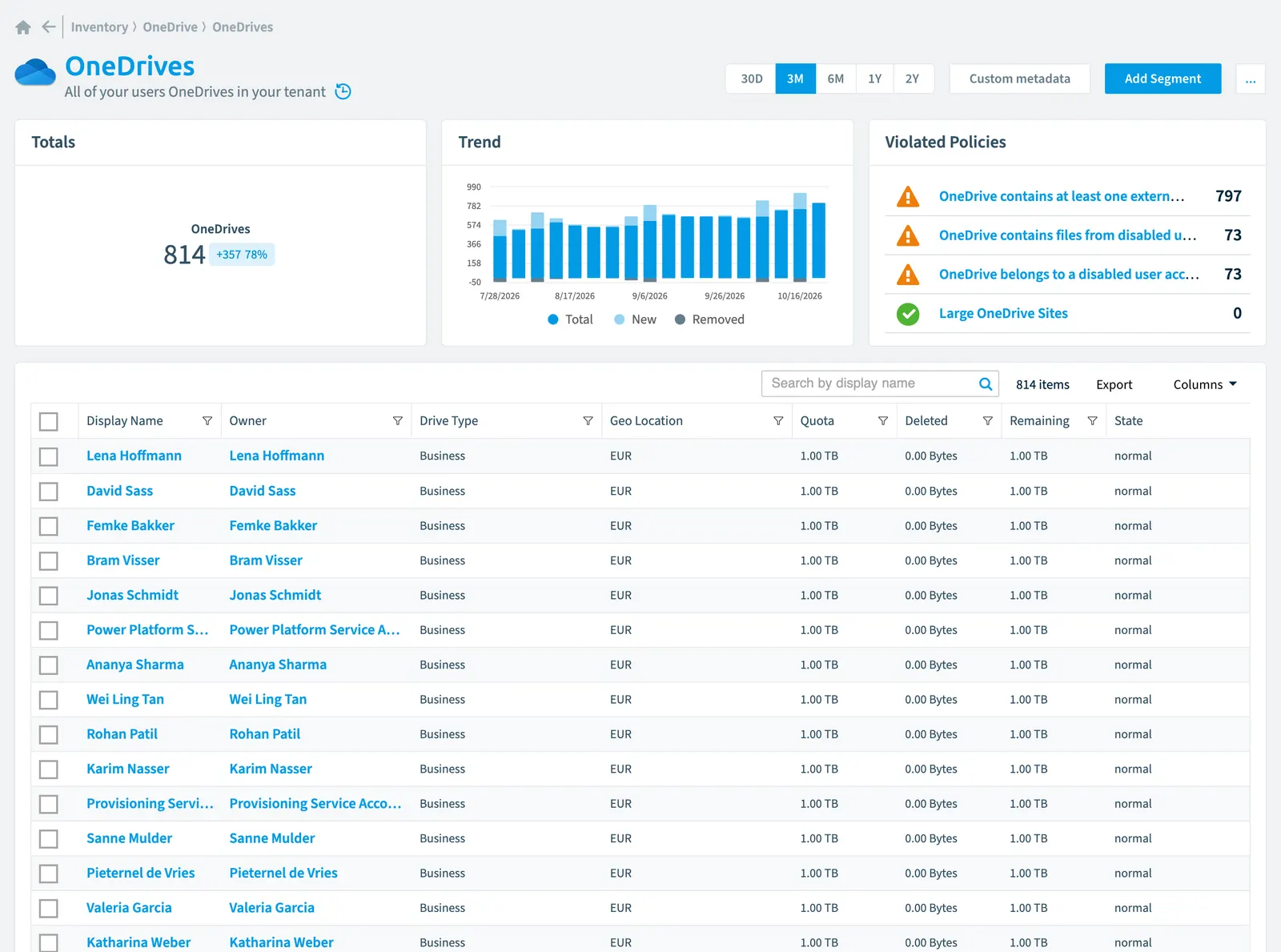
Rencore Governance tracks all user OneDrive storage in your tenant with configurable scanning schedules: daily, weekly, bi-weekly, or monthly. You can monitor quota usage, ownership, risk scores, and file counts for each account. Built-in policies identify issues like storage approaching limits, externally shared files, and accounts belonging to disabled users.
All of your users OneDrivesOneDriveOneDrive is the personal file storage of each Microsoft 365 user. The OneDrive connector of Rencore Governance, part of the Digital Workplace module, inventories every OneDrive with its files, folders and file sharing.Read more in your tenant
Part of the OneDrive inventory.
In Rencore Governance
Scan settings
| Default scanning interval | Allowed scanning intervals | Data removal during incremental scan |
|---|---|---|
| Daily | Daily, Weekly, Bi-Weekly, Monthly, Never, Initial | Yes |
Properties
| Property | Type | Description | Automation placeholder |
|---|---|---|---|
| Initially Scanned | DateTime | Shows when this object was initially found in a scan. | {{OneDrive. |
| Description | String | Provide a user-visible description of the drive. | {{OneDrive. |
| Display Name | String | {{OneDrive. | |
| File and Folder Count | Int64 | Total number of documents and folders inside drive | {{OneDrive. |
| Created Date | DateTime | Date and time of item creation. | {{OneDrive. |
| Last modified | DateTime | Date and time the item was last modified. | {{OneDrive. |
| Drive Type | String | Describes the type of drive represented by this resource. OneDrive personal drives will return personal. OneDrive for Business will return business. SharePoint document libraries will return documentLibrary. Allowed values: Business, DocumentLibrary, Personal. | {{OneDrive. |
| Geo Location | String | {{OneDrive. | |
| Last scan update | DateTime | Shows when this object was last updated in a scan. If an object is found during a scan but no property has been changed this date will not change. | {{OneDrive. |
| Owner | User | Drives owned by the user | {{OneDrive. |
| Owner Name | String | Drives owned by the user | {{OneDrive. |
| Deleted | Int64 | Total space consumed by files in the recycle bin, in bytes | {{OneDrive. |
| Remaining | Int64 | Total space remaining before reaching the quota limit, in bytes | {{OneDrive. |
| State | String | Drive owned by the user Allowed values: critical, exceeded, nearing, normal. | {{OneDrive. |
| Quota | Int64 | Total allowed storage space, in bytes | {{OneDrive. |
| Used | Int64 | Total space used, in bytes | {{OneDrive. |
| Used Percentage | Double | Total space used, in percent | {{OneDrive. |
| Risk Score | Int32 | Stores risk score | {{OneDrive. |
| Risk Score Update | DateTime | Stores risk score update | {{OneDrive. |
| Risk Score Value | String | Stores risk score value like Low_Low | {{OneDrive. |
| Id | String | Id of the SharePoint Site CollectionSite collectionA site collection is the top-level SharePoint container that holds a root site, its subsites, lists, libraries and files.Read more the OneDrive is based on. | {{OneDrive. |
| Site Url | String | Url of the SharePoint Site Collection the OneDrive is based on. | {{OneDrive. |
| Library Url | String | URL that displays the resource in the browser. | {{OneDrive. |
Relations
| Relation | Connector | Description |
|---|---|---|
| User | Microsoft 365Microsoft 365Microsoft 365 is the Microsoft cloud suite of Teams, SharePoint, OneDrive, Exchange and the Office apps.Read more | All users registered in your tenant (internal, external) |
| File | OneDrive | All OneDrive files stored in a library of a OneDrive |
| Folder | OneDrive | All OneDrive folders stored in a library of a OneDrive |
| File sharing | OneDrive | All shared OneDrives items with their sharing information |
Segments
This object does currently not have any segments.
Actions
This object does currently not have any actions.
Policies that check this object
| Policy | Severity | Description |
|---|---|---|
| OneDrives near storage limit | High | Shows OneDrives using more than 90% of their available storage space |
| OneDrive contains files from disabled user accounts | Medium | Highlights OneDrive files stored in accounts that have been disabled, creating compliance and security concerns. |
| OneDrive contains at least one externally shared file | Medium | Identifies OneDrive accounts where at least one file is shared externally, posing potential data security risks. |
| Large OneDrive sites | Medium | Show OneDrive Site with more than 100GB data |
| OneDrive belongs to a disabled user account | Medium | Finds OneDrive accounts linked to disabled user accounts that should be reassigned or deprovisioned. |
Frequently asked questions
What is the OneDrive object in Rencore Governance?
What is the OneDrive object in Rencore Governance?All of your users OneDrives in your tenant. OneDrive is an object type in the OneDrive inventory of Rencore Governance.
Which properties does Rencore Governance collect for OneDrive?
Which properties does Rencore Governance collect for OneDrive?Rencore Governance collects 23 properties for OneDrive, such as Initially Scanned, Description, Display Name and 20 more.
Which policies check OneDrive objects?
Which policies check OneDrive objects?5 built-in policies check OneDrive objects, such as OneDrives near storage limit, OneDrive contains files from disabled user accounts and 3 more.
How often is OneDrive scanned?
How often is OneDrive scanned?By default daily. You can change the scan interval of OneDrive objects under Configure objects (daily, weekly, bi-weekly, monthly, never or initial (collected once)). The interval is a target, not a guarantee: a scan can run later than planned.
Which module includes the OneDrive connector?
Which module includes the OneDrive connector?The OneDrive connector is part of the Digital Workplace module of Rencore Governance, which every Plan includes. The connector is generally available.
Was this page helpful?
Thanks for the feedback.
Thanks. What was wrong?