
Claude connector usage
AI summary
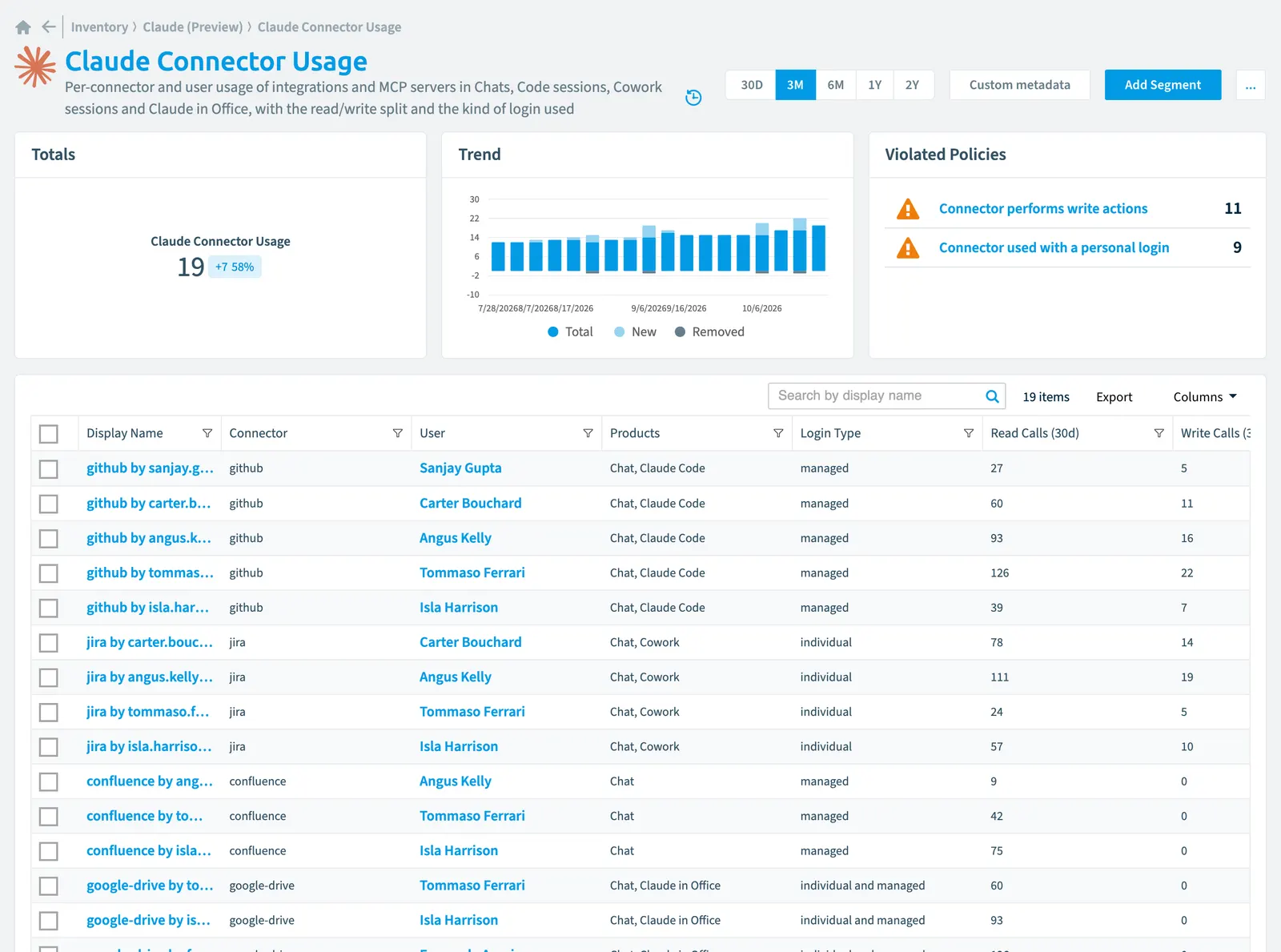
The Claude connector usage inventory, part of Claude Enterprise, tracks connector usage across Chat, Claude Code, Cowork, and Claude in Office. It provides per-user metrics on conversations, sessions, read and write operations, and whether users connect with personal or managed credentials.
Per-connector and user usage of integrations and MCP servers in Chats, Code sessions, Cowork sessions and Claude in Office, with the read/write split and the kind of login used
Part of the Claude Enterprise inventory.
In Rencore Governance
Scan settings
| Default scanning interval | Allowed scanning intervals | Data removal during incremental scan |
|---|---|---|
| Daily | Daily, Weekly, Bi-Weekly, Monthly, Never, Initial | Yes |
Properties
36 properties in 7 groups. Open a group to see its properties.
Name and identity 7
| Property | Type | Description | Automation placeholder |
|---|---|---|---|
| Display Name | String | {{ClaudeConnectorUsage. | |
| Group Name | String | Display name of the RBACRoles and teamsRoles and teams control what each user can do and see in a Workspace. Each user is assigned a role, which grants permissions, and a team, which grants access to inventory objects.Read more group of the user. | {{ClaudeConnectorUsage. |
| Login Type | String | Whether the requests of the user ran on a personal credential connected through their own consent flow, on an Enterprise Managed Auth credential provisioned by the organization, or on both. Empty when Anthropic does not report the login type: not enabled for the organization, or a window starting before 1 July 2026. Allowed values: individual, individual and managed, managed. | {{ClaudeConnectorUsage. |
| M365 User Name | String | Display name of the related M365Microsoft 365Microsoft 365 is the Microsoft cloud suite of Teams, SharePoint, OneDrive, Exchange and the Office apps.Read more user. | {{ClaudeConnectorUsage. |
| User Email | String | {{ClaudeConnectorUsage. | |
| User Id | String | The stable analytics user id (user_...); kept even when the user cannot be resolved. | {{ClaudeConnectorUsage. |
| User Name | String | Display name of the user the connector usage is attributed to. | {{ClaudeConnectorUsage. |
Organization and location 3
| Property | Type | Description | Automation placeholder |
|---|---|---|---|
| Claude in Office Sessions (30d) | Int32 | Distinct Claude in Office sessions in which the connector was used, across Word, Excel, PowerPoint and Outlook. | {{ClaudeConnectorUsage. |
| Organization | Claude linked organization | The organization the analytics key is scoped to. | {{ClaudeConnectorUsage. |
| Organization Name | String | Display name of the organization the analytics key is scoped to. | {{ClaudeConnectorUsage. |
Activity and usage 12
| Property | Type | Description | Automation placeholder |
|---|---|---|---|
| Chat Conversations (30d) | Int32 | Distinct claude.ai conversations in which the connector was used. | {{ClaudeConnectorUsage. |
| Claude Code Sessions (30d) | Int32 | Distinct Claude Code sessions in which the connector was used. | {{ClaudeConnectorUsage. |
| Cowork Sessions (30d) | Int32 | Distinct Cowork sessions in which the connector was used. | {{ClaudeConnectorUsage. |
| Excel Sessions (30d) | Int32 | {{ClaudeConnectorUsage. | |
| Last scan update | DateTime | Shows when this object was last updated in a scan. If an object is found during a scan but no property has been changed this date will not change. | {{ClaudeConnectorUsage. |
| Outlook Sessions (30d) | Int32 | {{ClaudeConnectorUsage. | |
| PowerPoint Sessions (30d) | Int32 | {{ClaudeConnectorUsage. | |
| Read Calls (30d) | Int32 | ConnectorConnectorA connector is the part of Rencore Governance that reads one service, such as Teams or SharePoint, into the inventory.Read more tool calls whose trusted read-only annotation marked them read-only. Empty, never 0, when the read/write split cannot be stated for the window: not enabled for the organization, or a window starting before 29 May 2026. | {{ClaudeConnectorUsage. |
| Total Uses (30d) | Int32 | Conversations and sessions in which the connector was used, across all products. | {{ClaudeConnectorUsage. |
| Unclassified Calls (30d) | Int32 | Connector tool calls with no trusted read-only annotation. The annotation is optional in the MCP spec and is discarded when connector access controls are active, so unclassified calls are common; this field shows how much of the activity the read/write split actually covers. | {{ClaudeConnectorUsage. |
| Word Sessions (30d) | Int32 | {{ClaudeConnectorUsage. | |
| Write Calls (30d) | Int32 | Connector tool calls whose trusted read-only annotation marked them not read-only - the connector changed data in the other system. Empty, never 0, when the read/write split cannot be stated for the window. | {{ClaudeConnectorUsage. |
AI and agents 2
| Property | Type | Description | Automation placeholder |
|---|---|---|---|
| Connector Key | String | The stable connector name the analytics API reports and paginates by; an opaque connector id for rows whose readable name had to be resolved separately. | {{ClaudeConnectorUsage. |
| Connector | String | Name of the connector, normalized by Anthropic ("Atlassian MCP server" and "mcp-atlassian" both report as "atlassian"); for rows keyed by an opaque connector id this is the resolved display name. | {{ClaudeConnectorUsage. |
Dates and scanning 1
| Property | Type | Description | Automation placeholder |
|---|---|---|---|
| Initially Scanned | DateTime | Shows when this object was initially found in a scan. | {{ClaudeConnectorUsage. |
Security and compliance 4
| Property | Type | Description | Automation placeholder |
|---|---|---|---|
| Key | String | Internal. | {{ClaudeConnectorUsage. |
| Risk Score | Int32 | Stores risk score | {{ClaudeConnectorUsage. |
| Risk Score Update | DateTime | Stores risk score update | {{ClaudeConnectorUsage. |
| Risk Score Value | String | Stores risk score value like Low_Low | {{ClaudeConnectorUsage. |
Other properties 7
| Property | Type | Description | Automation placeholder |
|---|---|---|---|
| Distinct Users (30d) | Int32 | Distinct users behind the row. Rows are grouped per user, so this is 1 and sums to the user count of the connector in reports. | {{ClaudeConnectorUsage. |
| Group | Claude group | The RBAC group of the user; empty when the user holds no group or more than one - the Claude Group Members inventory carries the full membership. | {{ClaudeConnectorUsage. |
| M365 User | User | The related M365 user in Entra IDMicrosoft Entra IDMicrosoft Entra ID, formerly Azure Active Directory, is the Microsoft identity service behind every Microsoft 365 tenant.Read more, for policies on M365 users. | {{ClaudeConnectorUsage. |
| Products | String | The Claude products the connector was used in over the window: Chat, Claude Code, Cowork and Claude in Office. | {{ClaudeConnectorUsage. |
| User | Claude user | The user the connector usage is attributed to; unlinked when the analytics user id cannot be resolved to an inventoried user. | {{ClaudeConnectorUsage. |
| Uses Personal Login | Boolean | The connector was used with a personal credential the user connected themselves. Empty, never false, when the login type is not reported. | {{ClaudeConnectorUsage. |
| Uses Managed Login | Boolean | The connector was used with an organization-managed credential provisioned through the identity provider. Empty, never false, when the login type is not reported. Both login fields can be set at once: they are independent buckets, not a partition. | {{ClaudeConnectorUsage. |
Relations
| Relation | Connector | Description |
|---|---|---|
| Claude group | Claude EnterpriseClaude EnterpriseClaude Enterprise is the business plan of the Claude AI assistant by Anthropic.Read more | RBAC and SCIM-provisioned groups of the Claude Enterprise parent organization |
| Claude linked organization | Claude Enterprise | The organizations linked under the Claude Enterprise parent organization |
| Claude user | Claude Enterprise | Every member across organizations |
| User | Microsoft 365 | All users registered in your tenant (internal, external) |
Segments
This object does currently not have any segments.
Actions
This object does currently not have any actions.
Policies that check this object
| Policy | Severity | Description |
|---|---|---|
| Connector used with a personal login | Medium | Detects connectors that people connected with their own credential instead of the company-managed login, from the Claude Console analytics of the Enterprise planPlanA Plan is the edition of Rencore Governance in your Subscription: Professional, Premium or Enterprise.Read more |
| Connector performs write actions | Medium | Detects connectors that changed data in other systems rather than only reading it, from the Claude Console analytics of the Enterprise plan |
Frequently asked questions
What is the Claude connector usage object in Rencore Governance?
What is the Claude connector usage object in Rencore Governance?Per-connector and user usage of integrations and MCP servers in Chats, Code sessions, Cowork sessions and Claude in Office, with the read/write split and the kind of login used. Claude connector usage is an object type in the Claude Enterprise inventory of Rencore Governance.
Which properties does Rencore Governance collect for Claude connector usage?
Which properties does Rencore Governance collect for Claude connector usage?Rencore Governance collects 36 properties for Claude connector usage, such as Key, Chat Conversations (30d), Claude Code Sessions (30d) and 33 more.
Which policies check Claude connector usage objects?
Which policies check Claude connector usage objects?2 built-in policies check Claude connector usage objects, such as Connector used with a personal login and Connector performs write actions.
How often is Claude connector usage scanned?
How often is Claude connector usage scanned?By default daily. You can change the scan interval of Claude connector usage objects under Configure objects (daily, weekly, bi-weekly, monthly, never or initial (collected once)). The interval is a target, not a guarantee: a scan can run later than planned.
Which module includes the Claude Enterprise connector?
Which module includes the Claude Enterprise connector?The Claude Enterprise connector is part of the AI & Agents module of Rencore Governance, an add-on module on the Premium and Enterprise Plans. The connector is in preview.
Was this page helpful?
Thanks for the feedback.
Thanks. What was wrong?