
ChatGPT conversation
AI summary
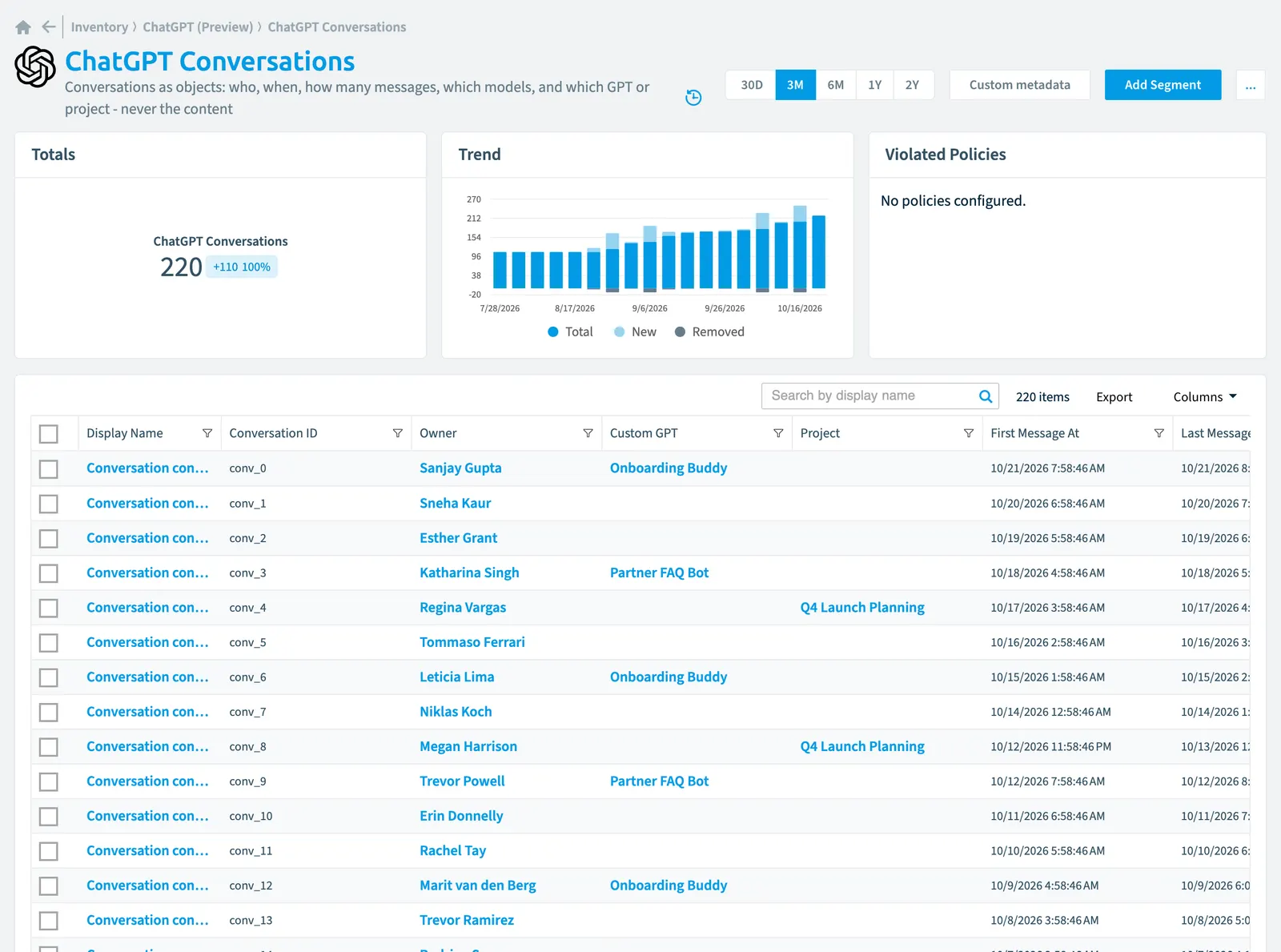
Rencore Governance catalogs ChatGPT Enterprise conversations as inventory objects, recording who participated, when they occurred, which AI models were used, and message counts, but not the conversation text itself. With 27 properties across nine groups, you can analyze usage trends by user and project, track which models are in use, assess risk, and support governance while preserving conversation privacy.
Conversations as objects: who, when, how many messages, which models, and which GPT or project - never the content
Part of the ChatGPT Enterprise inventory.
In Rencore Governance
Scan settings
| Default scanning interval | Allowed scanning intervals | Data removal during incremental scan |
|---|---|---|
| Daily | Daily, Weekly, Bi-Weekly, Monthly, Never, Initial | No |
Properties
27 properties in 9 groups. Open a group to see its properties.
Name and identity 3
| Property | Type | Description | Automation placeholder |
|---|---|---|---|
| Display Name | String | {{ChatGPTConversation. | |
| Conversation ID | String | {{ChatGPTConversation. | |
| M365 User Name | String | {{ChatGPTConversation. |
Organization and location 4
| Property | Type | Description | Automation placeholder |
|---|---|---|---|
| Project | ChatGPT project | The project the conversation ran in, where the event carries one. | {{ChatGPTConversation. |
| Project Name | String | {{ChatGPTConversation. | |
| WorkspaceWorkspaceA Workspace is the top-level container in Rencore Governance. It holds the settings, users, roles and connected apps for exactly one Environment, the connected Microsoft 365 tenant.Read more | ChatGPT Workspace | {{ChatGPTConversation. | |
| Workspace Name | String | {{ChatGPTConversation. |
Activity and usage 6
| Property | Type | Description | Automation placeholder |
|---|---|---|---|
| Assistant Messages | Int32 | {{ChatGPTConversation. | |
| First Message At | DateTime | {{ChatGPTConversation. | |
| Last Message At | DateTime | {{ChatGPTConversation. | |
| Last scan update | DateTime | Shows when this object was last updated in a scan. If an object is found during a scan but no property has been changed this date will not change. | {{ChatGPTConversation. |
| Messages | Int32 | Total messages in the conversation. A count, never the messages themselves. | {{ChatGPTConversation. |
| User Messages | Int32 | {{ChatGPTConversation. |
AI and agents 2
| Property | Type | Description | Automation placeholder |
|---|---|---|---|
| Models Used | String | Which models the conversation used. This is what makes models-per-user answerable for the cost and licence persona. | {{ChatGPTConversation. |
| Tool Messages | Int32 | {{ChatGPTConversation. |
Dates and scanning 1
| Property | Type | Description | Automation placeholder |
|---|---|---|---|
| Initially Scanned | DateTime | Shows when this object was initially found in a scan. | {{ChatGPTConversation. |
Sharing and access 3
| Property | Type | Description | Automation placeholder |
|---|---|---|---|
| Owner | ChatGPT user | {{ChatGPTConversation. | |
| Owner Email | String | {{ChatGPTConversation. | |
| Owner Name | String | {{ChatGPTConversation. |
Security and compliance 4
| Property | Type | Description | Automation placeholder |
|---|---|---|---|
| Key | String | Internal. | {{ChatGPTConversation. |
| Risk Score | Int32 | Stores risk score | {{ChatGPTConversation. |
| Risk Score Update | DateTime | Stores risk score update | {{ChatGPTConversation. |
| Risk Score Value | String | Stores risk score value like Low_Low | {{ChatGPTConversation. |
Custom attributes 2
| Property | Type | Description | Automation placeholder |
|---|---|---|---|
| Custom GPTCustom GPTA custom GPT is a version of ChatGPT that someone in your ChatGPT Enterprise workspace configured for one purpose and can share with others.Read more | ChatGPT custom GPT | The custom GPT the conversation ran in, where the event carries one. This is the signal behind usage-based GPT staleness. | {{ChatGPTConversation. |
| Custom GPT Name | String | {{ChatGPTConversation. |
Other properties 2
| Property | Type | Description | Automation placeholder |
|---|---|---|---|
| Client Surface | String | Where the conversation happened, where the event carries it: web, desktop, mobile. | {{ChatGPTConversation. |
| M365 User | User | The Entra IDMicrosoft Entra IDMicrosoft Entra ID, formerly Azure Active Directory, is the Microsoft identity service behind every Microsoft 365 tenant.Read more user behind the owner, so conversation volume can be read by department without touching any content. | {{ChatGPTConversation. |
Relations
| Relation | Connector | Description |
|---|---|---|
| ChatGPT custom GPT | ChatGPT EnterpriseChatGPT EnterpriseChatGPT Enterprise is the business plan of the ChatGPT AI assistant by OpenAI.Read more | Custom GPTs in the workspace, with their sharing visibility, configuration shape and usage |
| ChatGPT project | ChatGPT Enterprise | ChatGPT projects, with their sharing visibility, tools, connector scopes and usage |
| ChatGPT user | ChatGPT Enterprise | Every user in the connected ChatGPT workspace, with role, seat, spend and the Entra ID join |
| ChatGPT Workspace | ChatGPT Enterprise | The connected ChatGPT Enterprise workspace, its granted scopes and its coverage gaps |
| User | Microsoft 365Microsoft 365Microsoft 365 is the Microsoft cloud suite of Teams, SharePoint, OneDrive, Exchange and the Office apps.Read more | All users registered in your tenant (internal, external) |
Segments
This object does currently not have any segments.
Actions
This object does currently not have any actions.
Frequently asked questions
What is the ChatGPT conversation object in Rencore Governance?
What is the ChatGPT conversation object in Rencore Governance?Conversations as objects: who, when, how many messages, which models, and which GPT or project - never the content. ChatGPT conversation is an object type in the ChatGPT Enterprise inventory of Rencore Governance.
Which properties does Rencore Governance collect for ChatGPT conversation?
Which properties does Rencore Governance collect for ChatGPT conversation?Rencore Governance collects 27 properties for ChatGPT conversation, such as Key, Assistant Messages, Client Surface and 24 more.
How often is ChatGPT conversation scanned?
How often is ChatGPT conversation scanned?By default daily. You can change the scan interval of ChatGPT conversation objects under Configure objects (daily, weekly, bi-weekly, monthly, never or initial (collected once)). The interval is a target, not a guarantee: a scan can run later than planned.
Which module includes the ChatGPT Enterprise connector?
Which module includes the ChatGPT Enterprise connector?The ChatGPT Enterprise connector is part of the AI & Agents module of Rencore Governance, an add-on module on the Premium and Enterprise Plans. The connector is in preview.
Was this page helpful?
Thanks for the feedback.
Thanks. What was wrong?